Using the Fader/Overlap Function:
To fade in:
1. While in Standby, press the FADER button
until the desired fader indicator flashes in the
viewfinder.
2. Press the START/STOP button; the shot will
automatically fade in.
To fade out:
1. While recording, press the FADER button
repeatedly until desired fader mode flashes in the
Viewfinder.
2. Press the START/STOP button; the shot will
automatically fade out.
After the fade is completed, the camcorder re-
turns to the normal mode.
The fade modes are as follows:
Fader, Monotone, Overlap*, Wipe*, Dot*, none
*= fade in only
Sony VX-2000
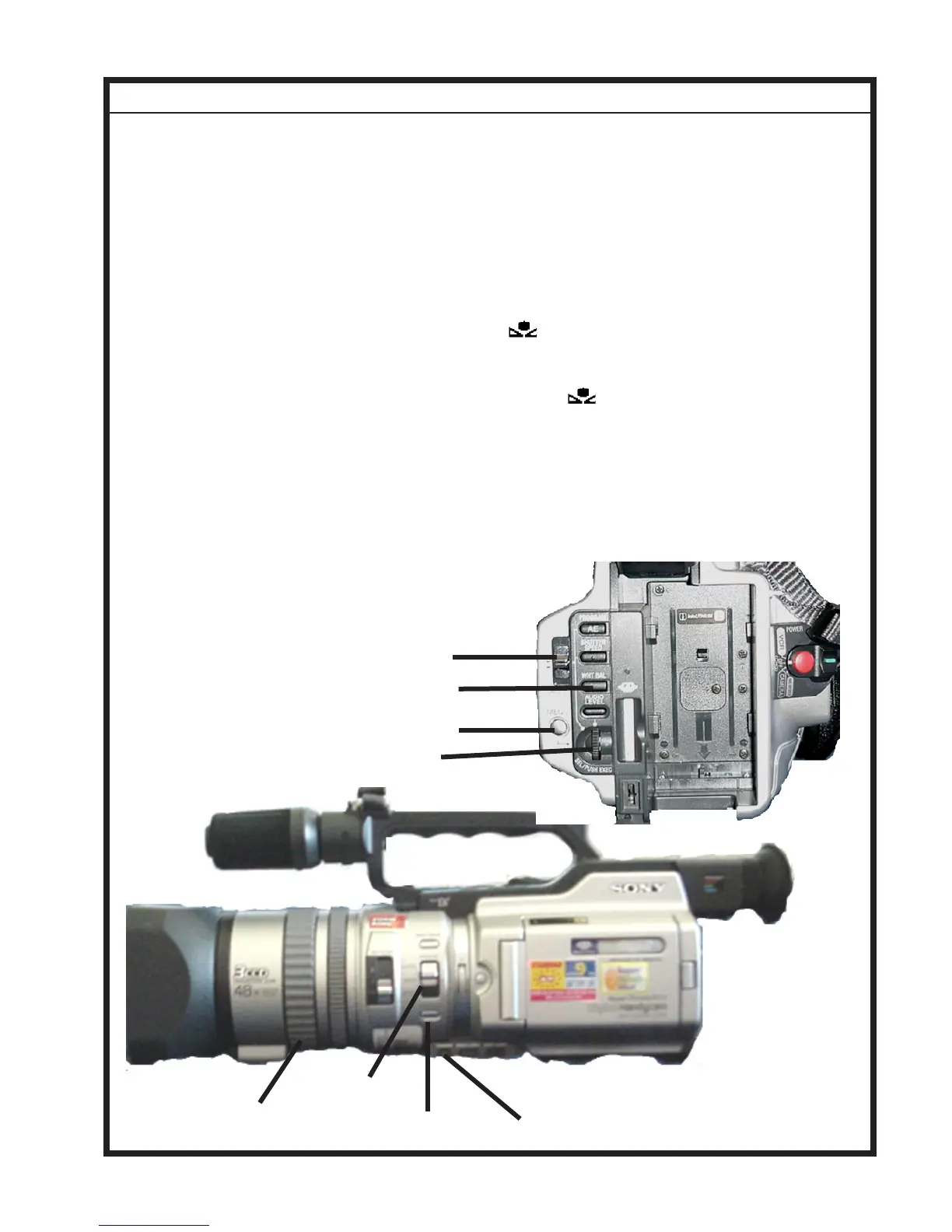
FADER Button
Manual Focus:
1. Set the FOCUS switch to MANUAL.
2. Rotate the FOCUS RING.
3. Press the PUSH AUTO button to auto focus
momentarily.
FOCUS Switch
FOCUS RING
Adjusting White Balance:
1. Set HOLD/AUTO LOCK switch to the cen-
ter position.
2. Press the WHT BAL button, the white bal-
ance indicator appears in the viewfinder.
3. Use the SEL/PUSH EXEC dial to the ap-
propriate white balance mode: one-push (manual
calibration), outdoor, or indoor.
4. To use one-push manual adjustment mode--
the camcorder must be in standby. Fill
the frame with a white object such as paper, and
press the SEL/PUSH EXEC dial. The indicator
flashes rapidly, to indicate storage of new
balance setting. The indicator stops flashing
when white balance has been adjusted.
4. To return to automatic adjustment, set the
AUTO LOCK switch to Auto Lock or press the
WHT BAL button. The indicator disappears
from the viewfinder.
MENU button
SEL/PUSH EXEC dial
HOLD/AUTO LOCK switch
WHT BAL button
PUSH AUTO Button
3













 To Next Page