EasyManua.ls Logo

Sony Walkman WM-FS222 - User Manual

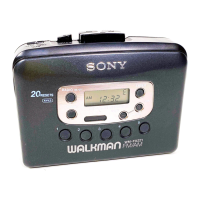
Sony Walkman WM-FS222
3 pages
Print Icon
To Next Page IconTo Next Page
Loading...
3-252-277-11 (1)
Radio
Cassette Player
Sony Corporation © 2003 Printed in Malaysia
WM-FS222
Operating Instructions
A
B
Product registration
For the customers in the USA
Please register this product on line at www.sony.com/
productregistration.
<http://www.sony.com/productregistration>
Proper registration will enable us to send you periodic mailings
about new products, services, and other important
announcements. Registering your product will also allow us to
contact you in the unlikely event that the product needs
adjustment or modification. Thank you.
Owner’s Record
The model number is located on the front and the
serial number is located inside the cassette lid.
Record these numbers in the space provided below.
Refer to them whenever you call upon your Sony
dealer regarding this product.
Model No. WM-FS222
Serial No. __________________
INFORMATION
This device complies with Part 15 of the FCC Rules. Operation
is subject to the following two conditions: (1) This device may
not cause harmful interference, and (2) this device must accept
any interference received, including interference that may cause
undesired operation.
You are cautioned that any changes or modifications not
expressly approved in this manual could void your authority to
operate this equipment.
If you have any questions about this product, you may call:
Sony Direct Response Center 1-(800)-222-7669
or write to:
Sony Direct Response Center 12451 Gateway Blvd. Fort Myers,
FL 33913
Declaration of Conformity
Trade Name: SONY
Model No.: WM-FS222
Responsible Party: Sony Electronics Inc.
Address: 680 Kinderkamack Road, Oradell,
NJ 07649 USA
Telephone No.: 201-930-6972
This device complies with Part 15 of the FCC Rules.
Operation is subject to the following two conditions: (1) This
device may not cause harmful interference, and (2) this
device must accept any interference received, including
interference that may cause undesired operation.
Preparations
To use the hand strap
Holding the Walkman in a hand A
1 Pass the strap through the handle of the
Walkman.
2 Pass one side of the strap through the
ladder lock of the other side.
3 Put your hand between the Walkman and
the strap, then adjust the length of the strap
and fix it. Slot the excess strap into the
handle of the Walkman.
Placing the Walkman on a belt
1 Pass the strap through the handle
described above in steps 1 and 2.
2 Tighten the strap at the ladder lock, then
slot the excess strap into the handle of the
Walkman.
B
3 Put the belt clip on a belt.
To insert a battery C
1 Unfasten the buckle.
2 Open the cassette lid.
3 Release the catch to open the battery
compartment lid and insert one size AA
(R6) dry battery with correct polarity.
When to replace the battery D
Replace the battery with the new one when
flashes in the display.
To replace the battery
1 Release the catch to open the battery
compartment lid.
2 Pull the ribbon up slowly and replace the
battery with new one.
Playing a Tape
1 Unfasten the buckle.
2 Open the cassette lid and place a cassette.
3 Press MENU repeatedly to set the cursor to
TAPE in the display. Then press SET to
select the tape type.
E
No message: normal (TYPE I)
METAL: High-position (TYPE II) or metal
(TYPE IV)
4 Press N.
Adjust the volume with VOLUME.
To increase the volume, turn VOLUME
counterclockwise.
To Press
Stop playback* x
Wind rapidly** M or m
* When the tape ends, the depressed N button is
released automatically (Auto shut-off function).
** If you leave the Walkman after the tape has been
wound or rewound, the battery will be consumed
rapidly. Be sure to press x.
Note
Do not open the lid of the cassette compartment while
the tape is running.
(turn over)
Printed using VOC (Volatile Organic Compound)-
free vegetable oil based ink.
C
D
Belt clip
SONY WM-FS222
Tested to Comply
With FCC Standards
FOR HOME OR OFFICE USE
E
MENU
SET
ENTER
“WALKMAN” is a registered trademark of Sony Corporation to
represent Headphone Stereo products.
is a trademark of Sony Corporation.
Specifications
• Frequency range
TV: 2 - 13 ch
WEATHER: 1 - 7 ch
FM: 87.5 - 108 MHz
AM: 530 - 1 710 kHz (North, Central and South America)
531 - 1 602 kHz (Other countries)
• Power requirements
1.5 V DC, battery size AA (R6) × 1
• Dimensions (w/h/d)
Approx. 102.3 × 117.5 × 43.2 mm (4
1
8
× 4
3
4
× 1
3
4
inches)
(excluding projecting parts and controls)
• Mass
Approx. 219 g (7.8 oz) (main unit only)
• Supplied accessories
Stereo headphones or earphones (1)
Hand strap with belt clip (1)
Design and specifications are subject to change without notice.
Battery life* (approximate hours)
Tape Radio
playback reception
Sony alkaline LR6 (SG)** 32 50
Sony R6P (SR) 9 15
* Measured value by the standard of JEITA (Japan Electronics
and Information Technology Industries Association). (Using
a Sony HF series cassette tape)
**When using a Sony LR6 (SG) “STAMINA” alkaline dry
battery (produced in Japan).
Note
The battery life may be shorter depending on the operating
condition, the surrounding temperature and battery type.
Downloaded from: https://www.usersmanualguide.com/
Question and Answer IconNeed help?

Do you have a question about the Sony Walkman WM-FS222 and is the answer not in the manual?

Summary

Operating Instructions

Preparations and Setup

Guide to attaching accessories, inserting batteries, and preparing the device for use.

Playing a Cassette Tape

Steps for loading a cassette, selecting tape type, and operating playback controls.

Radio Operation and Features

Listening to the Radio

Instructions for selecting bands, tuning stations, and adjusting reception.

Presetting Radio Stations

Methods for automatically and manually storing radio frequencies for quick access.

Using Other Functions

Details on locking controls, emphasizing bass sound, and using the volume limiter system.

Precautions and Troubleshooting

Important Precautions

Safety guidelines for battery use, handling, water resistance, and hearing protection.

Troubleshooting Common Issues

Solutions for display errors, abnormal operation, and cassette lid opening problems.

Summary

Operating Instructions

Preparations and Setup

Guide to attaching accessories, inserting batteries, and preparing the device for use.

Playing a Cassette Tape

Steps for loading a cassette, selecting tape type, and operating playback controls.

Radio Operation and Features

Listening to the Radio

Instructions for selecting bands, tuning stations, and adjusting reception.

Presetting Radio Stations

Methods for automatically and manually storing radio frequencies for quick access.

Using Other Functions

Details on locking controls, emphasizing bass sound, and using the volume limiter system.

Precautions and Troubleshooting

Important Precautions

Safety guidelines for battery use, handling, water resistance, and hearing protection.

Troubleshooting Common Issues

Solutions for display errors, abnormal operation, and cassette lid opening problems.

Overview

The Sony WM-FS222 is a portable radio cassette player, also known as a Walkman, designed for personal audio enjoyment. It combines the functionality of a cassette player with a multi-band radio tuner, making it a versatile device for listening to music and broadcasts on the go.

Function Description:

The primary function of the WM-FS222 is to play cassette tapes and receive radio broadcasts. For cassette playback, it features standard controls for play, stop, and rapid winding (fast forward and rewind). An "Auto shut-off" function is integrated, which automatically releases the depressed button when the tape ends, preventing unnecessary battery drain. The device also supports different tape types (Normal/TYPE I, High-position/TYPE II, and Metal/TYPE IV), which can be selected via the MENU and SET buttons to optimize playback quality.

The radio tuner offers reception across multiple bands: TV (channels 2-13), WEATHER (channels 1-7), FM (87.5-108 MHz), and AM (530-1710 kHz for North, Central, and South America; 531-1602 kHz for other countries). This wide range allows users to tune into various broadcasts, including television audio, weather alerts, and standard FM/AM radio stations. The device includes a "Tuning" control for manual station selection and a "Preset" function for storing and recalling favorite stations. Up to 40 stations can be preset across all bands (7 TV, 4 Weather, 15 FM, 14 AM). An "AVLS" (Automatic Volume Limiter System) feature is included to protect hearing by limiting the maximum volume output, which can be toggled on or off. The "Mega Bass" function enhances low-frequency sounds for a richer audio experience. A "HOLD" function is available to prevent accidental button presses during transport.

Important Technical Specifications:

  • Frequency Range:
    • TV: 2-13 ch
    • WEATHER: 1-7 ch
    • FM: 87.5-108 MHz
    • AM: 530-1710 kHz (North, Central and South America); 531-1602 kHz (Other countries)
  • Power Requirements: 1.5 V DC, powered by one AA (R6) size battery.
  • Dimensions (w/h/d): Approximately 102.3 x 117.5 x 43.2 mm (4 1/8 x 4 5/8 x 1 3/4 inches), excluding projecting parts and controls.
  • Mass: Approximately 219 g (7.8 oz) (main unit only).
  • Battery Life (approximate hours):
    • Sony alkaline LR6 (SG) battery:
      • Tape playback: 32 hours
      • Radio reception: 50 hours
    • Sony R6P (SR) battery:
      • Tape playback: 9 hours
      • Radio reception: 15 hours
    • Note: Battery life is measured by JEITA standards using a Sony HF series cassette tape and Sony LR6 (SG) "STAMINA" alkaline dry battery (produced in Japan). Actual battery life may vary depending on operating conditions, surrounding temperature, and battery type.
  • Supplied Accessories: Stereo headphones or earphones (1), Hand strap with belt clip (1).

Usage Features:

The WM-FS222 is designed for portability and ease of use. It comes with a hand strap and a belt clip, allowing users to carry it securely in hand or attach it to a belt for hands-free listening. The hand strap can be adjusted for length to ensure a comfortable fit.

Battery insertion is straightforward, requiring one AA (R6) dry battery. The display indicates when the battery needs replacement by flashing a battery icon. A ribbon inside the battery compartment facilitates easy removal of the battery.

For radio listening, the device offers both manual tuning and preset station recall. The "Tuning" dial allows for precise station selection, while the "Preset" function enables quick access to stored favorite stations. The "AVLS" system can be activated to limit the maximum volume, protecting the user's hearing, especially during prolonged use. The "Mega Bass" feature can be engaged to enhance the bass response, providing a more impactful sound. The "HOLD" switch prevents accidental operation of controls, which is particularly useful when the device is carried in a bag or pocket.

For cassette playback, users can select the appropriate tape type (Normal, High-position, or Metal) via the menu to ensure optimal sound quality. The automatic shut-off feature conserves battery life by stopping playback when the tape ends.

Maintenance Features:

The manual provides guidelines for proper care and maintenance to ensure the longevity and optimal performance of the device:

  • Battery Care: Users are advised not to mix old and new batteries or different types of batteries. When not using the Walkman for a long time, batteries should be removed to prevent leakage and corrosion. If the battery leaks, the compartment should be wiped clean.
  • Handling: The device should not be left in places subject to direct sunlight, excessive heat, or humidity. It should also be kept away from strong magnets.
  • Tape Care: Tapes should be stored in their cases to prevent dust accumulation. Old or worn tapes should not be used as they can damage the Walkman. Tapes should not be exposed to high temperatures or direct sunlight.
  • On Water Resistance: The WM-FS222 is designed to be splash-proof, meaning it can withstand light rain or splashes but should not be submerged in water or used in extremely wet conditions. The rubber cap for the headphone jack and the cassette lid should be securely closed to maintain water resistance. The device should be wiped dry if it gets wet.
  • On Headphones: Headphones should be kept clean and dry. Avoid pulling the cord excessively.
  • On Road Safety: Users are cautioned against using the Walkman while driving, cycling, or walking in situations where hearing ambient sounds is crucial for safety.
  • Preventing Hearing Damage: The AVLS system helps limit volume. Users are advised to avoid listening at high volumes for extended periods to prevent hearing damage.
  • Caring for Others: Users are encouraged to be considerate of others by keeping the volume at a reasonable level.
  • Cleaning: The exterior of the Walkman can be cleaned with a soft cloth dampened with a mild detergent solution. The tape head and tape path should be cleaned periodically using a cotton swab and cleaning fluid to ensure optimal sound quality.
  • Troubleshooting: The manual includes a troubleshooting section to address common issues like the display not operating, the tape not playing, or the radio not receiving stations. For example, if the display does not operate, checking the battery is recommended. If the cassette lid cannot be opened, it suggests checking if the HOLD switch is activated.

The device is designed with environmental considerations in mind, using VOC (Volatile Organic Compound)-free vegetable oil-based ink for printing the manual. It also carries the "WALKMAN" trademark, indicating its heritage as a headphone stereo product from Sony.

Sony Walkman WM-FS222 Specifications

General IconGeneral
BrandSony
ModelWalkman WM-FS222
CategoryCassette Player
LanguageEnglish

Related product manuals