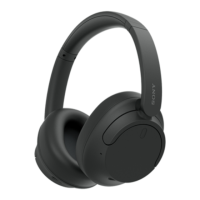
Need help?
Do you have a question about the Sony WH-XB900N and is the answer not in the manual?
Steps to power on the headphones and initiate Bluetooth pairing for connection.
Instructions for connecting the headphones to the companion mobile application.
Guide to powering the headphones on/off and selecting sound modes like Noise Canceling.
Instructions for handling calls and connecting to devices via Bluetooth and NFC.
Accessing support resources and troubleshooting information for the headphones.
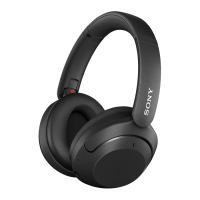
The device described in the manual is a pair of wireless noise-canceling headphones, model WH-XB900N, designed for an immersive audio experience and convenient communication. These headphones offer a range of features for both audio playback and hands-free calling, making them suitable for various daily activities.
The primary function of these headphones is to provide high-quality audio playback wirelessly, with the added benefit of noise-canceling technology. This feature allows users to block out ambient noise, creating a more focused listening environment, whether they are commuting, working, or simply relaxing. The headphones also support "Ambient Sound" mode, which allows users to hear their surroundings while still enjoying their audio, enhancing safety and awareness in certain situations. A third mode, "Ambient Sound Control Off," disables both noise canceling and ambient sound, providing a standard listening experience.
Beyond audio playback, the headphones are fully equipped for hands-free communication. They can be paired with smartphones (both Android and iPhone) to make and receive calls. The integrated microphone ensures clear voice transmission during calls.
The headphones are designed for wireless connectivity, primarily through Bluetooth. They also feature NFC (Near Field Communication) for quick and easy pairing with compatible Android devices. For wired listening, a headphone cable can be connected, which is useful when battery power is low or when connecting to devices without Bluetooth.
To power on the headphones, the user presses and holds the power button until the indicator light illuminates. To power off, the same button is pressed and held until the light turns off. For Bluetooth pairing, after powering on, the headphones can be put into pairing mode. For Android devices with NFC, simply touching the device to the N-mark on the left earcup initiates a quick connection. For other devices, standard Bluetooth pairing procedures are followed through the device's settings. Once paired, the headphones automatically connect to the last paired device when powered on.
The headphones feature physical controls for managing audio playback. Users can play/pause music, skip tracks forward or backward, and adjust the volume directly from the earcups. The specific controls for these functions are indicated by intuitive symbols in the manual. The noise-canceling and ambient sound modes can be toggled using a dedicated "CUSTOM" button. Each press cycles through "Noise Canceling," "Ambient Sound," and "Ambient Sound Control Off," allowing users to adapt their listening experience to their environment.
When a call comes in, users can answer it by pressing a specific button on the headphones. To end a call, the same button is pressed again. The manual also illustrates how to reject a call. During a call, the integrated microphone picks up the user's voice, and the audio from the call is heard through the headphones.
For situations where wireless connectivity is not preferred or available, the headphones can be used with a supplied audio cable. This involves plugging one end into the headphone jack on the left earcup and the other end into the audio output of the playback device. This feature is particularly useful for conserving battery life or for connecting to devices that lack Bluetooth functionality.
The headphones are rechargeable. The manual shows a USB cable being connected to the headphones for charging, indicating that they are powered by an internal rechargeable battery. The charging process is straightforward, requiring a standard USB power source.
The headphones are compatible with the "Sony Headphones Connect" application, which can be downloaded to a smartphone. This app likely provides advanced control over the headphones' features, such as customizing the noise-canceling levels, adjusting sound profiles, and potentially updating firmware. The manual includes a QR code and a URL for accessing information about this app.
The manual illustrates the correct way to wear the headphones, ensuring comfort and optimal sound performance. The earcups are designed to fit over the ears, and the headband is adjustable to suit different head sizes. The "L" and "R" markings on the earcups indicate the left and right sides, respectively, for proper orientation.
While the manual does not explicitly detail extensive maintenance procedures, it implies standard care for electronic devices. Cleaning: Keeping the earcups and headband clean is important for hygiene and longevity. Users should gently wipe the surfaces with a soft, dry cloth. Avoid using harsh chemicals or abrasive materials that could damage the finish or internal components. Storage: When not in use, the headphones should be stored in a safe place to prevent physical damage. The manual shows the headphones being folded, suggesting a compact design that facilitates storage and portability. Storing them in a protective case (if provided or purchased separately) can further safeguard them from dust, scratches, and impacts. Battery Care: To maximize battery life, it is generally recommended to avoid fully discharging the battery frequently and to store the headphones with a partial charge if they will not be used for an extended period. Overcharging should also be avoided, although modern devices typically have built-in protection against this. Cable Management: When using the wired connection, ensure the cable is not excessively bent or tangled, as this can lead to damage over time. Store the cable neatly when not in use. Software Updates: The "Sony Headphones Connect" app likely facilitates firmware updates, which can improve performance, add new features, or fix bugs. Regularly checking for and installing these updates is a good maintenance practice to ensure the headphones operate at their best.
In summary, the WH-XB900N headphones are a versatile audio device offering wireless freedom, effective noise cancellation, and hands-free communication, all managed through intuitive controls and supported by a dedicated smartphone application for enhanced customization. Proper care and maintenance, as implied by the manual, will ensure their long-term performance and enjoyment.
 General
| Impedance | 50 Ω |
|---|---|
| Driver type | Dynamic |
| Driver unit | 40 mm |
| Magnet type | Neodymium |
| Ear coupling | Circumaural |
| Diaphragm material | Polyethylene terephthalate (PET) |
| Headphone frequency | 2 - 20000 Hz |
| Headphone sensitivity | 101 dB |
| Cable length | 1.2 m |
| Headset type | Binaural |
| Product type | Headset |
| Product color | Black |
| Wearing style | Head-band |
| Volume control | Touch |
| Detachable cable | Yes |
| Country of origin | China |
| Recommended usage | Calls/Music |
| Works with Amazon Alexa | - |
| Frequency band | 2.4 - 2.4835 GHz |
| Wireless range | 10 m |
| Bluetooth version | 4.2 |
| Bluetooth profiles | A2DP, AVRCP, HFP, HSP |
| Connectivity technology | Wired & Wireless |
| Battery recharge time | 7 h |
| Continuous audio playback time | 35, 300 h |
| Number of products included | 1 pc(s) |
| Microphone type | Built-in |
| Package type | Box |
| Package depth | 88 mm |
| Package width | 240 mm |
| Package height | 200 mm |
| Package weight | 723 g |
| Harmonized System (HS) code | 85183000 |
 Weight and Dimensions
| Depth | 80 mm |
|---|---|
| Width | 220 mm |
| Height | 180 mm |
| Weight | 260 g |


 To Next Page