EasyManua.ls Logo

Sony WM-A52 - Page 3

Sony WM-A52
9 pages
Print Icon
To Next Page IconTo Next Page
To Previous Page IconTo Previous Page
Loading...
abn
ALi
sperm
nt
ARCA
a
na!
1
La
le
CONE
let
ete
Gd
ne,
amt
eee
oe
ae
or
ae
weer
Pree
es
ea
ao
Perea
ae
yen
inte
ot
be
pri
ta
Fin
an
nd
|
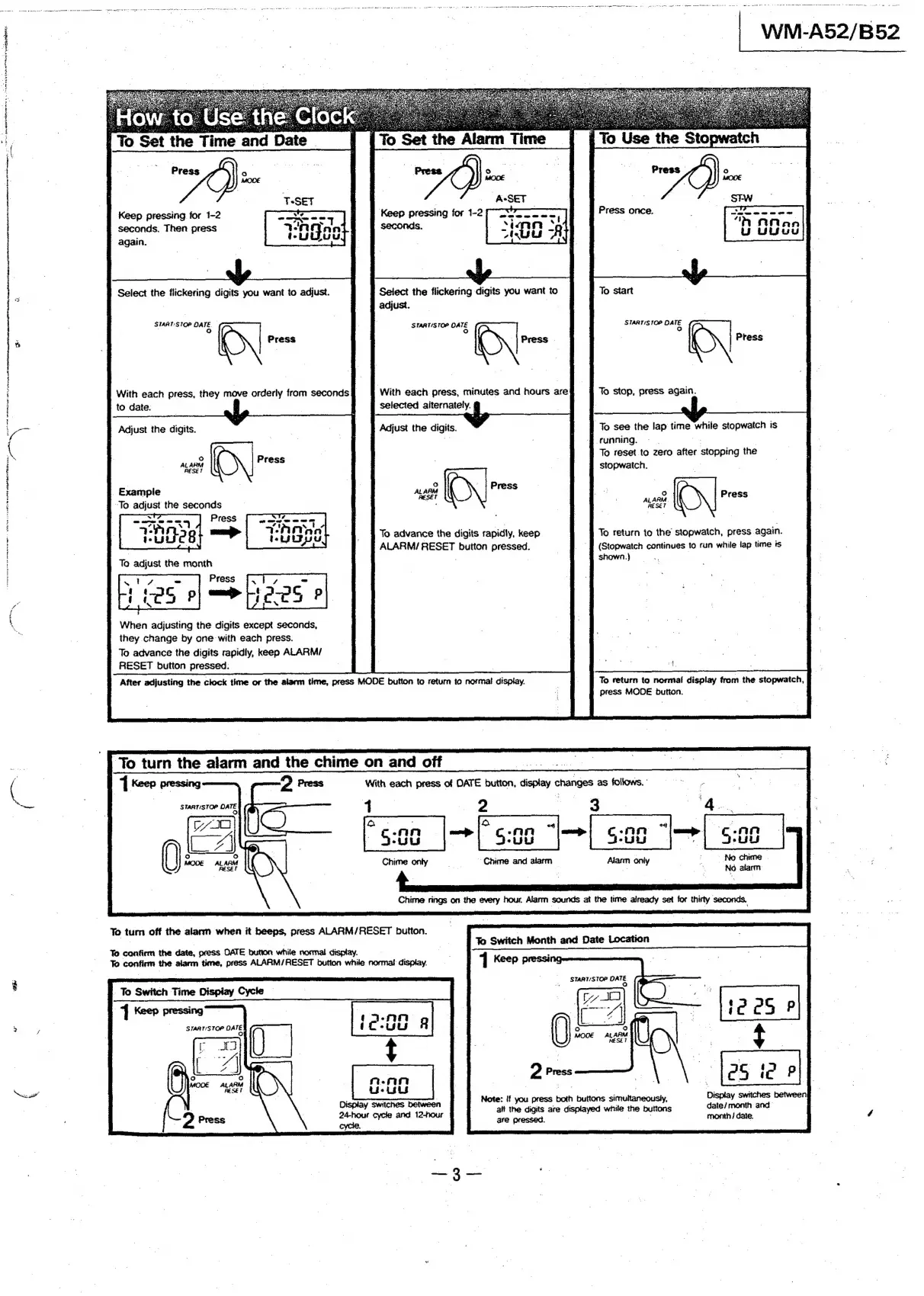
To
Set
the
Time
and
pa
Press
Keep
pressing
for
1-2
seconds.
Then
press
again.
seconds.
Select
the
flickering
digits
you
want
to
To
start
Select
the
flickering
digits
you
want
to
adjust.
;
adjust.
START:STOP
DATE.
o
STARTISTOP
DATE
STARTS
TOP
O4
%
°
Press
With
each
press,
minutes
and
hours
aref
To
stop,
press
again.
selected
alternately.
§
With
each
press,
they
move
orderly
from
seconds
to
date.
Jo
see
the
lap
time
while
stopwatch
is
Frunning.
-
-
.
To
reset
to
zero
after
stopping
the
stopwatch.
:
Adjust
the
digits.
Adjust
the
digits.
°o
‘A
aies
Press
RESET
Example
‘To
adjust
the
seconds
To
return
to
the
stopwatch,
press.
again.
(Stopwatch
continues
to
run
while
lap
time
is
shown.)
To
advance
the
digits
rapidly,
keep
#
ALARM/
RESET
button
pressed.
When
adjusting
the
digits
except
seconds,
they
change
by
one
with
each
press.
To
advance
the
digits
rapidly,
keep
ALARM/
RESET
button
pressed:
After
adjusting
the
clock
time
or
the
alarm
time,
press
MODE
button
to
return
to
normal
display.
To
return
to
normal
display
from
the
stopwatch,
press
MODE
button.
To
turn
the
alarm
and
the
chime
on
and
off
|
|
aoe
‘|
Keep
pressing
D
Press
With
each
press
of
DATE
button,
sok
changes
as
follows.
START/STOP
DATE
2
3
—.
Wau
OFS
ALARM
To
turn
off
the
alarm
when
it
beeps,
press
ALARM/RESET
button.
To
confirm
the
date,
press
DATE
button
while
normal
display.
To
confirm
the
alarm
time,
press
ALARM/RESET
button
while
normal
display.
To
Switch
Time
Display
Cycle
4
Keep
pressing
STARTISTOP
DA
Ja
9
Press
Note:
if
you
press
both
buttons
simultaneously,
;
alt
the
digits
are
displayed
while
the
buttons
date/month
and
are
pressed.
month
/
date.
24-hour
cycle
and
12-hour
cycle.

Related product manuals