13
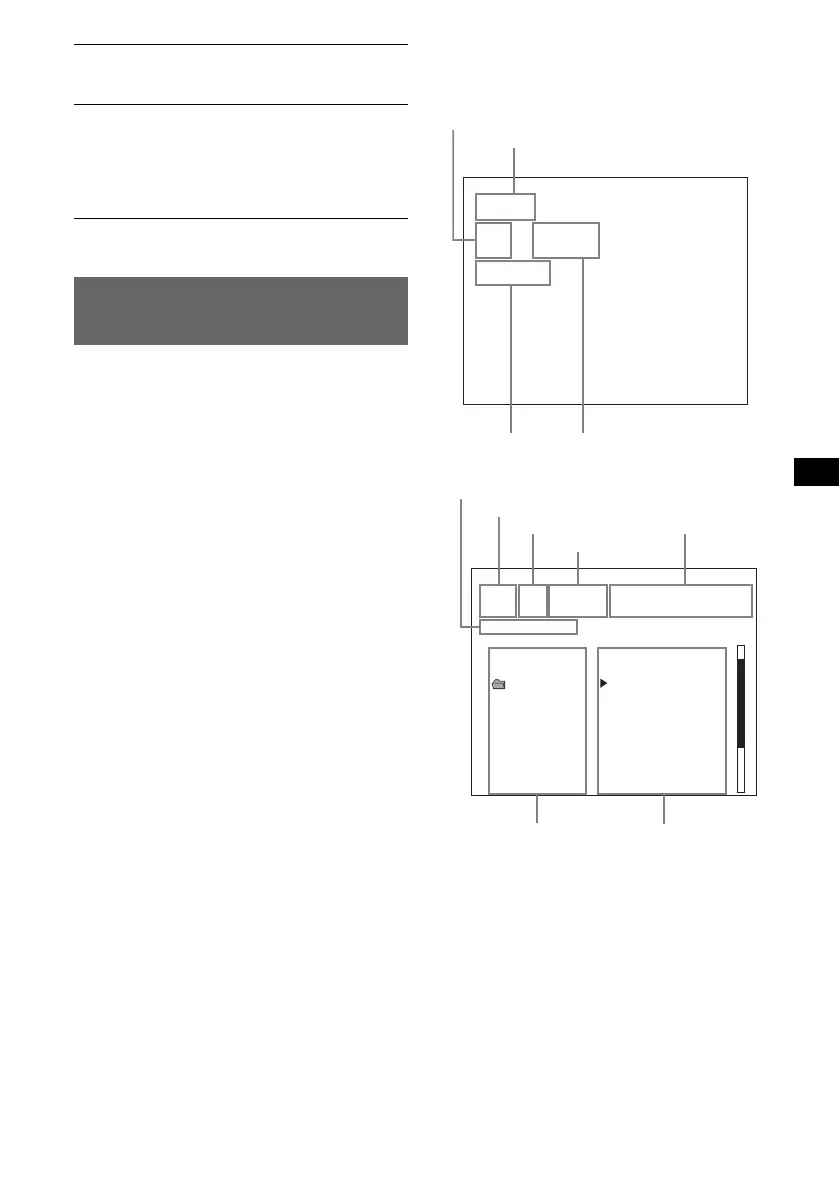
Using the On-Screen Display
(CD/Video CD only)
You can check the operating status of the player
and the information about the disc using the on-
screen display on the TV.
1 Press (5) (OSD).
The on-screen display will appear on the TV.
Notes
• The initial setting of the on-screen display changes
depending on the selected source.
– when the CD, MP3 is played back: on.
– when the Video CD is played back: off.
• You cannot turn off the on-screen display when a CD
or MP3 is played.
Switching the language for the
on-screen display
1 During playback, press (5) (OSD) for
2 seconds.
Each time you press (5) (OSD) for
2 seconds, the language changes as follows:
ENGLISH y CHINESE
Display information of the on-screen
display
Note
The display information will differ, depending on the
operation or settings.
LPF (Low Pass Filter)
To select the subwoofer cut-off frequency: “LPF
OFF” (
z), “LPF125Hz” or “LPF 78Hz.”
LOUD (Loudness)
To allow you to listen clearly at low volume
levels.
– “LOUD-ON” : to reinforce bass and treble.
– “LOUD-OFF” (
z): to not reinforce bass and
treble.
* When the unit is turned off.
CD - DA
TRK - REP
2 1 : 42
Disc type
Track number
Elapsed playing time
Play mode
ALBM
3 3 0 : 51 TRACK00003[ ALBUM03 ]
[ ALBM - SHUF ]
ALBUM01
ALBUM02
ALBUM03
ALBUM04
ALBUM05
ALBUM06
ALBUM07
ALBUM08
TRACK00001. MP3
TRACK00002. MP3
TRACK00003. MP3
TRACK00004. MP3
TRACK00005. MP3
TRACK00006. MP3
TRACK00007. MP3
TRACK00008. MP3
TRACK00009. MP3
TRACK00010. MP3
TRK SECMIN ID3
Play mode
Album number
Track number
Elapsed playing time
ID3 tag
Album name Track name



 To Next Page