EasyManua.ls Logo

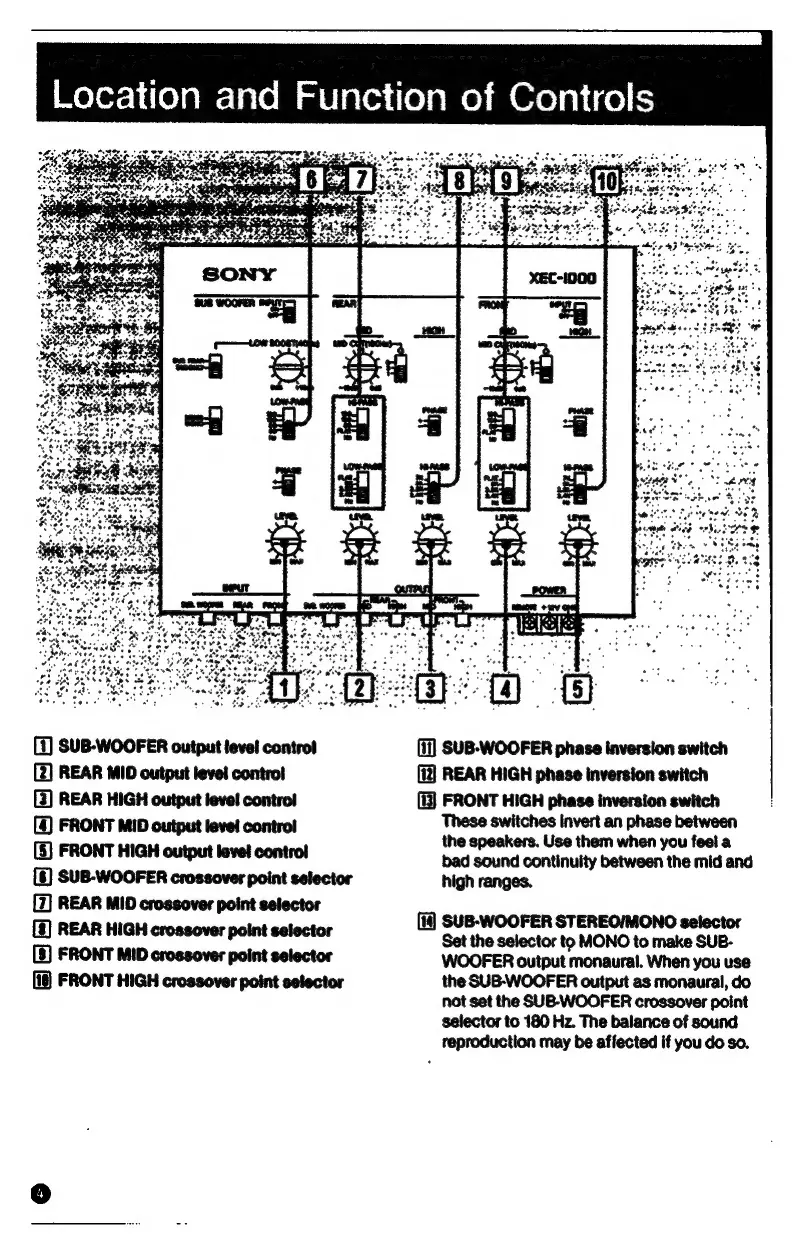
Sony XEC-1000 - Location and Function of Controls; Front Panel Controls Overview; Phase Inversion and Mode Selectors

Sony XEC-1000
32 pages
Print Icon
To Next Page IconTo Next Page
To Previous Page IconTo Previous Page
Loading...
|Moler-}i(e)amrs
ia
(em
al
¥laceni(e)amel
am
Ore
alice)
is
(1)
SUB-WOOFER
output
level
contro!
[2]
REAR
MID
output
level
contro!
(3)
REAR
HIGH
output
level
contro!
(4)
FRONT
MID
output
level
contro!
(5)
FRONT
HIGH
output
level
contro!
[6)
SUB-WOOFER
crossover
point
selector
[7]
REAR
MID
crossover
point
selector
[§)
REAR
HIGH
crossover
point
selector
[5]
FRONT
MID
crossover
point
selector
(18)
FRONT
HIGH
crossover
point
selector
(i)
SUB-WOOFER
phase
inversion
switch
(i]]
REAR
HIGH
phase
inversion
switch
FRONT
HIGH
phase
inversion
switch
These
switches
invert
an
phase
between
the
speakers.
Use
them
when
you
feel
a
bad
sound
continuity
between
the
mid
and
high
ranges.
(i)
SUB-WOOFER
STEREO/MONO
selector
Set
the
selector
to
MONO
to
make
SUB-
WOOFER
output
monaural.
When
you
use
the
SUB-WOOFER
output
as
monaural,
do
not
set
the
SUB-WOOFER
crossover
point
selector
to
180
Hz.
The
balance
of
sound
reproduction
may
be
affected
if
you
do
so.

Other manuals for Sony XEC-1000