Messaging
Reading and sending messages
The Messaging application shows your messages as conversations, which means
that all messages to and from a particular person are grouped together. To send
multimedia messages, you need the correct MMS settings on your device. See
Internet and messaging settings
on page 24.
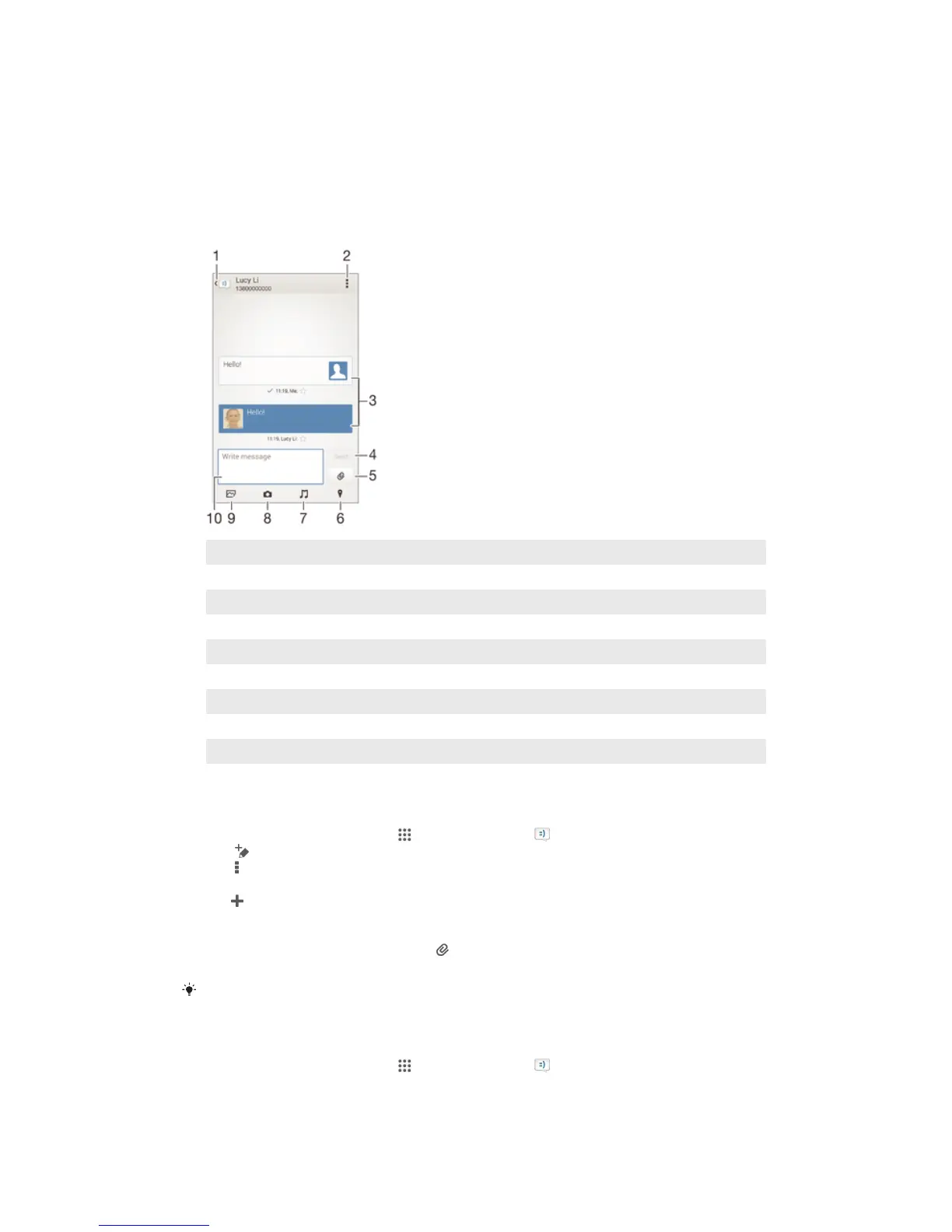
1 Go back to the list of conversations
2 View options
3 Sent and received messages
4 Send button
5 Attach a file
6 Attach a location
7 Attach a sound clip
8 Take a photo and attach it
9 Attach a photo saved on your device
10 Text field
To create and send a message
1
From your Home screen, tap , then find and tap .
2
Tap .
3
Tap , then tap Add recipient and select a contact from the Contacts list. If the
recipient is not listed as a contact, enter the recipient's number manually and
tap .
4
When you are finished adding recipients, tap Done.
5
Tap Write message and enter your message text.
6
If you want to add a media file, tap
and select an option.
7
To send the message, tap Send.
If you exit a message before sending, it gets saved as a draft. The conversation gets tagged
with the word Draft:.
To read a received message
1
From your Home screen, tap , then find and tap .
2
Tap the desired conversation.
3
If the message is not yet downloaded, tap and hold the message, then tap
Download message.
51
This is an Internet version of this publication. © Print only for private use.










 To Next Page