EasyManua.ls Logo

Sony XV-C900 - Location and Function of Controls

Sony XV-C900
20 pages
Print Icon
To Next Page IconTo Next Page
To Previous Page IconTo Previous Page
Loading...
|
Motor)
ilelaw-laleM
mUlaveiitelame)m@relalinze)
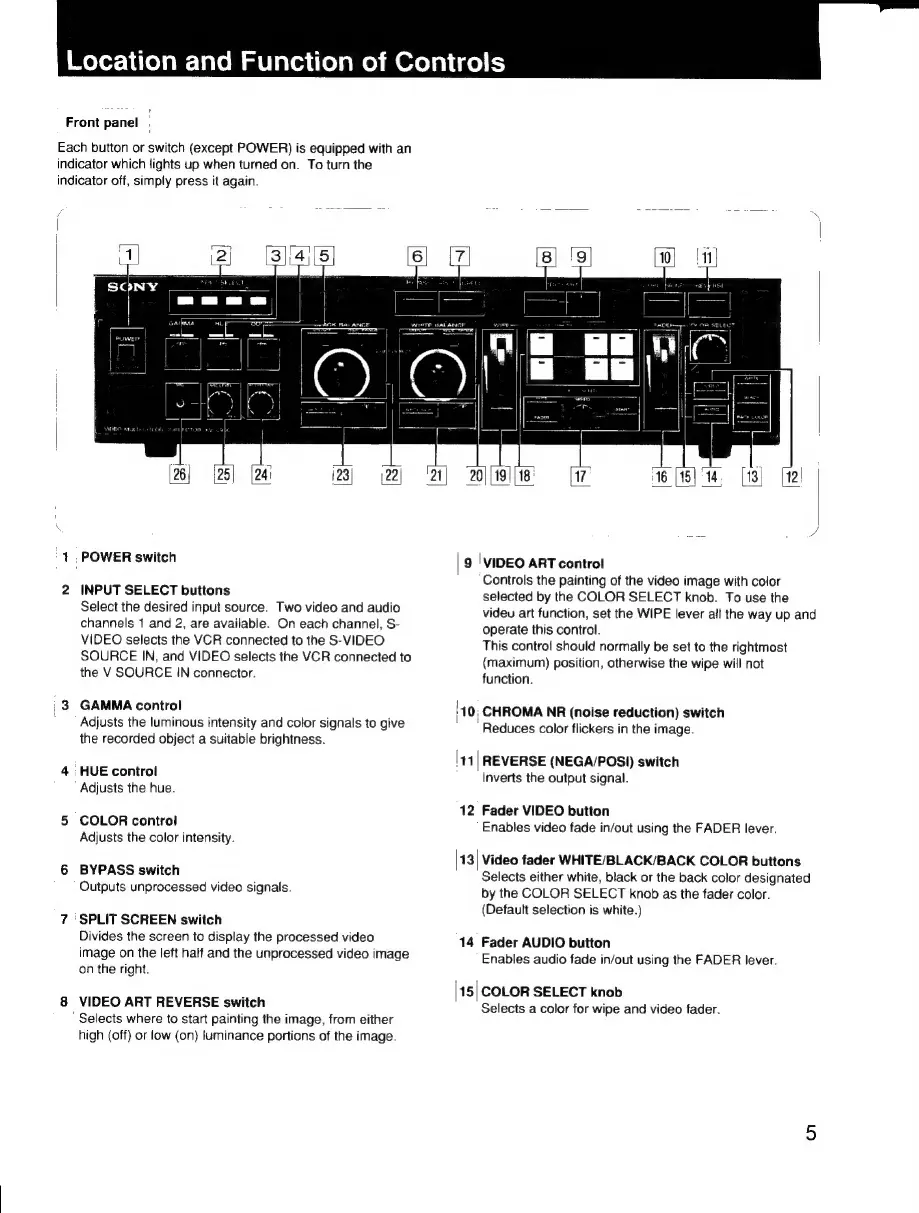
Front
panel
Each
button
or
switch
(except
POWER)
is
equipped
with
an
indicator
which
lights
up
when
turned
on.
To
turn
the
indicator
off,
simply
press
it
again.
(23; |22|
[13]
[12!
7
16
[15]
‘14
1,
POWER
switch
INPUT
SELECT
buttons
Select
the
desired
input
source.
Two
video
and
audio
channels
1
and
2,
are
available.
On
each
channel,
S-
VIDEO
selects
the
VCR
connected
to
the
S-VIDEO
SOURCE
IN,
and
VIDEO
selects
the
VCR
connected
to
the
V
SOURCE
IN
connector.
GAMMA
control
Adjusts
the
luminous
intensity
and
color
signals
to
give
the
recorded
object
a
suitable
brightness.
HUE
control
Adjusts
the
hue.
COLOR
control
Adjusts
the
color
intensity.
BYPASS
switch
Outputs
unprocessed
video
signals.
‘SPLIT
SCREEN
switch
Divides
the
screen
to
display
the
processed
video
image
on
the
left
half
and
the
unprocessed
video
image
on
the
right.
VIDEO
ART
REVERSE
switch
'
Selects
where
to
start
painting
the
image,
from
either
high
(off)
or
low
(on)
luminance
portions
of
the
image.
9
|
VIDEO
ART
control
Controls
the
painting
of
the
video
image
with
color
selected
by
the
COLOR
SELECT
knob.
To
use
the
videu
art
function,
set
the
WIPE
lever
all
the
way
up
and
operate
this
control.
This
control
should
normally
be
set
to
the
rightmost
(maximum)
position,
otherwise
the
wipe
will
not
function.
|
;10;
CHROMA
NR
(noise
reduction)
switch
"Reduces
color
flickers
in
the
image.
41
|
REVERSE
(NEGA/POSI)
switch
Inverts
the
output
signal.
12
Fader
VIDEO
button
Enables
video
fade
in/out
using
the
FADER
lever.
|13|
Video
fader
WHITE/BLACK/BACK
COLOR
buttons
Selects
either
white,
black
or
the
back
color
designated
by
the
COLOR
SELECT
knob
as
the
fader
color.
(Default
selection
is
white.)
14
Fader
AUDIO
button
Enables
audio
fade
in/out
using
the
FADER
lever.
|15|
COLOR
SELECT
knob
Selects
a
color
for
wipe
and
video
fader.