EasyManua.ls Logo

Sony XV-C900 - Connections

Sony XV-C900
20 pages
Print Icon
To Next Page IconTo Next Page
To Previous Page IconTo Previous Page
Loading...
Connections
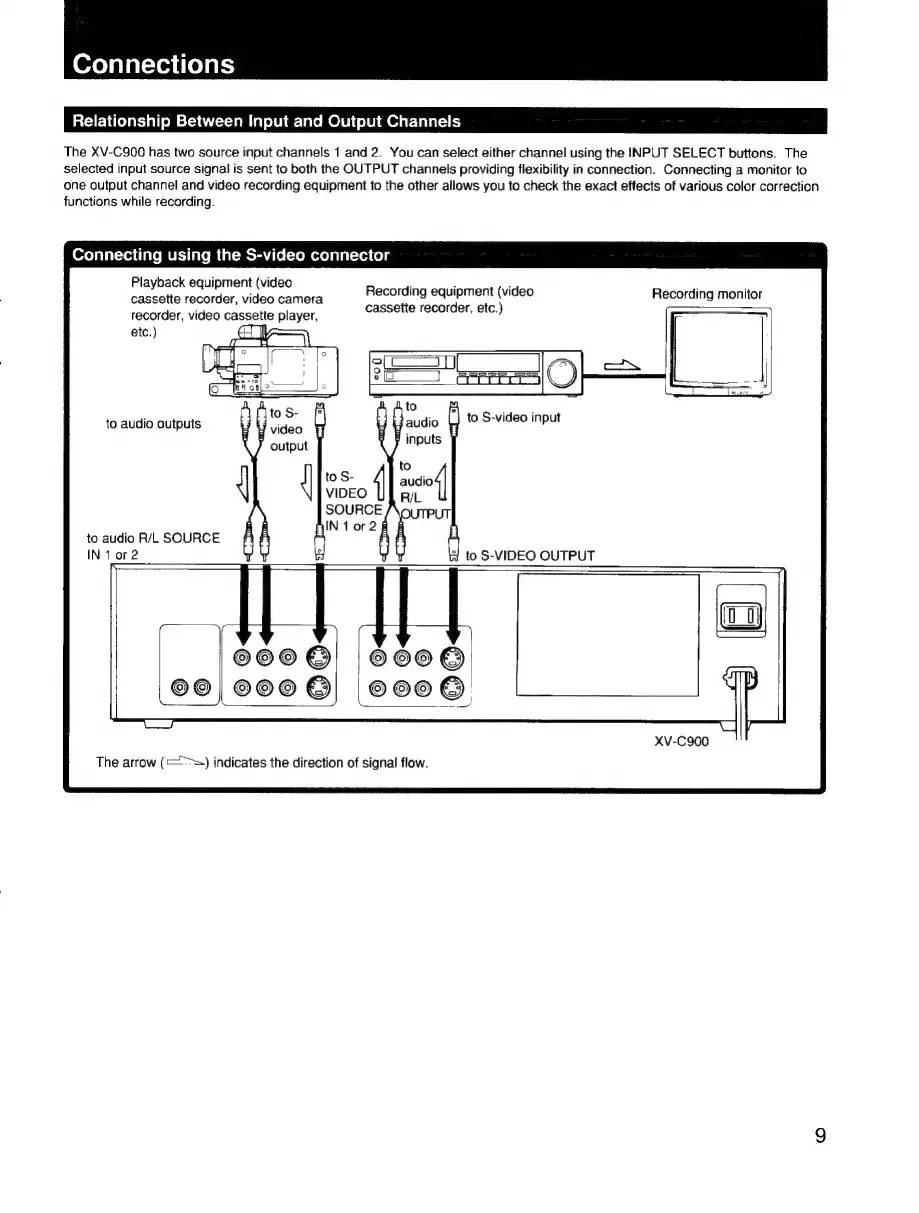
Relationship
Between
Input
and
Output
Channels
The
XV-C900
has
two
source
input
channels
1
and
2.
You
can
select
either
channel
using
the
INPUT
SELECT
buttons.
The
selected
input
source
signal
is
sent
to
both
the
OUTPUT
channels
providing
flexibility
in
connection.
Connecting
a
monitor
to
one
output
channel
and
video
recording
equipment
to
the
other
allows
you
to
check
the
exact
effects
of
various
color
correction
functions
while
recording.
Connecting
using
the
S-video
connector
Playback
equipment
(video
;
:
: .
cassette
recorder,
video
camera
Recording
equipment
(video
Recording
monitor
;
cassette
recorder,
etc.)
>
recorder,
video
cassette
player,
to
audio
outputs
vides
uC
Big
output
inputs
to
S-
ausio4/
VIDEO
RIL
SOURCE
fy
1or2
to
audio
R/L
SOURCE
IN
1
or2
to
S-VIDEO
OUTPUT
©6006
©eo@
©0|
600
©
e808
XV-C900
The
arrow
(>=)
indicates
the
direction
of
signal
flow.