EasyManua.ls Logo

Sony XV-C900 - Page 7

Sony XV-C900
20 pages
Print Icon
To Next Page IconTo Next Page
To Previous Page IconTo Previous Page
Loading...
|
Rear
panel
1]
(2)
[3]
[4]
[5]
[6]
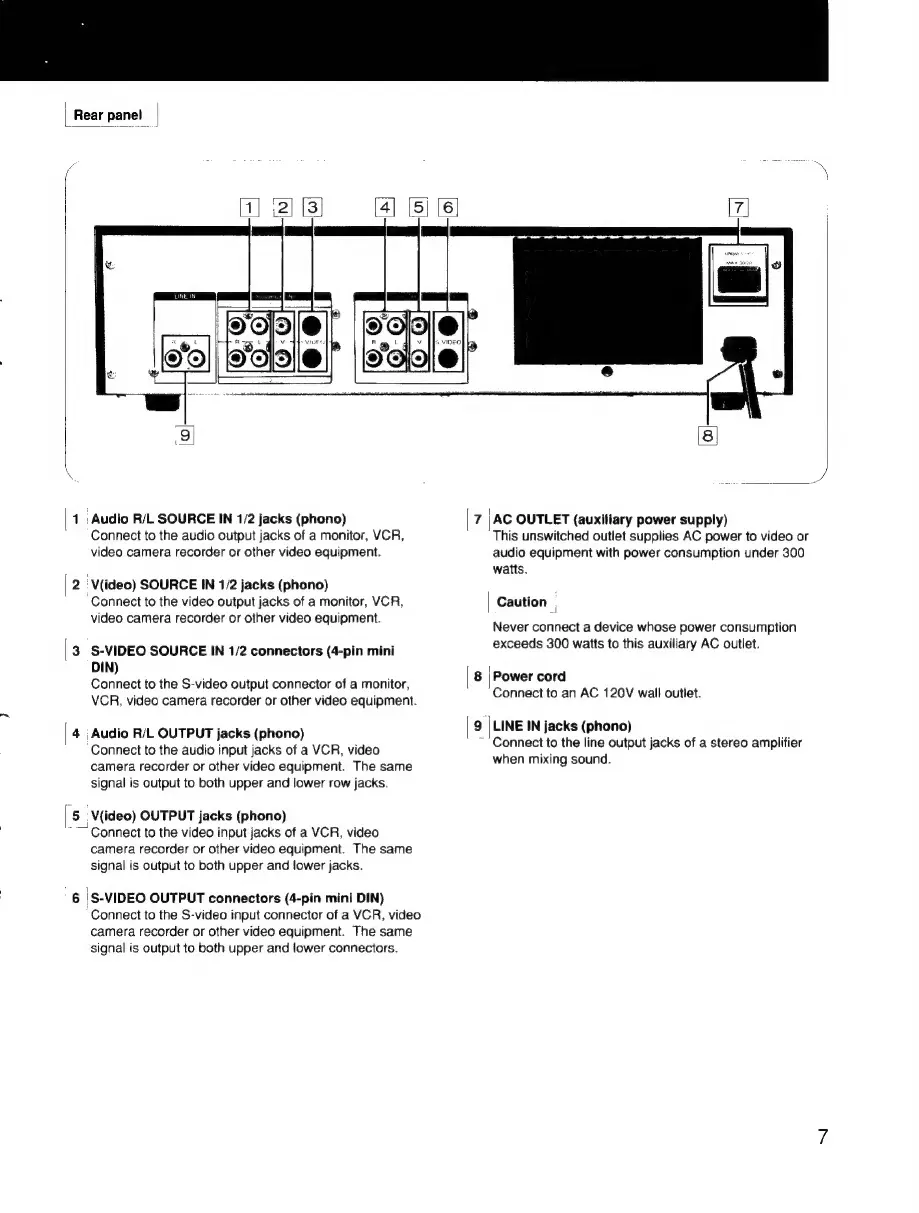
1
:
Audio
R/L
SOURCE
IN
1/2
jacks
(phono)
Connect
to
the
audio
output
jacks
of
a
monitor,
VCR,
video
camera
recorder
or
other
video
equipment.
2
'V(ideo)
SOURCE
IN
1/2
jacks
(phono)
Connect
to
the
video
output
jacks
of
a
monitor,
VCR,
video
camera
recorder
or
other
video
equipment.
3
S-VIDEO
SOURCE
IN
1/2
connectors
(4-pin
mini
DIN)
Connect
to
the
S-video
output
connector
of
a
monitor,
VCR,
video
camera
recorder
or
other
video
equipment.
4
Audio
R/L
OUTPUT
jacks
(phono)
‘Connect
to
the
audio
input
jacks
of
a
VCR,
video
camera
recorder
or
other
video
equipment.
The
same
signal
is
output
to
both
upper
and
lower
row
jacks.
5;
V(ideo)
OUTPUT
jacks
(phono)
““~
Connect
to
the
video
input
jacks
of
a
VCR,
video
camera
recorder
or
other
video
equipment.
The
same
signal
is
output
to
both
upper
and
lower
jacks.
6
|S-VIDEO
OUTPUT
connectors
(4-pin
mini
DIN)
‘Connect
to
the
S-video
input
connector
of
a
VCR,
video
camera
recorder
or
other
video
equipment.
The
same
signal
is
output
to
both
upper
and
lower
connectors.
|
8]
AC
OUTLET
(auxitiary
power
supply)
This
unswitched
outlet
supplies
AC
power
to
video
or
audio
equipment
with
power
consumption
under
300
watts.
Caution
7
Never
connect
a
device
whose
power
consumption
exceeds
300
watts
to
this
auxiliary
AC
outlet.
i
Power
cord
Connect
to
an
AC
120V
wall
outlet.
LINE
IN
jacks
(phono)
Connect
to
the
line
output
jacks
of
a
stereo
amplifier
when
mixing
sound.