Help Guide
Digital Media Player
NW-A306
Playback methods
This topic includes instructions for the following operations.
Selecting the playback mode.
Setting the playback range.
The relationship between playback mode and playback range.
Selecting the playback mode
Hint
You can also set the playback mode from the option menu. Tap the menu items in the following order.
(Options) - [Settings].
Then, select the desired playback mode from [Shuffle] or [Repeat].
When a track list is displayed, you can start shuffle playback with the displayed track list as the playback range by tapping the
shuffle playback button.
Setting the playback range
The relationship between playback mode and playback range
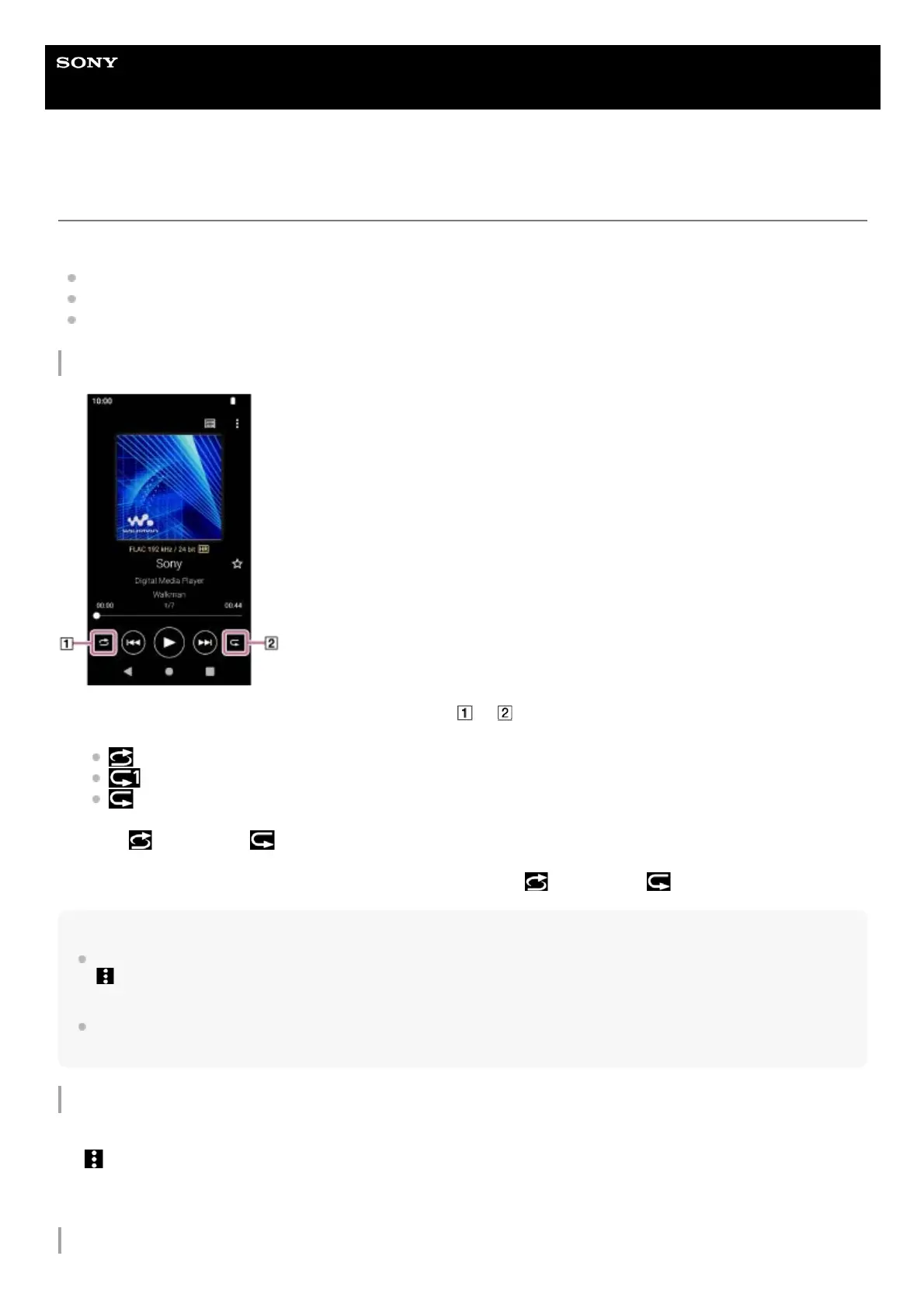
On the playback screen in “Music player”, tap the area ( or ) to select a playback mode.
(Shuffle)
(Repeat 1 song)
(Repeat all)
When
(Shuffle) and (Repeat all) are lit up, “Music player” will play all tracks in the selected playback range
randomly.
To return to the normal playback mode, tap the icons so that both
(Shuffle) and (Repeat) darken.
1.
Tap the menu items in the following order.
(Options) - [Settings] - [Playback range].
1.
Tap the desired playback range.2.


 To Next Page