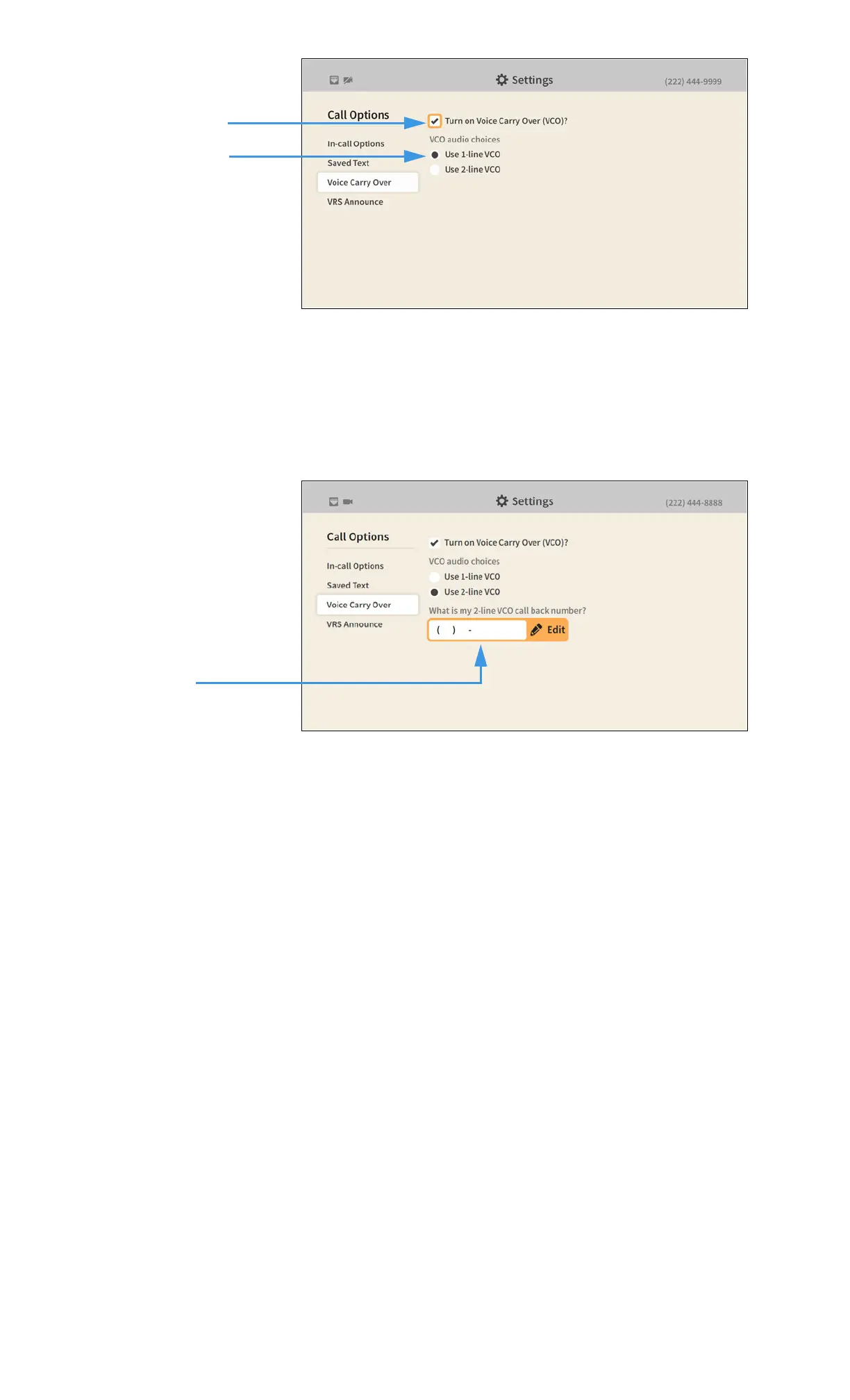
Step 5. Move to and select the Voice Carry Over checkbox as shown below.
Selecting the Turn on Voice Carry Over (VCO)? checkbox reveals the VCO audio
choices radio buttons. You can use either 1-line VCO or 2-line VCO. If you select 2-line
VCO, you must enter a call back phone number of the voice telephone you will be using.
If you select 1-line VCO, you can return to the Home screen by pressing the Home key on
the remote control. Your VCO selection will be saved.
Step 6. To use 2-line VCO, select the Use 2-line VCO radio button as shown below.
Selecting the 2-line VCO radio button reveals the call back phone number field. Enter
your call back phone number in the field and then press the Home key on the remote
control to return to the Home screen. Your VCO selection will be saved.
Turn on Voice Carry Over
(VCO)? checkbox
VCO audio choices
radio buttons
Callback phone
number field


 To Next Page