
 Need help?
Do you have a question about the SOREX FLEX Fingerprint and is the answer not in the manual?
Instructions to reset the cylinder by pressing the 'Set' button and confirming with an administrator finger before returning.
Details on door thickness, power, operating temperature, storage, battery life, weight, and rejection rates.
List of components included in the package: cylinder, Allen key, needle, and batteries.
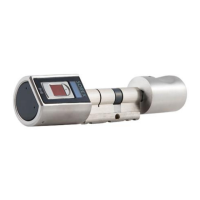
Visual guide to identify key parts of the SOREX FLEX Fingerprint Cylinder.
Procedures for adding and deleting administrator and user fingerprints on the cylinder.
Steps to add/delete remote controls, change language, lock time, and test firmware.
Guide to reset the cylinder to its original delivery condition, erasing all configured data.
Verify package contents, remove metal sleeve and battery cover from the cylinder.
Guide on how to adjust the exterior length of the cylinder using the provided screwdriver.
Instructions on removing the existing cylinder from the door by unscrewing it.
Steps to insert the SOREX FLEX cylinder into the lock, ensuring correct orientation.
Fix the cylinder, insert batteries, attach the cover and sleeve, and secure the screws.
Mount the metal knob on the inside pole and fix it with the screwdriver.
Explains the procedure for teaching in administrator fingers before adding remote controls or wireless switches.
Contact details, address, and website for SOREX wireless Solutions GmbH.
 General
| Operating Temperature | -20°C to 60°C |
|---|---|
| Fingerprint Capacity | Up to 100 fingerprints |
| Authentication Method | Fingerprint |
| Power Supply | Battery |
| Response Time | Less than 1 second |
| Security Level | High |

 To Next Page