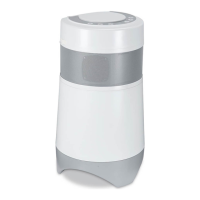
The Soundcast OutCast system is a wireless audio solution designed to deliver high-quality sound from your iPod or other music sources to a weather-resistant speaker. The system comprises two main components: the Soundcast iCast transmitter and the OutCast Weather Resistant Wireless Speaker. This manual provides comprehensive instructions for the installation, operation, and maintenance of both components.
Function Description
The primary function of the Soundcast OutCast system is to wirelessly transmit audio from a source device to the OutCast speaker. The iCast transmitter acts as the central hub for your audio sources. It features a docking bay specifically designed for various iPod models, allowing you to play music directly from your iPod while simultaneously charging its built-in battery. When an iPod is docked, the iCast transmitter wirelessly sends the audio signal to the OutCast speaker.
Beyond iPod compatibility, the iCast transmitter is versatile and can connect to other audio sources such as computers (Mac or PC) or CD players. When an iPod is removed from the dock, the headphone jack on the back of the transmitter transforms into an input jack, enabling you to connect external devices using the provided 3.5 mm mini-to-mini or RCA-to-mini cables. This flexibility allows you to stream audio from a wide range of devices to the OutCast speaker. It's important to note that the iCast system is strictly an audio device and does not transmit video or other computer files.
The OutCast Weather Resistant Wireless Speaker is the receiving end of the system, designed to reproduce the audio transmitted by the iCast. Its weather-resistant construction makes it suitable for both indoor and outdoor use, offering flexibility in where you can enjoy your music. The OutCast speaker is equipped with its own controls for power, volume, and iPod playback (when an iPod is docked in the transmitter). It also features mood lighting, which can be turned on or off.
A key feature of the OutCast speaker is its ability to operate on a built-in Nickel Metal Hydride (Ni-MH) battery, providing portability and freedom from power outlets for extended periods. The battery is charged when the OutCast is connected to an AC outlet. For local playback, the OutCast speaker also includes a mini-jack input on its side, allowing you to connect an MP3 player or portable CD player directly to the speaker. When a local source is connected, the OutCast will play music from that device instead of the iCast transmitter.
The Soundcast system supports multi-zone audio, allowing you to operate up to two OutCast units or iCast receivers with a single iCast transmitter. This means you can transmit audio to different locations within your home or outdoor area. Furthermore, it's possible to operate two entirely different Soundcast systems in the same household by utilizing different transmission channels, preventing interference between the systems.
Usage Features
iCast Transmitter Setup:
- iPod Docking: Insert your iPod into the docking bay, ensuring the slot at the bottom of the iPod aligns with the socket in the middle of the dock.
- Power Connection: Plug the AC adapter into an AC outlet and connect the power cord to the iCast Transmitter. A blue light on top of the transmitter will illuminate, indicating power.
- iPod Charging: Your iPod will charge automatically while docked.
- iPod Controls: While docked, all iPod controls except volume will function normally. Volume adjustments must be made on the OutCast unit.
- External Audio Sources: To connect a computer or CD player, remove the iPod. The headphone jack on the back of the transmitter becomes an input. Use the provided 3.5 mm mini-to-mini or RCA-to-mini cables to connect your external device. Note that iPod control buttons on the OutCast will not function when an external source is used; you must control music selection from your connected device.
- Range Optimization: For outdoor use, position the iCast transmitter near a window facing the outdoor area to maximize the wireless signal range (up to 350 feet outdoors, 150 feet indoors).
- Wireless Link Indicator: A blue light on the iCast will flicker when there is no wireless link and glow steadily once a link is established with the OutCast speaker.
- Continuous Operation: The iCast system is designed for 24/7 operation, but it's recommended to disconnect power supplies from wall outlets if not used for extended periods to conserve energy.
OutCast Speaker Setup and Operation:
- Battery Installation: Remove the battery cover screws from the bottom of the OutCast. Insert the Ni-MH battery, ensuring correct orientation of the connector. Replace the screws to secure the cover. The OutCast will not operate if the battery cover is not screwed into place due to a safety interlock.
- Power Connection and Charging: Connect the power cord to the three-prong outlet on the back of the OutCast and plug it into an AC outlet. This supplies AC power and charges the battery pack.
- Initial Charge: Charge the battery for at least 3 hours before operating the OutCast on battery power alone. A full charge from a completely discharged state takes approximately 2-3 hours when the unit is off; charging while playing will take longer.
- Battery Status Indicators:
- Green Light (Right Side): Indicates the unit is turned on.
- Red Light (Left Side):
- Flashes slowly: Battery is low.
- Stays on: Battery is discharged.
- Goes out: Battery is fully charged.
- Flashes rapidly for a few seconds upon power cord insertion: Normal circuit self-test during charging.
- Controls (Top Panel):
- Power On/Off (Center Button): Turns the unit on or off.
- Volume Up/Down (Next Two Buttons): Adjusts the speaker volume.
- iPod Control Buttons (Left Side): Pause/play, track back, and track forward (only functional when an iPod is docked in the iCast transmitter).
- Mood Lighting On/Off (Far Right Button): Activates or deactivates the mood lighting.
- Wireless Link Indicator: The power light on the OutCast will start green when pressed and switch to blue once a wireless link with the iCast transmitter is established.
- Local Audio Source: To use an MP3 player or portable CD player directly with the OutCast, lift the rubber cover on the side of the unit and connect your device to the mini-jack input using the supplied cord. Music will play from the local device instead of the iCast. Remember to replace the rubber cover when not in use to protect the circuits from moisture. Note that iPod controls on the OutCast will not operate a locally connected MP3 player.
- Channel Selection: On the back of the iCast transmitter and under the rubber cover on the side of the OutCast, there is a 3-position selector switch (1, 2, or 3). All Soundcast products are factory-set to Channel 1. To operate multiple Soundcast systems in the same household or to avoid interference from a neighbor's system, set both the transmitter and receiver to the same alternative channel (2 or 3).
Maintenance Features
Battery Care:
- Charging: Always use the built-in charger. Charge the battery for at least 3 hours initially and whenever it is discharged.
- Storage: If not using the device for a prolonged period, remove the battery and store it in a dry place between -20°C and +35°C. This prevents leakage, rust, and decreased performance.
- Discharge: The battery will slowly discharge if left off for several weeks, especially in hot climates. Fully charge the battery for best performance if not used for some time.
- Safety:
- Do not dispose of batteries in fire or expose to high temperatures.
- Do not insert batteries with reversed polarity.
- Do not connect batteries directly to power outlets or car cigarette lighter ports.
- Do not connect positive and negative terminals with metal objects.
- Do not disassemble, modify, or directly solder the battery.
- Do not use if the battery shows signs of leakage, change of color/shape, or other abnormalities.
- Do not wet the battery or place it in water/sea water.
- Do not remove or damage the coating tube, as this can lead to short-circuiting or leakage.
- Store batteries out of reach of small children.
- If the battery is rusted or generating heat upon purchase, return it to the point of purchase.
- Avoid applying strong force or throwing the battery.
- Do not place the battery in direct sunlight, hot cars, near stoves, or other hot places, as this can cause leakage and deteriorate performance.
- If alkaline liquid from the battery comes into contact with eyes, immediately wash with clean water and consult a doctor.
General Device Maintenance:
- Cleaning: Clean the apparatus only with a dry cloth.
- Ventilation: Do not block any ventilation openings. Install in accordance with manufacturer's instructions.
- Heat Sources: Do not install near radiators, heat registers, stoves, or other heat-producing apparatus.
- Water Exposure: Do not use this apparatus near water. While OutCast is weather-resistant, it is not waterproof.
- Power Cord Protection: Protect the power cord from being walked on or pinched, especially at plugs, convenience receptacles, and where it exits the apparatus.
- AC/DC Adapter: Use only the AC/DC adapter or power cord supplied by Soundcast Systems. Using an incorrect adapter may damage the product and void its warranty.
- Safety Plug: When operating the OutCast on battery power, replace the protective safety plug over the AC socket to prevent moisture from entering.
- Servicing: Refer all servicing to qualified service personnel. Do not attempt to open the cabinet or remove covers, as there are no user-serviceable parts inside. Servicing is required if the apparatus has been damaged (e.g., damaged power supply cord/plug, liquid spilled, objects fallen into, exposed to rain/moisture, not operating normally, or dropped).
- Replacement Power Supply: If replacing the direct plug-in power supply or a separable, cord-connected power supply, the replacement must be an exact duplicate or manufacturer-recommended.
- FCC Compliance: Any changes or modifications not expressly approved by the party responsible for compliance could void the user's authority to operate the equipment. If interference occurs, try reorienting/relocating the receiver/transmitter, increasing separation between equipment, connecting to a different circuit, or consulting a dealer/radio/TV technician.
Warranty and Support:
- Soundcast Systems offers a two-year warranty on hardware products from the date of purchase.
- For warranty service, contact Soundcast Systems to obtain a Return Merchandise Authorization (RMA) number before shipping the product.
- Ship authorized returns freight prepaid to the Soundcast Warranty Repair Service Center, accompanied by a copy of the original sales receipt.
- Soundcast Systems is not responsible for damage to connected audio equipment, including iPods, resulting from misuse, abuse, neglect, improper installation, or unauthorized modification.
- For any questions regarding installation or use, contact Soundcast Systems customer support via email or phone.

 Need help?
 General

 To Next Page