02 QSG QSG 03
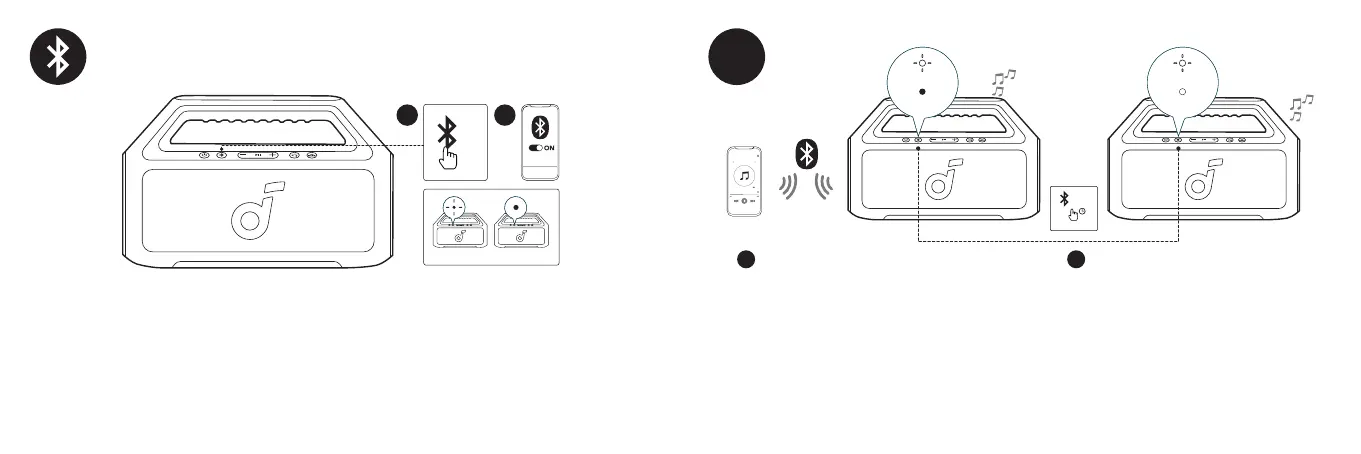
With one speaker connected to a smartphone, press and hold the Bluetooth button for 2 seconds on two speakers to enter TWS
pairing mode.
DE: Wenn ein Lautsprecher mit einem Smartphone verbunden ist, halten Sie die Bluetooth-Taste auf zwei Lautsprechern 2 Sekunden lang
gedrückt, um den TWS-Kopplungsmodus zu betreten.
ES: Con un altavoz conectado a un smartphone, presione y mantenga presionado el botón Bluetooth durante 2 segundos en dos altavoces
para entrar en el modo de emparejamiento TWS.
FR : Avec un haut-parleur connecté à un smartphone, appuyez et maintenez le bouton Bluetooth pendant 2 secondes sur deux
haut-parleurs pour entrer en mode d'appariement TWS.
RU: Если один динамик подключен к смартфону, нажмите и удерживайте кнопку Bluetooth на двух динамиках в течение 2 секунд,
чтобы войти в режим сопряжения TWS.
JP: スマートフォンに1台のスピーカーが接続されている場合、1台目と2台目のスピーカーのBluetoothボタンを同時に2秒間長押しするとTWSペ
アリングモードに切り替わります。
ID: Dengan satu pengeras suara yang terhubung ke smartphone, tekan dan tahan tombol Bluetooth selama 2 detik pada dua pengeras
suara untuk memasuki mode pairing TWS.
TWS
1 2
PAIRING
CONNECTED
PAIRING
CONNECTED
>2s
Press the Bluetooth button to enter Bluetooth pairing mode, then select "soundcore Boom 2" from the Bluetooth list to connect.
DE: Drücken Sie die Bluetooth-Taste, um den Bluetooth-Kopplungsmodus zu betreten, und wählen Sie dann "soundcore Boom 2" aus der
Bluetooth-Liste aus, um eine Verbindung herzustellen.
ES: Presione el botón Bluetooth para entrar en el modo de emparejamiento Bluetooth, luego seleccione "soundcore Boom 2" de la lista
Bluetooth para conectar.
FR : Appuyez sur le bouton Bluetooth pour entrer en mode d'appariement Bluetooth, puis sélectionnez "soundcore Boom 2" dans la liste
Bluetooth pour vous connecter.
RU: Нажмите кнопку Bluetooth, чтобы войти в режим сопряжения Bluetooth, затем выберите "soundcore Boom 2" из списка Bluetooth
для подключения.
JP: Bluetoothボタンを1回押すとBluetoothペアリングモードに入ります。ご使用の機器のBluetoothリストで「soundcore Boom 2」を選択して接
続します。
ID: Tekan tombol Bluetooth untuk masuk ke mode pencocokan Bluetooth, kemudian pilih "soundcore Boom 2" dari daftar Bluetooth untuk
menyambungkan.
1
x1
2
soundcore
Boom 2
PAIRING CONNECTED








 To Next Page