04 QSG QSG 05
X1
X1
X2
X3
X1
>2s
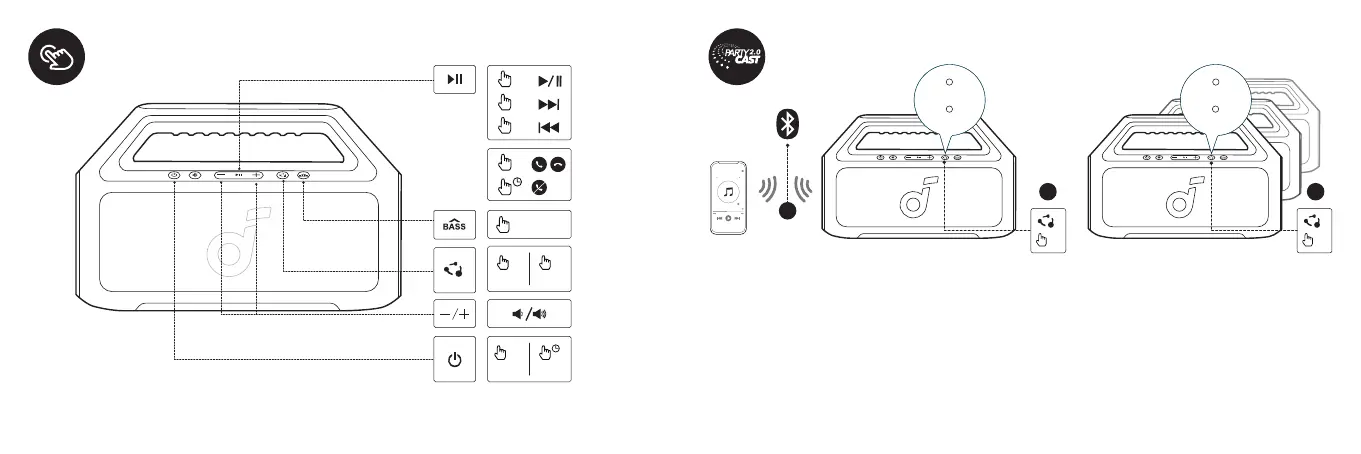
Button Controls
DE: Tastensteuerung
ES: Controles de Botón
FR : Contrôles Bouton
RU: Управление кнопками
JP: ボタンの操作方法
ON OFF
>2s
ON OFF
x1
x1
x1
BassUp
With one speaker connected to a smartphone, press the PartyCast button on up to 100 soundcore speakers with PartyCast
function to synchronize audio and light.
DE: Wenn ein Lautsprecher mit einem Smartphone verbunden ist, drücken Sie die PartyCast-Taste auf bis zu 100 soundcore-Lautsprechern
mit PartyCast-Funktion, um Audio und Licht zu synchronisieren.
ES: Con un altavoz conectado a un smartphone, presione el botón PartyCast en hasta 100 altavoces soundcore con función PartyCast para
sincronizar el audio y la luz.
FR : Avec un haut-parleur connecté à un smartphone, appuyez sur le bouton PartyCast sur jusqu'à 100 haut-parleurs soundcore avec la
fonction PartyCast pour synchroniser l'audio et la lumière.
RU: Если один динамик подключен к смартфону, нажмите кнопку PartyCast на 100 динамиках soundcore с PartyCast, чтобы
синхронизировать звук и освещение.
JP: 1台のスピーカーが接続されている状態で、1台目と2台目のスピーカー(*)のPartyCastボタンを押すと、オーディオとライトを連動させるこ
とができます。
* 最大100台まで接続可能です。
ID: Dengan satu pengeras suara yang terhubung ke smartphone, tekan tombol PartyCast pada hingga 100 pengeras suara soundcore yang
memiliki fungsi PartyCast untuk menyinkronkan audio dan cahaya.
1
2
×1
PAIRING
CONNECTED
3
×1
PAIRING
CONNECTED








 To Next Page