Press Enter Bluetooth Pairing Mode
Flashing Blue Bluetooth Pairing
Steady Blue Bluetooth Connected
• To re-enter Bluetooth pairing mode, press the Bluetooth button once.
• This speaker can only play music on one mobile device at a time. To play from
another connected device, pause the device that's currently active first.
• Each time you power on your speaker, it will automatically connect to your
last connected device if available within the Bluetooth range. If not, press the
Bluetooth button to enter Bluetooth pairing mode.
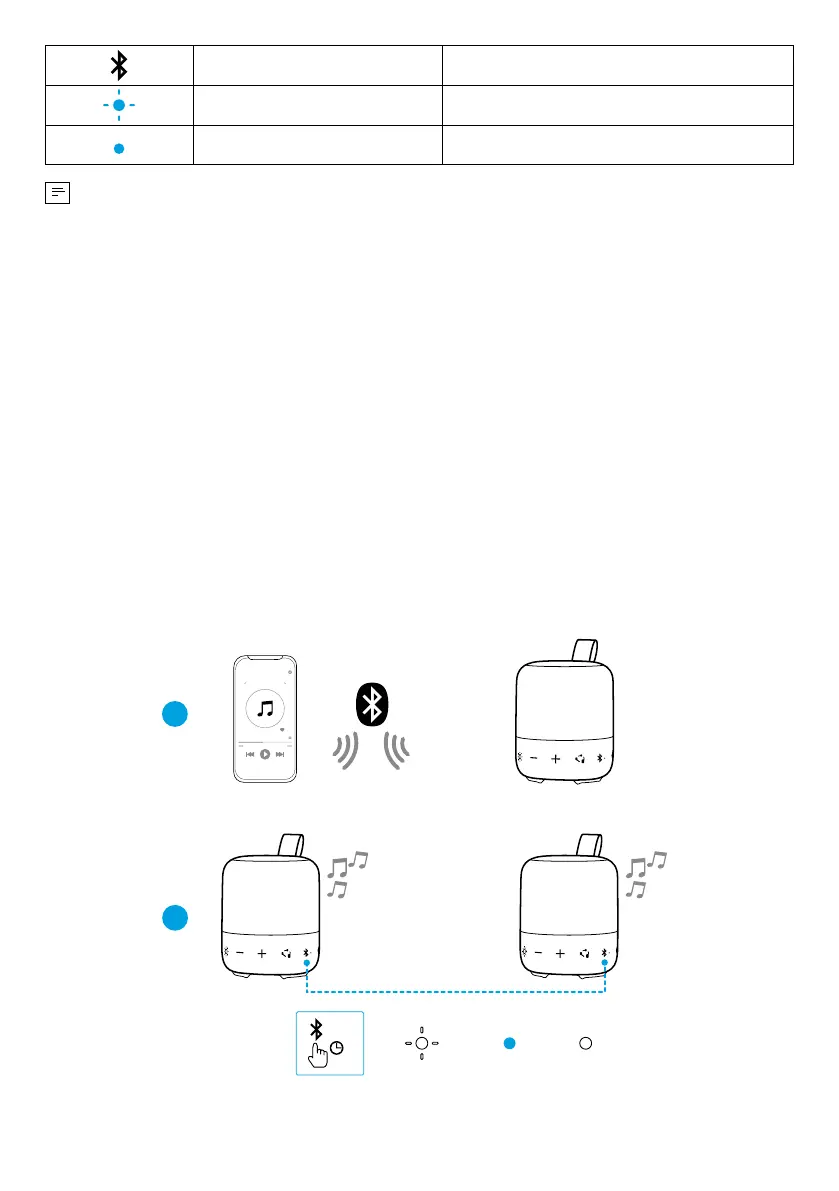
TWS Mode
Two identical Soundcore speakers can pair with each other for stereo sound. Both
speakers can play the same audio (one as the left channel and the other as the
right channel).
With one speaker connected to a smartphone, press and hold the Bluetooth
button for 2 seconds on two speakers to enter TWS pairing mode.
1
2
Speaker 1
PAIRING
CONNECTED
Speaker 1Speaker 1/ Speaker 2
CONNECTED
Speaker 2
Speaker 1 Speaker 2
>2s










 To Next Page