Need help?
Do you have a question about the Soundcore Glow Mini and is the answer not in the manual?
Identifies and describes all physical buttons, ports, and indicators on the speaker.
Details how to charge the speaker and explains the meaning of LED indicators for battery status.
Explains the steps to turn the speaker on and off, including automatic power-off features.
Guides the user on how to pair the speaker with a Bluetooth-enabled device.
Instructions for connecting two speakers for stereo sound output.
Steps to synchronize audio and light across multiple speakers with PartyCast.
Lists all available button functions for controlling playback, calls, and modes.
Details features like EQ settings, firmware updates, and light effects available through the app.
Provides instructions on how to reset the speaker to its factory default settings.
Outlines key technical details such as power input, battery capacity, and Bluetooth range.
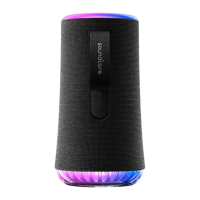
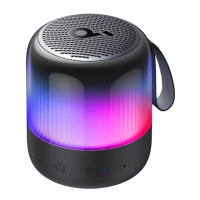
The Soundcore Glow Mini (A3136) is a portable speaker designed to deliver audio and light synchronization, enhancing the user's listening experience. It features a compact design with an LED ring light, making it suitable for various environments. The device is equipped with a range of controls for easy operation and can be managed through the Soundcore app for extended functionalities.
The Soundcore Glow Mini serves primarily as a Bluetooth speaker, allowing users to wirelessly stream audio from their mobile devices. Its key distinguishing feature is the integrated LED ring light, which can synchronize with the rhythm of the music, offering a dynamic visual experience. The speaker supports multiple light modes, including music-sync presets like Campfire Vibes, Neon Night, Spring Break, Euphoric Dance, and Romantic Stroll, as well as customizable light effects through the Soundcore app.
Beyond standard Bluetooth playback, the Glow Mini offers advanced connectivity options. It supports TWS (True Wireless Stereo) mode, enabling two identical Soundcore speakers to pair together for a stereo sound experience, with one speaker acting as the left channel and the other as the right. This expands the audio stage and provides a more immersive listening experience. Furthermore, the speaker incorporates PartyCast mode, allowing users to connect up to 100 Soundcore speakers with PartyCast functionality. This feature synchronizes both audio and light across all connected speakers, creating a unified and expansive party atmosphere.
The device also includes a built-in microphone, facilitating hands-free calling. Users can answer, end, or reject calls directly from the speaker using its button controls. Additionally, it supports activation of voice assistant software, providing convenient access to smart assistant features on a connected smartphone.
Operating the Soundcore Glow Mini is intuitive, thanks to its clearly labeled physical buttons and app integration.
Powering On/Off: The speaker is powered on by pressing the power button once. A steady white light indicates it's on. To power off, users can press and hold the power button for 2 seconds, which will turn off the light. The speaker also features an auto-power off function, automatically shutting down after 20 minutes if no device is connected, conserving battery life. This auto-power off time can be customized via the Soundcore app.
Bluetooth Connectivity: To enter Bluetooth pairing mode, the Bluetooth button is pressed once. The LED will flash blue, indicating it's ready to pair. Users then select "soundcore Glow Mini" from their device's Bluetooth list. Once connected, the LED will show a steady blue light. The speaker automatically reconnects to the last paired device when powered on, provided the device is within range. If not, pressing the Bluetooth button again will re-enter pairing mode. The speaker can only play music from one mobile device at a time; to switch sources, the currently active device must be paused first.
Volume and Playback Control: Volume adjustments are made using the volume up (+) and volume down (-) buttons. Music playback can be controlled with the power button: a single press plays or pauses the track, a double press skips to the next track, and a triple press goes back to the previous track.
Light Modes: The LED ring light can be controlled via the dedicated LED ring light button. A single press cycles through the available light modes, while pressing and holding for 2 seconds turns the light off. More extensive light customization and additional effects are available through the Soundcore app.
TWS Mode: To activate TWS mode, ensure one speaker is connected to a smartphone. Then, press and hold the Bluetooth button for 2 seconds on both speakers. The LEDs will flash white during pairing. Once connected, the primary speaker (left channel) will show a steady blue light, and the secondary speaker (right channel) will show a steady white light. To exit TWS mode, press and hold the Bluetooth button on either speaker for at least 2 seconds.
PartyCast Mode: With one speaker connected to a smartphone, press the PartyCast button on the primary speaker. This enters PartyCast pairing mode, indicated by a flashing white light. Then, press the PartyCast button on other compatible Soundcore speakers to join the PartyCast group. Once connected, the primary speaker will show a steady blue light, and the connected PartyCast speakers will show a steady white light. This synchronizes audio and light across all speakers. To exit PartyCast mode, press and hold the PartyCast button for at least 2 seconds.
Soundcore App Integration: The Soundcore app, available on Google Play and the App Store, significantly enhances the speaker's functionality. Through the app, users can:
The Soundcore Glow Mini is designed for durability and ease of maintenance, ensuring a long lifespan.
Charging: The speaker is charged via a USB-C charging port. It is crucial to use a certified USB-C cable and charger to prevent any damage to the device. Before the first use, it is recommended to fully charge the speaker to prolong the lifespan of its built-in battery. During charging, the power LED will show a steady red light. Once fully charged, the LED will turn steady white. If the battery is low, the power LED will flash red.
Waterproof Level: The device has an IP67 waterproof rating, meaning it is protected against dust ingress and can withstand immersion in water up to 1 meter for 30 minutes. This makes it suitable for use in various outdoor and wet environments, such as by the pool or at the beach, without fear of damage from splashes or brief submersion.
Reset Functionality: In case of any operational issues or to clear all pairing records, the speaker can be reset. To do this, press and hold the Bluetooth button and the volume up button simultaneously for at least 4 seconds. This action will restore the speaker to its factory default settings.
By combining robust audio performance with dynamic lighting and versatile connectivity, the Soundcore Glow Mini offers a comprehensive and engaging portable audio experience, supported by user-friendly controls and app-based customization.
 General
| Product Name | Soundcore Glow Mini |
|---|---|
| Category | Bluetooth Speaker |
| Connectivity | Bluetooth 5.0 |
| Battery Life | 12 hours |
| Charging Time | 3 hours |
| Driver | Full-range driver |
| Frequency Response | 80Hz - 20kHz |
| Charging Port | USB-C |
| Water Resistance | IPX7 |
| App Support | Soundcore App |
| Bluetooth Range | 20m |









 To Next Page