Contents [ hide
1 Safety Instructions
2 What’s Included
3 At a Glance
4 Using Your Soundcore Icon
4.1 Turn On / Of
4.2 Bluetooth mode
4.3 AUX-In mode
5 Charging your Soundcore Icon
6 Specifications
7 File Downloads
8 References
9 Related Manuals
Safety Instructions
Avoid dropping.
Do not disassemble.
Soundcore Icon can be immersed in water up to lm for up to 30 minutes.
Avoid extreme temperatures.
Do not use the device outdoors during thunderstorms.
Do not use any corrosive cleaner/ oil to clean.
What’s Included
At a Glance
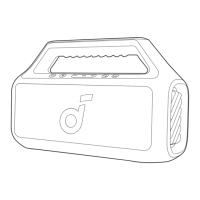
1. Power Indicator
2. Power Button
3. Volume – Button
4. Multi-function Button 3.5mm Audio Input Port
5. Volume + Button micro USB Port
6. Bluetooth Button
7. Bluetooth Indicator
8. Carry-handle
Using Your Soundcore Icon
Turn On / Of









 To Next Page