04 QSG QSG 05
1
PAIRING
CONNECTED
PAIRING
CONNECTED
>2s
TWS
2
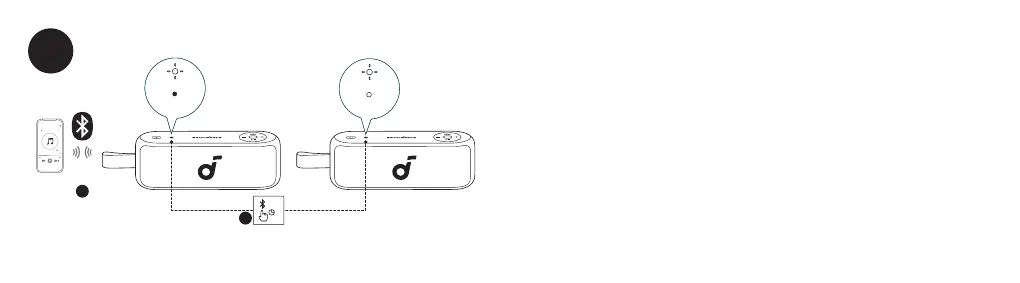
With one speaker connected to a smartphone, press and hold the Bluetooth button for 2 seconds on
two speakers to enter TWS pairing mode.
DE: Wenn ein Lautsprecher mit einem Smartphone verbunden ist, halten Sie die Bluetooth-Taste auf zwei
Lautsprechern 2 Sekunden lang gedrückt, um den TWS-Kopplungsmodus zu betreten.
ES: Con un altavoz conectado a un smartphone, presione y mantenga presionado el botón Bluetooth durante 2
segundos en dos altavoces para entrar en el modo de emparejamiento TWS.
FR : Avec un haut-parleur connecté à un smartphone, appuyez et maintenez le bouton Bluetooth pendant 2
secondes sur deux haut-parleurs pour entrer en mode d'appariement TWS.
RU: Если один динамик подключен к смартфону, нажмите и удерживайте кнопку Bluetooth на двух
динамиках в течение 2 секунд, чтобы войти в режим сопряжения TWS.
JP: スマートフォンに1台のスピーカーが接続されている場合、1台目と2台目のスピーカーのBluetoothボタンを同
時に2秒間長押しするとTWSペアリングモードに切り替わります。



 To Next Page