Need help?
Do you have a question about the Soundcore Motion 300 and is the answer not in the manual?
Connect to a mobile device via Bluetooth for audio playback.
Pair two speakers for synchronized stereo sound.
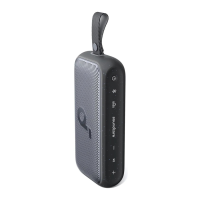
The Soundcore Motion 300 (A3135) is a portable Bluetooth speaker designed to deliver high-quality audio with versatile usage and adaptive sound features. It offers a robust set of functionalities for both casual listening and more immersive audio experiences, including True Wireless Stereo (TWS) pairing and advanced audio codecs like LDAC.
The Soundcore Motion 300 serves as a portable audio output device, connecting wirelessly to smartphones, tablets, and other Bluetooth-enabled devices. Its primary function is to play music and other audio content. The speaker supports Bluetooth connectivity, allowing users to stream audio from their preferred sources. A key feature is its ability to enter Bluetooth pairing mode, making it easy to connect to new devices. For an enhanced audio experience, two identical Soundcore Motion 300 speakers can be paired together in True Wireless Stereo (TWS) mode, creating a stereo soundstage where one speaker acts as the left channel and the other as the right. This allows for a more immersive and expansive sound, suitable for larger spaces or a more cinematic listening experience.
The speaker also incorporates an "Auto Adaptive EQ" feature, which automatically adjusts its sound profile based on its physical placement. This ensures optimal audio quality whether the speaker is placed vertically (Immersive Mode), horizontally (360° Mode), or held vertically in hand (Dynamic Mode). This intelligent EQ adjustment adapts the sound to the environment, providing a consistent and high-quality listening experience regardless of how the speaker is positioned.
For users seeking higher audio fidelity, the Soundcore Motion 300 supports the LDAC audio codec. When paired with devices running Android 8.0 or later, LDAC enables the transmission of high-resolution audio, offering a richer and more detailed sound. This feature can be activated and managed through the Soundcore app, allowing users to prioritize audio quality.
The speaker includes a range of button controls for easy operation. These controls allow users to power the device on and off, adjust volume, play/pause music, skip tracks (next/previous), answer/end calls, reject calls, and activate voice assistant software. A dedicated BassUp button allows users to toggle the bass enhancement feature, catering to different musical preferences.
The Soundcore Motion 300 is designed for straightforward and intuitive use. To power on the speaker, a short press of the power button is sufficient. To power it off, the power button needs to be pressed and held for 2 seconds. The speaker also has an automatic power-off feature, turning off after 20 minutes if no device is connected, which helps conserve battery life.
Connecting to a Bluetooth device is simple: users press the Bluetooth button to enter pairing mode, then select "soundcore Motion 300" from their device's Bluetooth list. The speaker will automatically attempt to reconnect to the last paired device when powered on, provided it's within Bluetooth range. If not, pressing the Bluetooth button again will re-enter pairing mode. The speaker can only play music from one mobile device at a time; to switch sources, the currently active device must be paused first.
TWS pairing involves pressing and holding the Bluetooth button for 2 seconds on two identical Soundcore Motion 300 speakers while one is already connected to a smartphone. This initiates the TWS pairing mode, allowing the speakers to synchronize for stereo sound.
The Soundcore app significantly enhances the user experience by providing additional control and customization options. Through the app, users can check product information, update firmware, monitor battery status, and adjust volume. Crucially, the app offers various EQ settings, including "soundcore Signature" (balanced sound), "Voice" (clearer vocals), "Treble Boost" (enhanced high frequencies), "Balance" (no specific enhancement), and a "Custom" EQ for personalized sound profiles. The app also allows users to toggle BassUp, set an auto-power off time, and mute or restore voice prompts for power on/off.
The detachable strap adds to the speaker's portability, allowing users to easily carry or hang the device. The USB-C charging port ensures convenient and modern charging compatibility.
Maintaining the Soundcore Motion 300 involves simple practices to ensure its longevity and optimal performance. Users are advised to use a certified USB-C cable and charger to prevent any damage during charging. It is recommended to fully charge the speaker before its first use to prolong the lifespan of the built-in battery.
Firmware updates, which can be managed through the Soundcore app, are crucial for keeping the speaker's software up-to-date, potentially introducing new features, improving performance, or fixing bugs. The app will notify users when a new firmware version is available.
For troubleshooting or to restore the speaker to its factory settings, a reset function is available. This is performed by simultaneously pressing and holding the Bluetooth button and the volume up button for at least 4 seconds. This can resolve various operational issues and is a standard maintenance step.
When using LDAC, it's noted that it increases power consumption and reduces playtime. Users should be aware of this trade-off between audio quality and battery life. Additionally, enabling LDAC in a low-interference environment is recommended to ensure a stable Bluetooth connection, as high-resolution audio transmission can be more susceptible to interference.
 General
| Brand | Soundcore |
|---|---|
| Model | Motion 300 |
| Bluetooth Version | 5.3 |
| IP Rating | IPX7 |
| Playtime | 13 hours |
| Charging Time | 4 hours |
| USB Charging Port | USB-C |
| Built-in Microphone | Yes |
| Speakerphone Function | Yes |
| Color Options | Black, Blue, Green |
| App Support | Yes |

 To Next Page