EasyManua.ls Logo

SoundLogic XT BTSH-12/6335 - User Manual

SoundLogic XT BTSH-12/6335
8 pages
Print Icon
To Next Page IconTo Next Page
Loading...
1
BTSH-12/6335
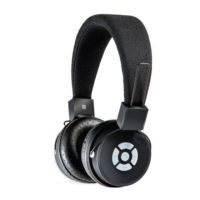
Bluetooth Stereo Headphone
with built-in Mic
INSTRUCTION MANUAL
PLEASE READ ALL INSTRUCTIONS CAREFULLY
AND RETAIN FOR FUTURE USE
Question and Answer IconNeed help?

Do you have a question about the SoundLogic XT BTSH-12/6335 and is the answer not in the manual?

Summary

Getting Started and Key Features

Package Contents

Lists all items included in the product packaging.

Key Features

Highlights the main functionalities and benefits of the Bluetooth headphone.

Safety Instructions

General Safety Precautions

Advises on avoiding hazards like heat, water, misuse, and damage to prevent injury.

Product Description

Parts Identification

Identifies and labels the various physical components and controls of the headphone.

Instructions for Use

Charging the Device

Explains the charging process, cable usage, and LED indicators for charging status.

Powering On;Off and Bluetooth Pairing

Guides on turning the device on/off and connecting it to other Bluetooth devices.

Functionality Summary

Music Playback Controls

Details button operations for music playback, volume adjustment, and track skipping.

Call Management Functions

Outlines functions for answering, ending calls, and redialing the last number.

Advanced Features and Maintenance

LED Indicators and Modes

Explains LED light behavior for charging and pairing status.

Alternative Listening Modes

Describes how to use the headphone via the AUX-In cable connection.

Usage Guidelines and Care

Provides important usage restrictions, cleaning, and maintenance recommendations.

Specifications and Compliance

Technical Specifications

Lists key technical details such as Bluetooth version, operating distance, and battery.

FCC Compliance Information

Explains FCC rules, regulatory compliance, and potential radio frequency interference.

Limited Warranty Information

Warranty Terms and Coverage

Details the warranty duration, what is covered, and items excluded from coverage.

Service and Repair Procedures

Provides contact information and steps for obtaining service or repairs.

Overview

This document describes the SoundLogic XT BTSH-12/6335 Bluetooth Stereo Headphone with built-in Mic, an audio device designed for wireless music streaming and hands-free calling.

Function Description:

The BTSH-12/6335 is a Bluetooth stereo headset equipped with a built-in microphone, allowing for hands-free communication with Bluetooth-enabled devices. It supports wireless music playback and can automatically connect to previously paired devices for convenience. The headphone is designed for comfortable wear with an adjustable headband.

Important Technical Specifications:

  • Bluetooth Specification: Bluetooth 3.0
  • Operating Distance: 33 Feet
  • Working Time (Music): Approximately 3 hours
  • Working Time (Talk): Approximately 3 hours
  • Charging Input Voltage: DC 5V
  • Charging Time: Approximately 2-3 hours
  • Speaker Output: 2x50mW
  • Built-In Battery: 240mAh

(Note: Battery life and charging time may vary based on usage and types of devices used.)

Usage Features:

Getting Started:

To begin, remove the product and all packaging from the box. It is recommended to retain all packaging. The package contents include the Bluetooth Headphone, a USB charging cable, a 3.5mm auxiliary cable, and an Instruction Manual.

Charging Instructions:

The headphone features a built-in rechargeable battery. Before initial use, fully charge the battery using the supplied USB cord. Connect the USB charging cable to a computer USB port and the Micro USB plug to the headphone's charging port. A red LED light indicates charging, which typically takes 2-3 hours. Once fully charged, the LED light will turn blue.

Turning On/Off:

Press and hold the MF (Multi-Function) button for 2-4 seconds to turn the device ON or OFF. An indication tone will sound.

Pairing with Bluetooth Devices:

  1. Ensure the device is off.
  2. Press and hold the MF button for 2-4 seconds to turn it on. The LED will flash blue rapidly, indicating pairing mode.
  3. Place the headphone and your Bluetooth device (phone or music device) within 3 feet of each other.
  4. Activate the Bluetooth function on your device and select "SL BT HDSET" from the list of available Bluetooth devices.
  5. If prompted, enter the password '0000' to confirm pairing.
  6. Upon successful pairing, a beep sound will be heard, and the LED will flash blue slowly.
  7. The device's pairing mode lasts for approximately 10 minutes; if no device is paired within this time, it will power off automatically.
  8. The headphone remembers previously paired devices and will automatically connect when switched on and in range, eliminating the need for re-pairing.
  9. To pair with a new device, follow the steps above.

Listening to Music:

Once paired, music will stream wirelessly through the Bluetooth Headphone.

  • Increase Volume: Long press the V+ button.
  • Decrease Volume: Long press the V- button.
  • Pause Music: Short press the MF button.
  • Restart Music (Play): Short press the MF button.
  • Previous Track: Short press the Previous Track (KK) button.
  • Next Track: Short press the Next Track (KK) button.

Making Calls (Bluetooth Mode):

  • Answer a Call: Press the MF button once during an incoming call.
  • End a Call: Short press the MF button after a conversation.
  • Increase Volume (During a Call): Long press the V+ button.
  • Decrease Volume (During a Call): Long press the V- button.
  • Redial Last Number: Short press the MF button twice while in standby mode and connected to a device. (Note: Not all mobile phones support all functions, and certain functions/tones may vary by phone.)

LED Indicator Statuses:

  • Red LED: Charging
  • Blue LED: Charging Completed
  • LED Flashes Blue Rapidly: Pairing mode

Listening to Music using AUX-In Mode:

  1. Insert the provided 3.5mm auxiliary cable into the Aux input of the headphone.
  2. Connect the other end of the cable to your audio device (e.g., computer, tablet).
  3. Select and play your desired song from the source device. (Note: In AUX-in mode, the headphone does not need to be turned on. Volume, play/pause, and track control are managed solely through the source device.)

Maintenance Features:

Do's and Don'ts:

  • Do not play music at excessive levels to prevent hearing damage and equipment issues.
  • Avoid using the unit outdoors in wet or damp conditions.
  • Keep the unit away from heat sources, direct sunlight, humidity, water, and other liquids.
  • Do not operate if exposed to water or moisture to prevent electric shock or damage.
  • Do not use if dropped or damaged.
  • Only qualified electricians should perform repairs.
  • Do not use with wet hands.
  • Do not insert objects into openings.
  • Keep free from dust and lint.
  • Use only for its intended purpose.
  • Keep out of reach of children; this product is not a toy.
  • Do not use the handset at excessive volume levels.

Care and Maintenance:

  • Do not expose the headphone to liquid, moisture, or humidity to protect internal circuits.
  • Do not use abrasive cleaning solvents.
  • Avoid extremely high or low temperatures, as this can shorten device life, destroy the battery, or distort plastic parts.
  • Do not dispose of the device in fire, as it may explode.
  • Avoid contact with sharp objects to prevent scratches and damage.
  • Do not drop the device, as internal circuits may be damaged.
  • Do not attempt to disassemble the device unless you are a professional, as it may cause damage.
  • If the device malfunctions, return it to the store of purchase for assistance.

FCC Instructions:

Changes or modifications not expressly approved by the responsible party could void the user's authority to operate the product. This device complies with Part 15 of the FCC Rules, meaning it will not cause harmful interference and must accept any interference received.

SoundLogic XT BTSH-12/6335 Specifications

General IconGeneral
BrandSoundLogic XT
ModelBTSH-12/6335
CategoryHeadphone
LanguageEnglish

Related product manuals