CD9220 / English Instruction Manual
1
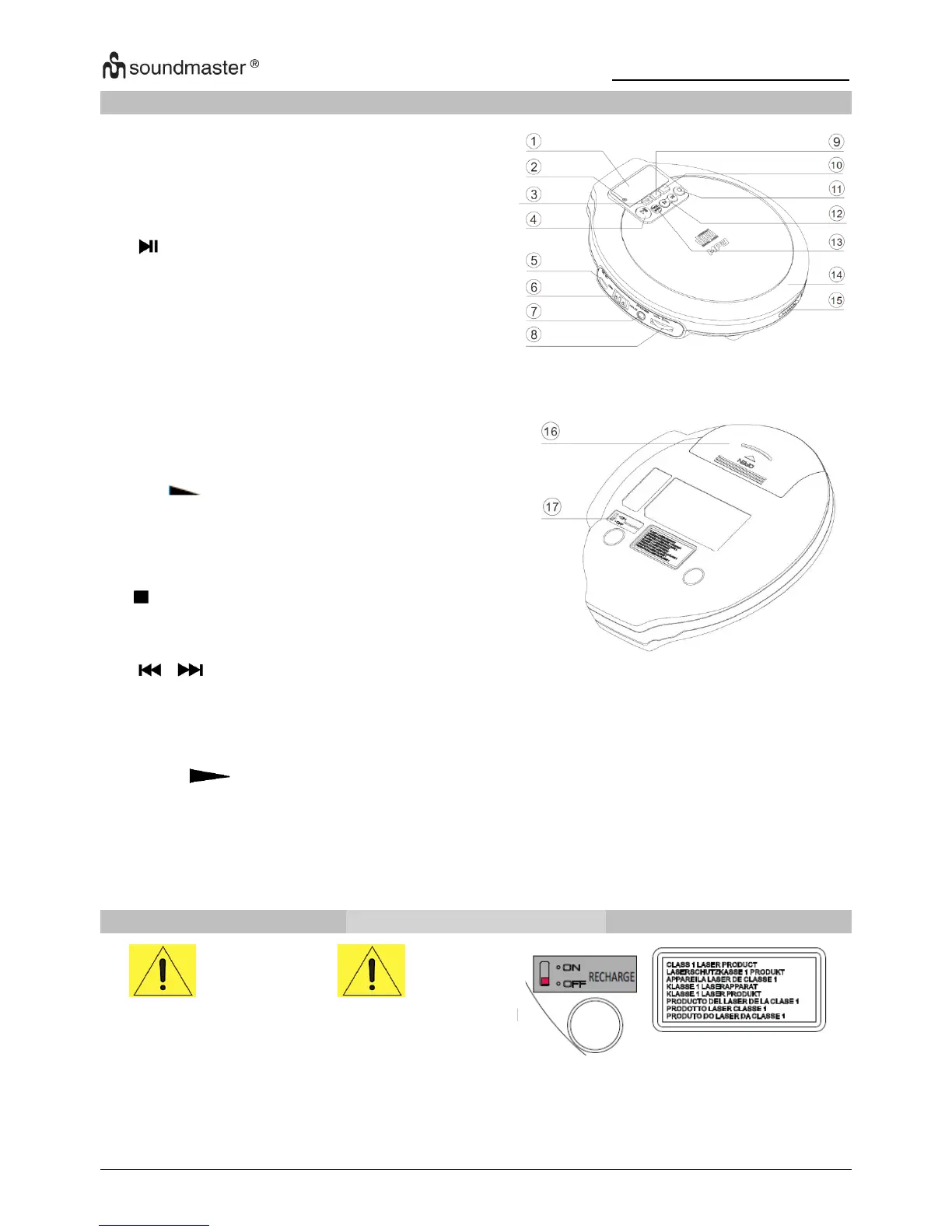
LOCATION OF CONTROLS
2. Battery charging indicator
Turns on/off ESP (Electronic
Skip Protection)
switches the player on, starts
or pauses playback.
jack for connecting external
power supply.
6. RESUME
HOLD
OFF Switch
Enable resume function
locks all buttons
switch off HOLD and
RESUME.
3.5mm headphone jack to
connect the headphones.
selects the bass enhancement
switch off Volume restriction
stop playback, clears a
program or switches the
player off
skips and searches backward or forward
PROG: program tracks, reviews the program.
MODE: selects the different playing possibilities: REPEAT and RANDOM
ON: when using adaptor, recharge the rechargeable batteries.
OFF: when using adaptor, switch off for standard/conventional batteries.
Attention
On operation with standard/conventional batteries, be sure
that the charging switch
“RECHARGE” (17) slide to OFF position.
Otherwise the batteries may become hot and may
explode.



 To Next Page