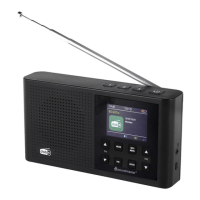
DAB165 / English Instruction Manual
3
• Signal strength / Error Rate: Shows the strength of the radio station.
• Audio info: The display shows the digital audio bit rate of the current reception.
• Date and weekday: The time and date are set automatically.
Under FM
• RT (Radio text): Text broadcasted from the FM station
• Station name
• Program Type: Show the program type of the radio station.
• Reception Frequency
• Date and weekday: The time and date are set automatically.
MENU OPTIONS
1. Press and hold the “INFO/MENU” button until the main menu is shown.
2. Choose with “CH / “ the desired menu point and press “ENTER” for confirm.
3. Select with “CH / “ the desired option and press “ENTER” for confirm.
Following menu points are available:
Shows the DAB station list
Select between “All Stations” or “Strong Stations only”
Starts the DAB station scan
Removes invalid station from the station list
Backlight level for ON mode and time setting to activate the Dim
mode
Manual Time / Date Adjustment
Possibility to select different kind of sound modes.
Language setting possibility
Set the unit back to Factory default
Shows the actual installed software version
The current version of the instruction manual can be downloaded from www.soundmaster.de
Technical changes and misprints reserved
Copyright by Woerlein GmbH, 90556 Cadolzburg, www.soundmaster.de
Duplication only with the express permission of Woerlein GmbH


 To Next Page