DAB950 / English Instruction Manual
2
REMOTE CONTROL
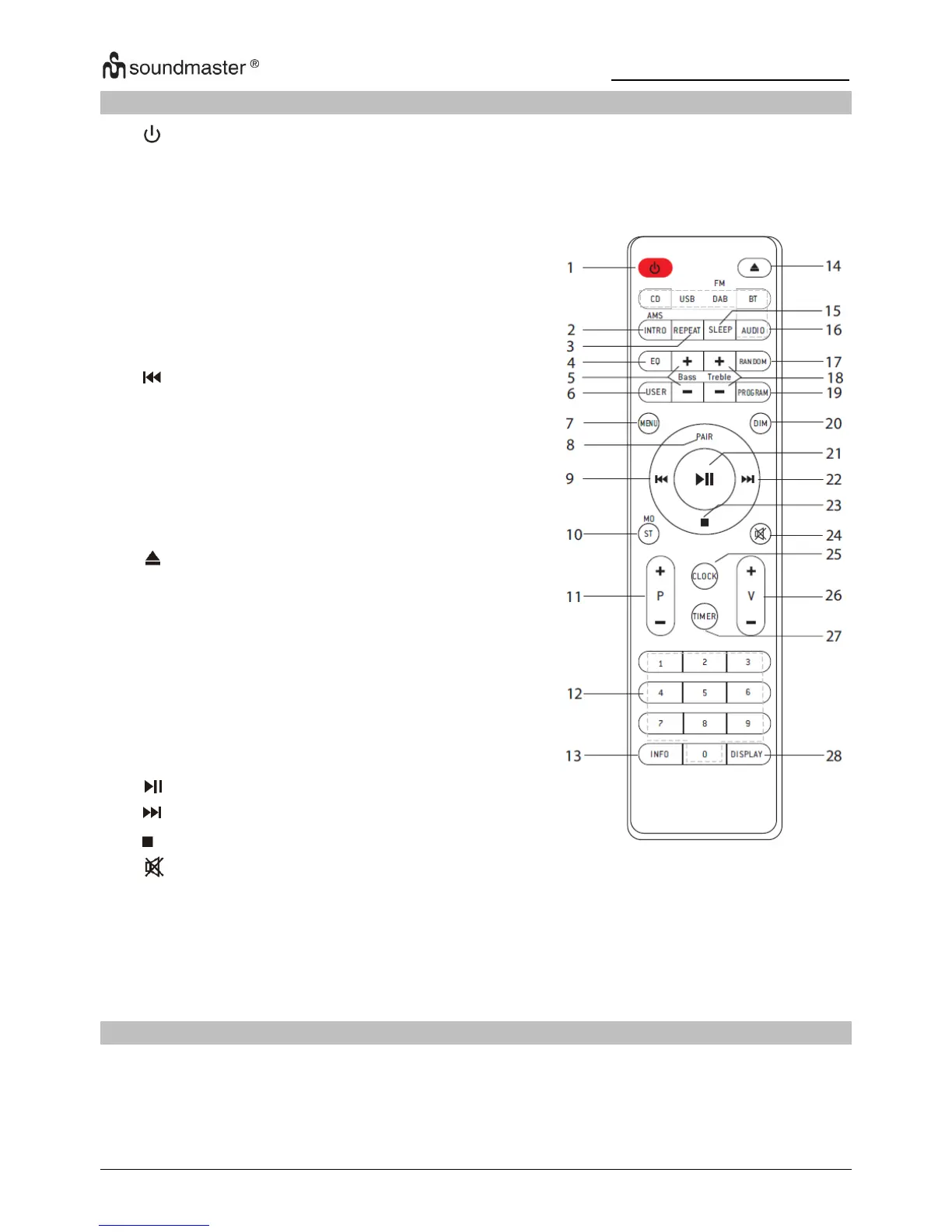
Start scanning tracks in CD/USB
Select Bass and Treble in USER
Mode
Display Menu in DAB and FM
Select mono or stereo mode
Select previous/next in FM and
DAB
Display information in
DAB/FM/CD/USB
Play randomly in CD and USB
Adjust Treble in USER Mode
Programme in CD, USB, DAB, FM
Select different levels of
brightness for the display screen
OPERATION YOUR REMOTE CONTROL
1. Press and slide the back cover to open the battery compartment of the remote control.
2. Insert two AAA size batteries. Make sure the (+) and (-) ends of the batteries match
the (+) and (-) ends indicated in the battery compartment
3. Close the battery compartment cover


 To Next Page