EasyManua.ls Logo

SOUNDMASTER KCD1600 - Location of Controls; Battery Installation

SOUNDMASTER KCD1600
5 pages
Print Icon
To Next Page IconTo Next Page
To Previous Page IconTo Previous Page
Loading...
KCD1600 / English Instruction Manual
1
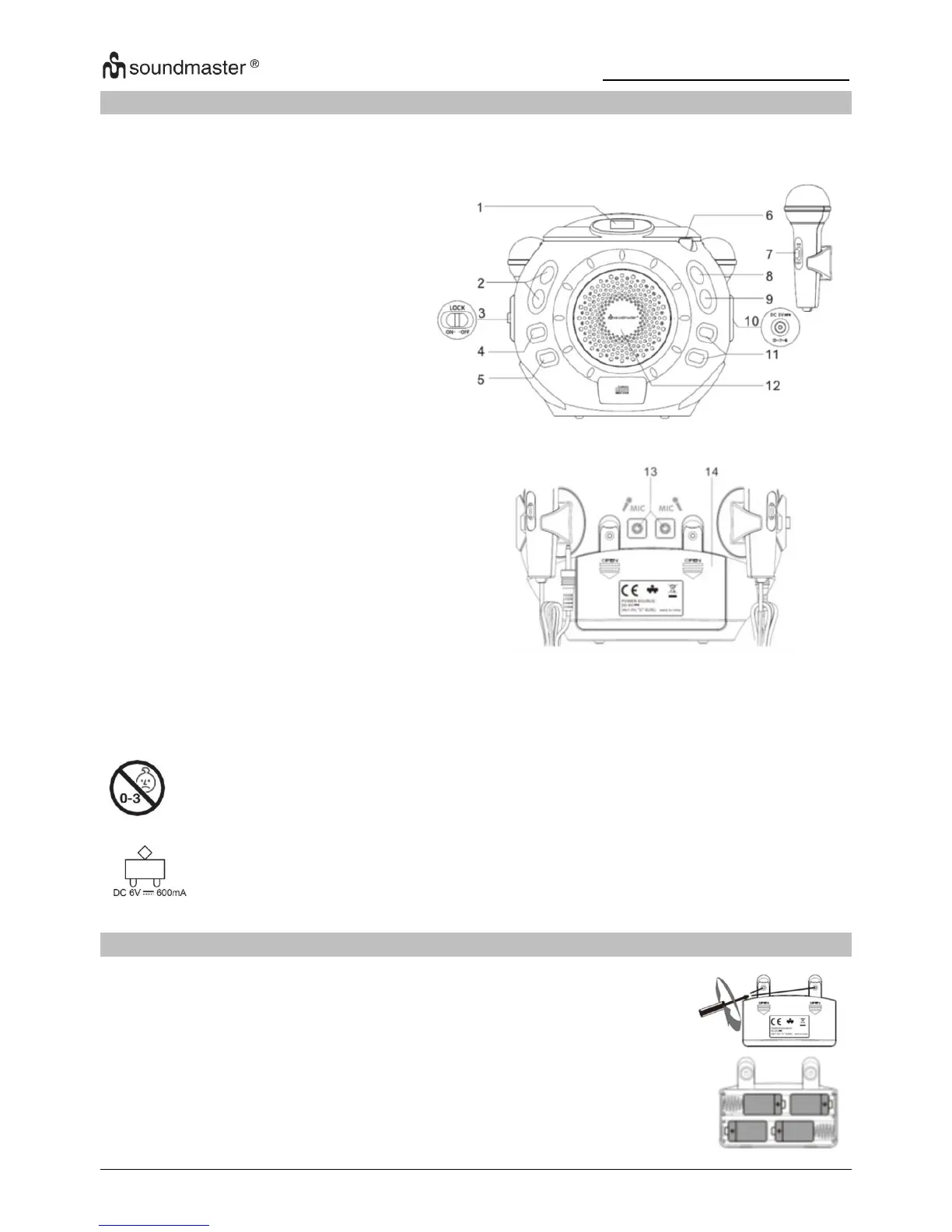
LOCATION OF CONTROLS
FRONT VIEW
BOTTOM VIEW
13
Mic jack
14
Battery compartment
WARNING: Not suitable for children under 3 years due to small parts, choking
hazard and Strangulation Hazard.
Use remommended type and rating of external transformer only.
BATTERY INSTALLATION
1. Open the battery compartment: Loosen the screw on the cover of
battery compartment with a screwdriver and remove the cover.
2. Insert 4 x “C” Size (UM2 / LR14 1.5V) type batteries (not included).
Make sure that you follow the polarity markings inside the
compartment!
3. Close the battery compartment and tighten the screw.

1
LED display
2
VOLUME UP / DOWN
3
Lock function switch
4
STANDBY / ON button
5
MODE button
6
CD door open
7
MICROPHONE ON / OFF
8
PLAY / PAUSE button
9
STOP button
10
DC jack
11
SKIP button
12
Speaker

Other manuals for SOUNDMASTER KCD1600

Related product manuals