2.
2.
2.
2. PREPARATION
PREPARATION
PREPARATION
PREPARATION BEFORE
BEFORE
BEFORE
BEFORE PLAY
PLAY
PLAY
PLAY .
2.1 Accessory: (check if the following accessories are complete after unwrapping the box).
2.2 Install the battery of the remote controller.
Press down on the compartment cover, and slide to remove the cover.
Place the two batteries (UM4), (AAA), (LR03) batteries in the remote control according to the
polarity markings ("+" and "-") inside the compartment.
Place the cover over the compartment, press down lightly, and push it upward until it snaps on.
II.
II.
II.
II. BRIEFS
BRIEFS
BRIEFS
BRIEFS OF
OF
OF
OF CONTROL
CONTROL
CONTROL
CONTROL KEYS.
KEYS.
KEYS.
KEYS.
1.
1.
1.
1. IDENTIFICATION
IDENTIFICATION
IDENTIFICATION
IDENTIFICATION OF
OF
OF
OF CONTROLS
CONTROLS
CONTROLS
CONTROLS
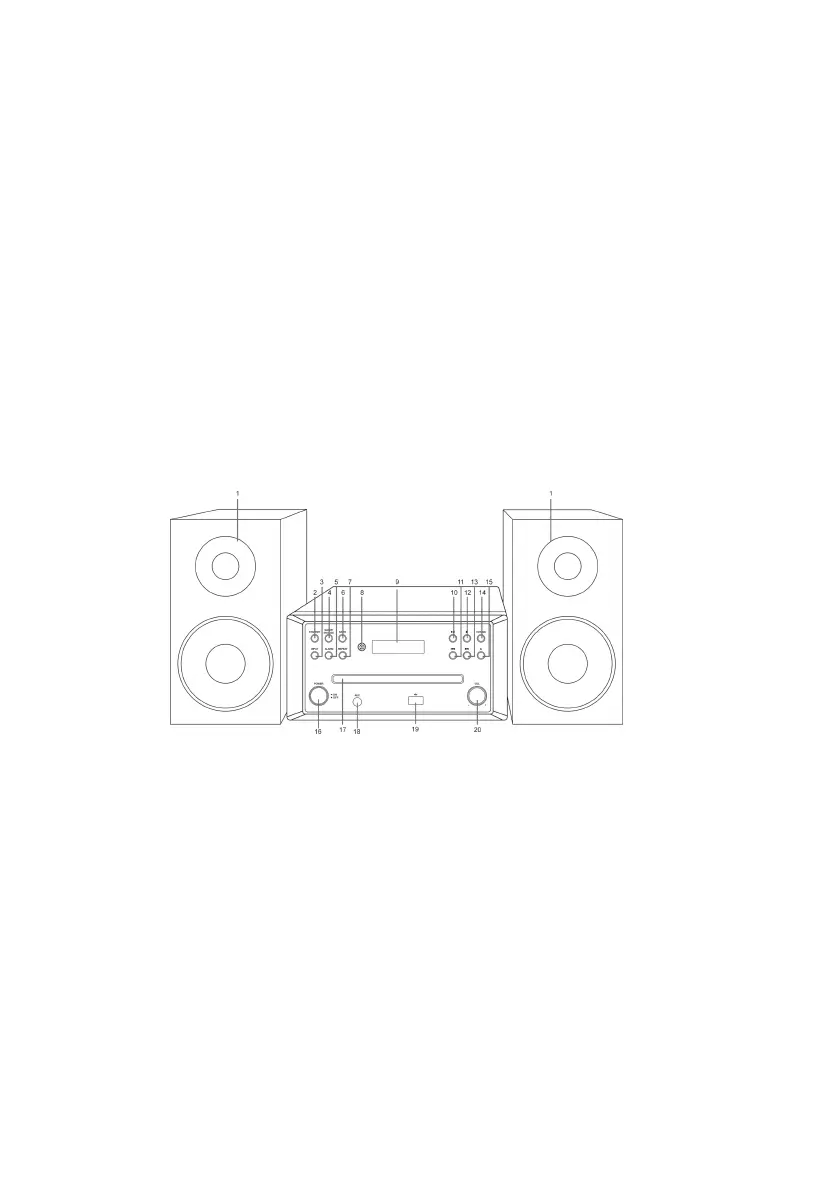
Front view
1 X REMOTE CONTROL
1 X MANUAL
1 x FM PIG TAIL ANETNNA
11.
Previous track button
12. Stop button
13. Next track button
14. CD/USB button
15. Open/Close button
16. Power switch button
17. CD drawer
18. AUX socket
19. USB socket
20. Volume-/+ control
2
1. Speaker
2. Standby button
3. INPUT button
4. SLEEP/SNOOZE button
5. ALARM button
6. MUTE button
7. REPEAT button
8. Remote receiving window
9. LCD display
10. Play/Pause button















 To Next Page