ENGLISH
ENG 7
3. To confirm, briefly press the RECORD button once. ‘DEL’ will appear steadily in the
Display for few seconds and then the Display will resume to USB/Card playback stop
mode with the total track number deducted by 1.
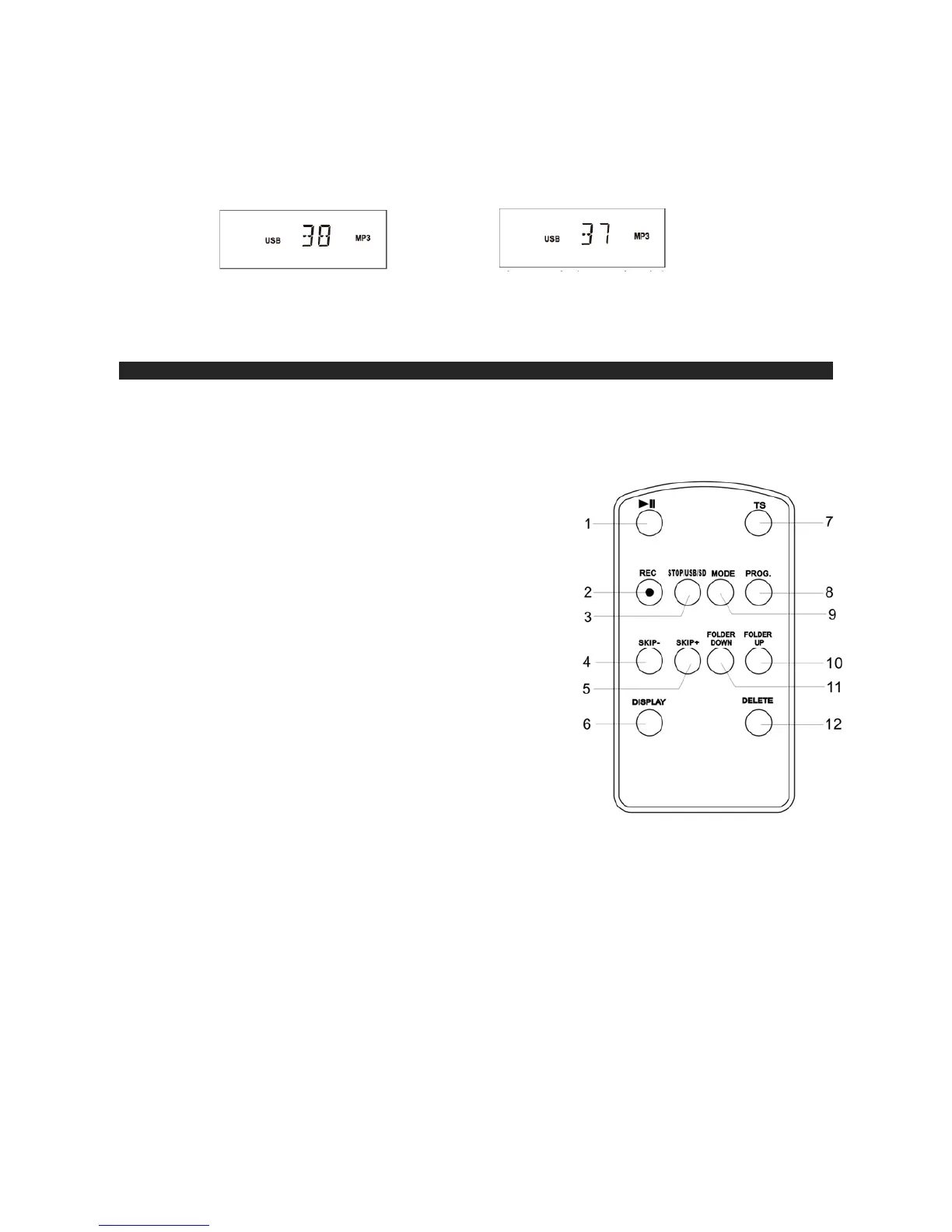
Original 38 Files After Deleting Track 5
4. Repeat 1-3 above to delete more tracks as desired.
Bass boost OPERATION
To enhance the low frequency sound, press the BASS BOOST BUTTON (13) once (button in) to
activate. Press the BASS BOOST Button (13) again (button out) to turn the Bass Boost off.
Note: Please refer to the ON/OFF graphic on the Front Panel for correct operation of the Bass Boost
function
REMOTE CONTROL UNIT
1. PLAY/PAUSE BUTTON
2. RECORD BUTTON
3. STOP/USB/SD BUTTON
4. SKIP- BUTTON
5. SKIP+ BUTTON
6. DISPLAY BUTTON
7. TS BUTTON (TRACK seperation for split next song)
8. PROG BUTTON
9. MODE BUTTON (Repeat 1,Repeat Album, Repeat
All ,Intro,Random)
10. FOLDER UP BUTTON
11. FOLDER DOWN BUTTON
12. DELETE BUTTON
TS BUTTON (Track seperation, press it for split next song)
IT IS HELPFUL WHEN RECORDING A VINYL TO USB OR SD, MMC. PRESS ONCE THE TS
BUTTON WHEN FINISHED A SONG, IT GENERATE A NEW FILE FOR ANOTHER SONG, BUT
IT TAKES AROUND 6 – 10 SECONDS TO READ THE USB OR SD/MMC. IT SHOULD TAKE
NOT THAT MAY NOT BE RECORD COMPLETED SONG.
ACTIVATING THE REMOTE CONTROL
Remove the plastic insulator tag sticking out of the Battery Compartment of the Remote Control by
pulling on it. Once the tag is removed, the Remote Control will be ready for use.












 To Next Page