ENGLISH
CONTROL LOCATION
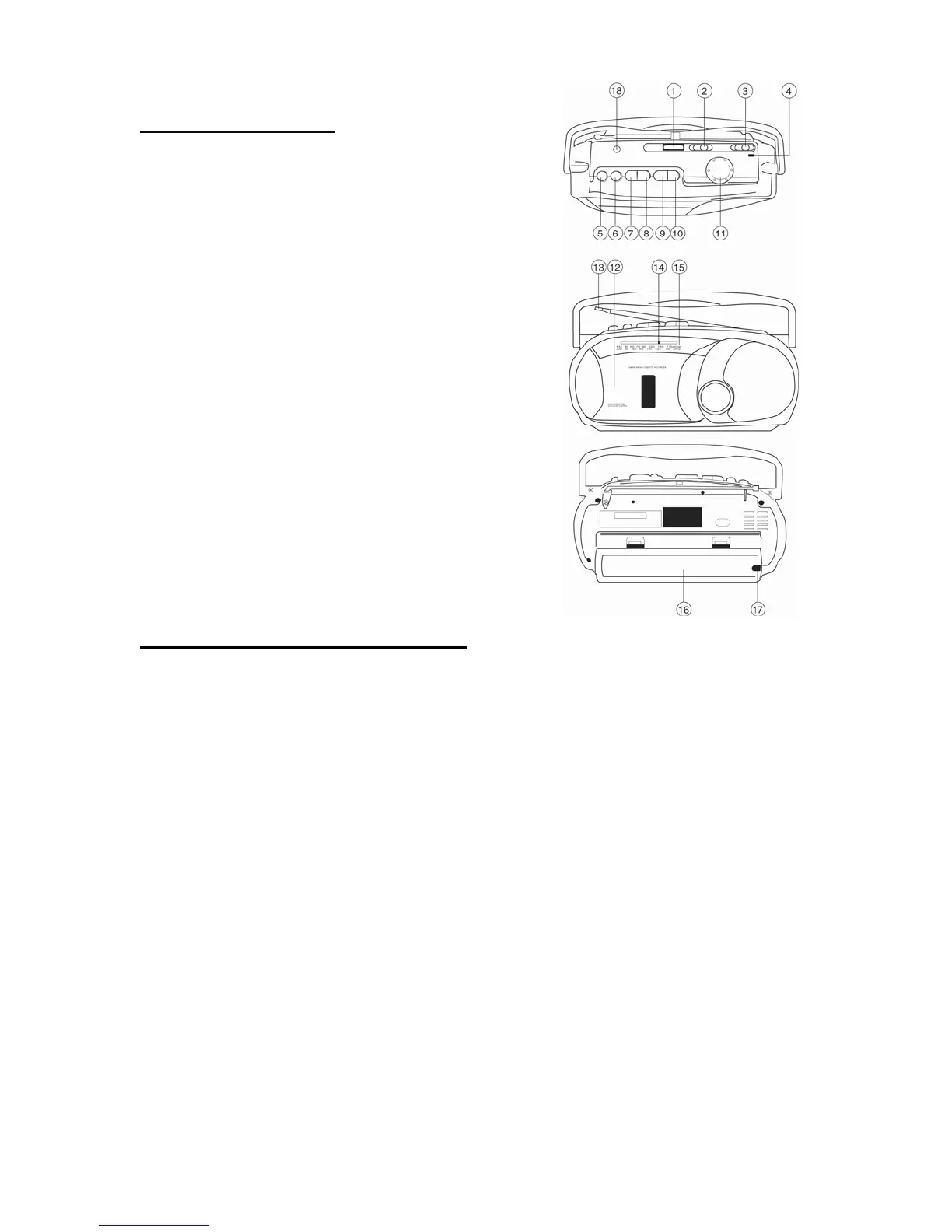
1. Volume Control
2. Function Switch
3. Band Selector
4. Built-in Condenser Microphone
5. Pause Button
6. Stop/Eject Button
7. Fast Forward Button
8. Rewind Button
9. Play Button
10. Record Button
11. Tuning Knob
12. Cassette Door
13. FM Telescopic Antenna
14. Dial Pointer
15. Dial Scale
16. Battery Compartment
17. AC Power Cord Socket
18. Headphone Jack
POWER SUPPLY AND CONNECTION
BATTERY OPERATION
- Set the FUNCTION switch (2) to the TAPE position.
- Remove the battery compartment cover. (16)
- Insert four D-size batteries.
- Replace the battery compartment cover. (16)
Note:
- Check your batteries regularly. Old or exhausted batteries should be replaced.
- If the unit is not going to be used for a long period of time or is being run
exclusively on an AC power supply, remove the batteries to avoid leaking and
damage to the unit.
AC OPERATION
- Plug the Power Cord into an AC outlet.
Note:
- This radio cannot be operated by batteries if the AC power cord is connected to
the unit.
ENG 1



 To Next Page