ENGLISH
ANTENNA
DO NOT CONNECT FM ANTENNA TO AN EXTERNAL ANTENNA
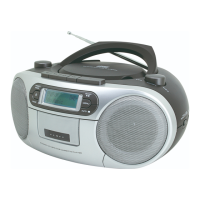
- For FM reception, pull out the telescopic antenna (13). To improve reception,
incline and turn the antenna (13).
- Reduce its length if the FM signal is too strong (very close to a transmitter).
- For AM reception, the signals are picked up through the built-in ferrite antenna.
- Rotate the radio itself to receive an optimum reception.
CASSETTE RECORDER
CONTROLS
- STOP/EJECT button(6)
During operation, depress to stop all deck operation. Press again to open the
cassette door.
- FAST FORWARD button(7) and REWIND button(8)
Press to rapidly advance the tape in either forward or reverse direction.
- PLAY button(9)
Press to start playback.
- PAUSE button(5)
Press to stop tape operation temporarily. Press again to resume tape operation.
- RECORD button(10)
Press to start recording. PLAY button(9) will be activated automatically.
INSERTION AND REMOVAL OF CASSETTE TAPE
- Press the STOP/EJECT button (6) to open the cassette door.
- Insert a cassette into the holding position on the inside of the cassette door, with
the exposed section upward (playback side facing you).
- Close the cassette door securely before starting.
- When finished, press the STOP/EJECT button (6) to open the cassette door and
remove your cassette tape.
CASSETTE PLAYBACK
- Set the FUNCTION switch (2) to the TAPE position.
- Press the STOP/EJECT button (6).
- Insert a pre-recorded tape into the cassette compartment.
- Close the door gently.
- Press the PLAY button (9) to activate playback.
- Adjust the VOLUME control (1) to the desired sound level.
- Press the STOP/EJECT button (6) when finished.
ENG 3


 To Next Page
 Loading...