FEATURES
AND
CONTROLS
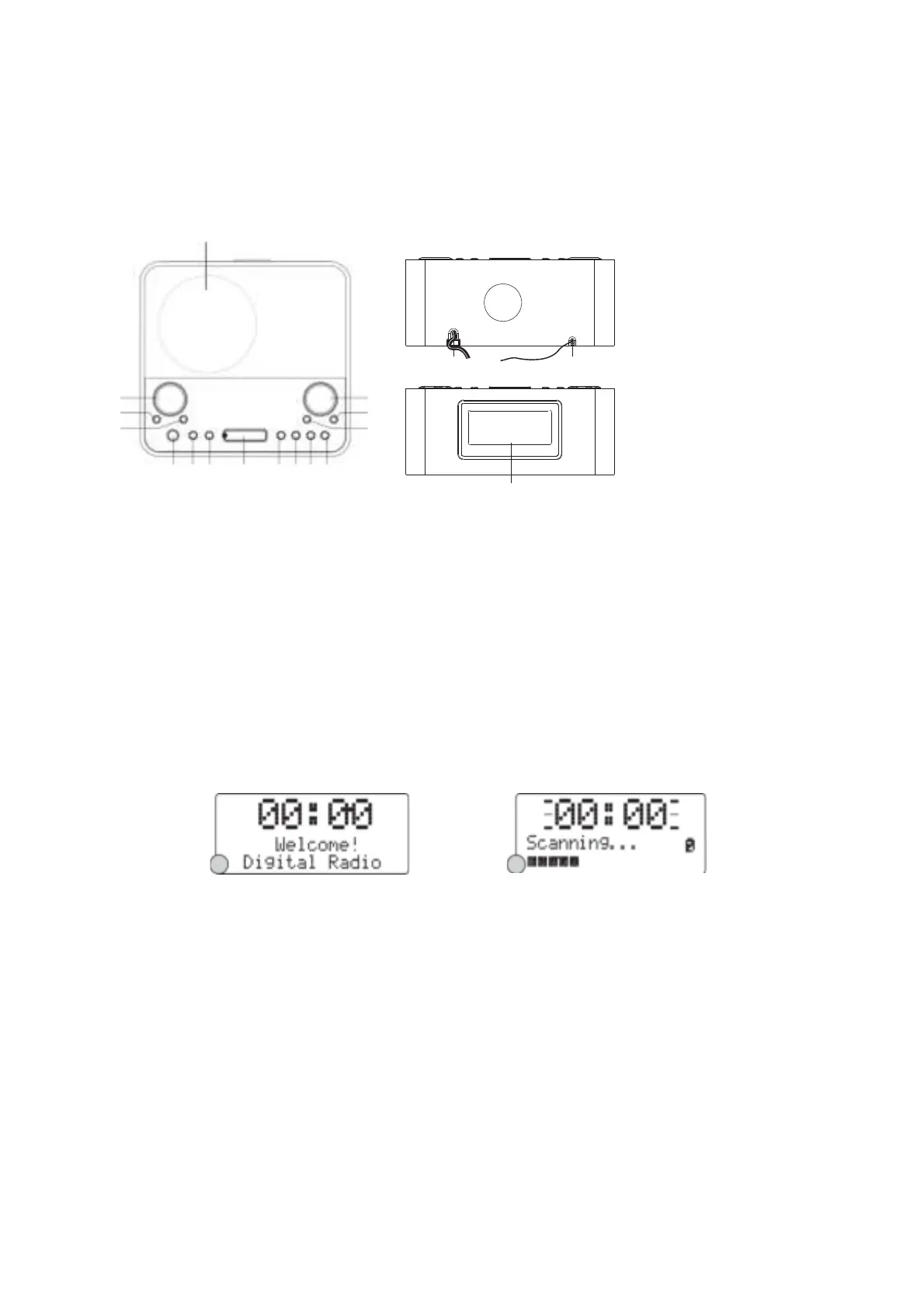
FEATURES AND CONTROLS
1. SPEAKER
1
2. SCROLL BUTTON
3. MEMORY BUTTON
4. SELECT BUTTON
5. STANDBY/ON BUTTON
6.
7.
MODE BUTTON
BACKLIGHT BUTTON
8. SNOOZE BUTTON
9. INFO BUTTON
2
3
4
5 6 7 8 9 10 11 12
17
18
15
14
13
16
10. MENU BUTTON
11. SLEEP BUTTON
12. MUTE BUTTON
13. ALARM 1 BUTTON
14. ALARM 2 BUTTON
15. VOLUME BUTTON
16. LCD DISPLAY
17. AC CORD
18
.
WIRE ANTENNA
LISTENING
TO
YOUR
RADIO
Hints for better
reception
This radio carries a single DAB/FM lead wire antenna, to obtain the best performance, you should fully
extend the wire antenna and adjust the position as well as the direction until you find the best reception.
For ideal DAB reception, always maintain the lead wire antenna in a vertical position (holding it upward or
downward behind the unit) is highly recommended.
Getting
started
When the radio is connected to the AC power for the first time, it will be in standby mode. The display
backlight will be on for a few seconds and the clock will be finally displayed. Press the STANDBY/ON
button once to turn the radio on, it will then automatically enter into the DAB mode and perform auto scan
function. During the scan the display will show ³6FDQQLQg «´ together with a slide bar that indicates the
progress of the scan and the amount of stations that have been found so far. (F. 1) (F. 2)
Once the scan has finished, the radio will select the first alphanumerically found station. You can now
press the Ÿ or ź button to explore the found stations and then press the SELECT button to select your
station.
F1
F2
Note: If there is no stations found after auto scan, the radio will then enter into the Tune Select Menu, you
can now press the Ÿ / ź buttons followed by pressing the SELECT button to select ³0DQXDl tune´ or
³$XWRVFDQ´ for stations.
Clock
setting
The clock will only set and be updated if you can receive DAB signals in your location. In order for the
clock to synchronise to the current local time, you must leave it one DAB station for a short period. Manual
clock setting is not required.
DAB auto
scan
The auto scan will search for the entire DAB Band III channels. After the scan has finished, the first
alphanumerically found station will be automatically selected.
1. To activate auto scan, first press the MENU button to enter into the Tune Select Menu and then press
the Ÿ or ź button to select ³$XWRVFDQ´, finally press the SELECT button to confirm, the display will
show ³6FDQQLQg «´ and a progressing slide bar.(F. 3)
2. All the stations that have been found will be stored automatically, to explore the stations that have
been found, press the Ÿ or ź buttons and when you find a station that you would like to listen to,


 To Next Page