UR2045 / English Instruction Manual
1
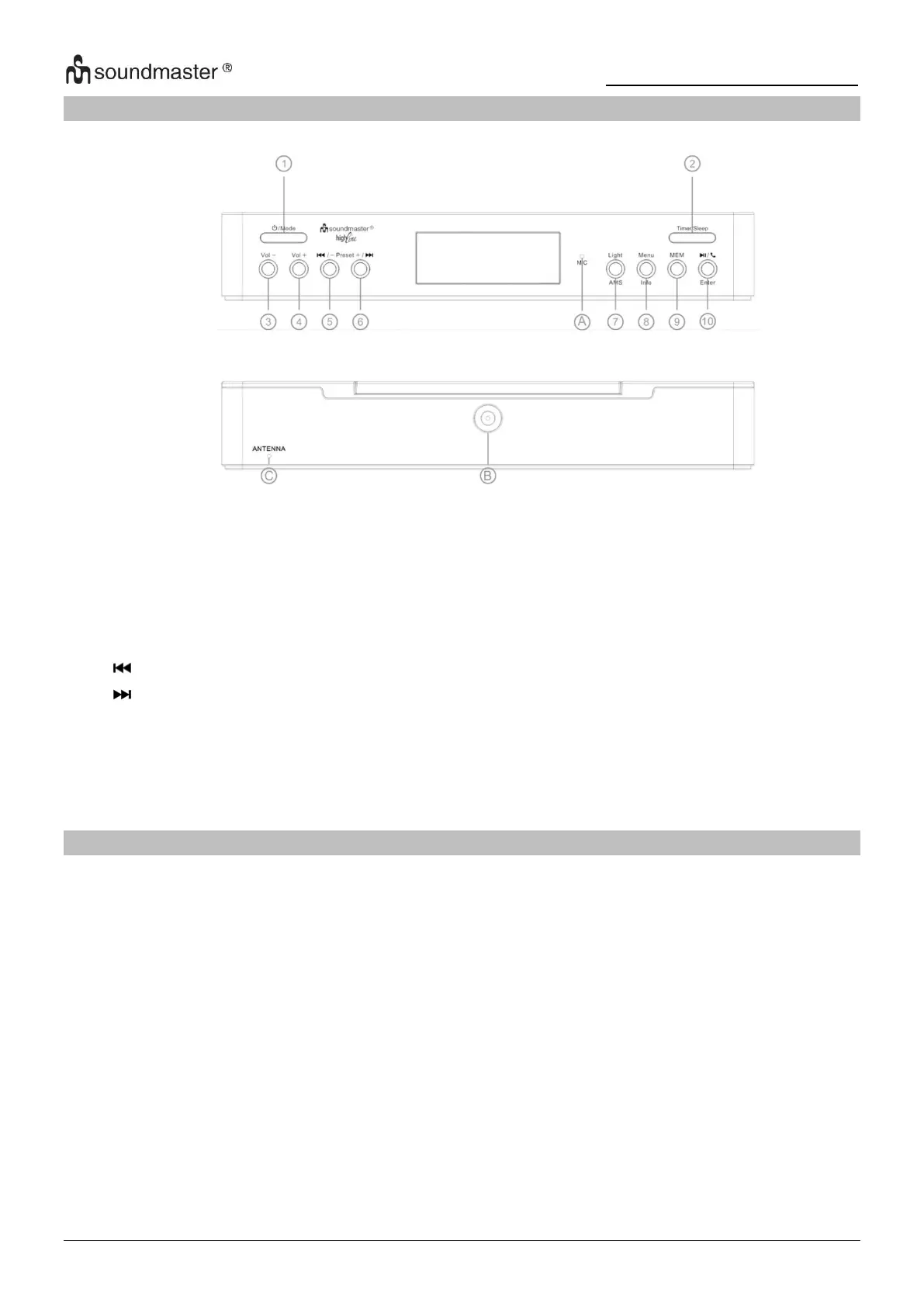
LOCATION OF CONTROLS
INSTALLATION
CONTENT OF DELIVERY
➢ Mounting kit incl. mounting template sheet
POWER SUPPLY
➢ Use only the supplied AC adaptor!
➢ Ensure that the voltage is the same as that indicated on the ac adapter identification plate.
➢ Connect the supplied AC adapter to a properly installed safety power socket and the plug of
the cable into the DC IN jack at the back side of the unit.
➢ Please extend the wire antenna completely and fix it vertical.
Whenever the unit is powered on the first time or the after a reconnection to the power supply,
the automatic update function will start automatically and the display show “UPDATE“. Press
any key to terminate it.
Power On/Off / Mode selection
LED light On/Off / AMS (Automatic
Cooking timer / Sleep timer
/ Station search down / Preset -
Play/Pause / Call pick up/hand up
/ Station search up / Preset +
Built-in microphone for phone











 To Next Page