1.800.338.7337 / www.soundoffsignal.com
ETSA48(x)CSX 0119
SLIDE SWITCH SETTINGS:
1. Press and hold Auxiliary Push-Button “1” and “4” until slide
switch #2 indicator LED ashes.
2. Press Auxiliary Push-Button “1”, “2” or “3” depending on
which conguration for the slide switch is required.
HIGH
LOW 2
65
3
7
4
Setting PA Volume:
1. Press and Hold Auxiliary Push-Button “1” and “2” until slide switch
#2 and #3 indicator LED ashes.
2. Depress and hold PA switch on microphone and press Push-Button
“1”-“8” depending on volume required. When correct
volume is determined, press Radio Rebroadcast and the
volume setting will be permanently stored.
ALTERNATE MODES:
1. Press and Hold Auxiliary Push-Button “2” and “6” until Slide
Switch indicator #1 and #2 LED ashes.
1. Alternate Horn Ring control: Custom operation of vehicle
horn when pressed. Refer to gure below for details.
ON = Enabled
OFF = Disabled
2. Alternate Horn Ring control option: (Alternate Horn Ring
Control must be enabled). Custom operation of vehicle
horn when pressed. Refer to gure below for details.
ON = Option 2
OFF = Option 1
ALTERNATE HORN RING CONTROL
OPTION 1 OPTION 2
STANDBY OEM HORN OEM HORN
LEVEL 1 OEM HORN OEM HORN
LEVEL 2 Air Horn or Wail
Button Tone while
Pressed *
Tap to Turn On Warning Tone,
Tap again to Change Warning
Tone. Press and Hold for Air
Horn Tone
LEVEL 3 Tap to turn ON
Warning Tone, Tap
again to change
Warning Tone. Press
and Hold for Air Horn
Tone
TONE
SWITCH OFF:
Air Horn Tone
or Wail Button
Tone while
Pressed *
TONE
SWITCH ON:
Tap to change
Warning Tone,
Press and Hold
for Air Horn
Tone
BACKLIGHT INTENSITY:
While pressing RADIO REBROADCAST BUTTON,
press Auxiliary Push-Button “1”-”8” to adjust backlight intensity.
“1” = Lowest intensity, “8” = Highest intensity.
Backlight must be enabled by the Gray wire on CN6.
3. Gun Lock Security:
ON = Operator must press Standby button
within 1 second after pressing 8
second time delay button to active
switch
OFF = 8 second time delay switch is
activated immediately when
pressed
6. Disable Relay Error for AUX 7 & 8:
ON = Disable fault detect indication for
Aux relays 7& 8.
OFF = Fault detect normal.
7
SLIDE SWITCH SETTINGS
MODE
RELAY
OUTPUT
#1
RELAY
OUTPUT
#2
RELAY
OUTPUT
#3
SLIDE
SWITCH
POSITION
1
AUXILIARY PUSH-BUTTON 1
IS SELECTED
1
2
3
2
AUXILIARY PUSH-BUTTON 2
IS SELECTED
1
2
3
3
AUXILIARY PUSH-BUTTON 3
IS SELECTED
1
2
3
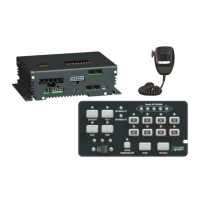
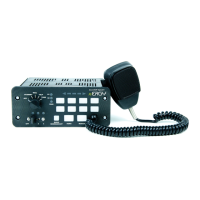
CONTROL PANEL
PSRN4CTRL2
PSRN4CTRL3
PROGRAMMING MANUAL
* Set in “Other Modes” 6. Horn Ring Standby Tone
7. Slide Switch Enabled Without Ignition: After ignition is turned off,
device will stay on in lower power mode and allow (ONLY the
slider to operate).
ON = With ignition off, slider relays will
still turn on if slider is in position
1, 2, or 3. Device will turn off if no
ignition after 18 hours, or if battery
is below 10.5V after 2 hours.
OFF =Device turns off normally, sliders
will not work when off.
8. Invert Backlight Color: Swap the background and active
colors of buttons.
ON = Backlight color is green, active is
red.
OFF = Backlight color is red, active is
green.
OTHER MODES:
1. Press and Hold Auxiliary Button “1” and “5” until slide switch
#1 and #3 indicator LED ashes.
1. Horn Ring Activation: Determines when pressing the Vehicle
Horn will activate siren tone
ON = Enabled whenever siren is ON
OFF = Enabled only when slide switch
is in level position 3
2. Buzzer: Audible tone from control panel whenever operator
presses push-button or changes position of slide/rotary
switch
ON = Buzzer enabled
OFF = Buzzer disabled
3. Speakers Diag LED disable: Disabling Diagnostic LED does
not turn off secondary speaker channel
ON enable Diagnostic LED (200W)
OFF disable Diagnostic LED (100W)
4. Horn Ring Latch Mode: (Alternate Horn Ring Control Must
be Disabled) Activates the siren tone per scroll mode off
settings when operator momentarily presses on Vehicle
Horn. *Wail Only. Only works when tone is already
active. (See Horn Ring Table).
ON = Horn ring Toggle Switch Mode
OFF = Horn ring Momentary Switch
Mode


 To Next Page
 Loading...