GND: Connect to Vehicle Chassis (-)
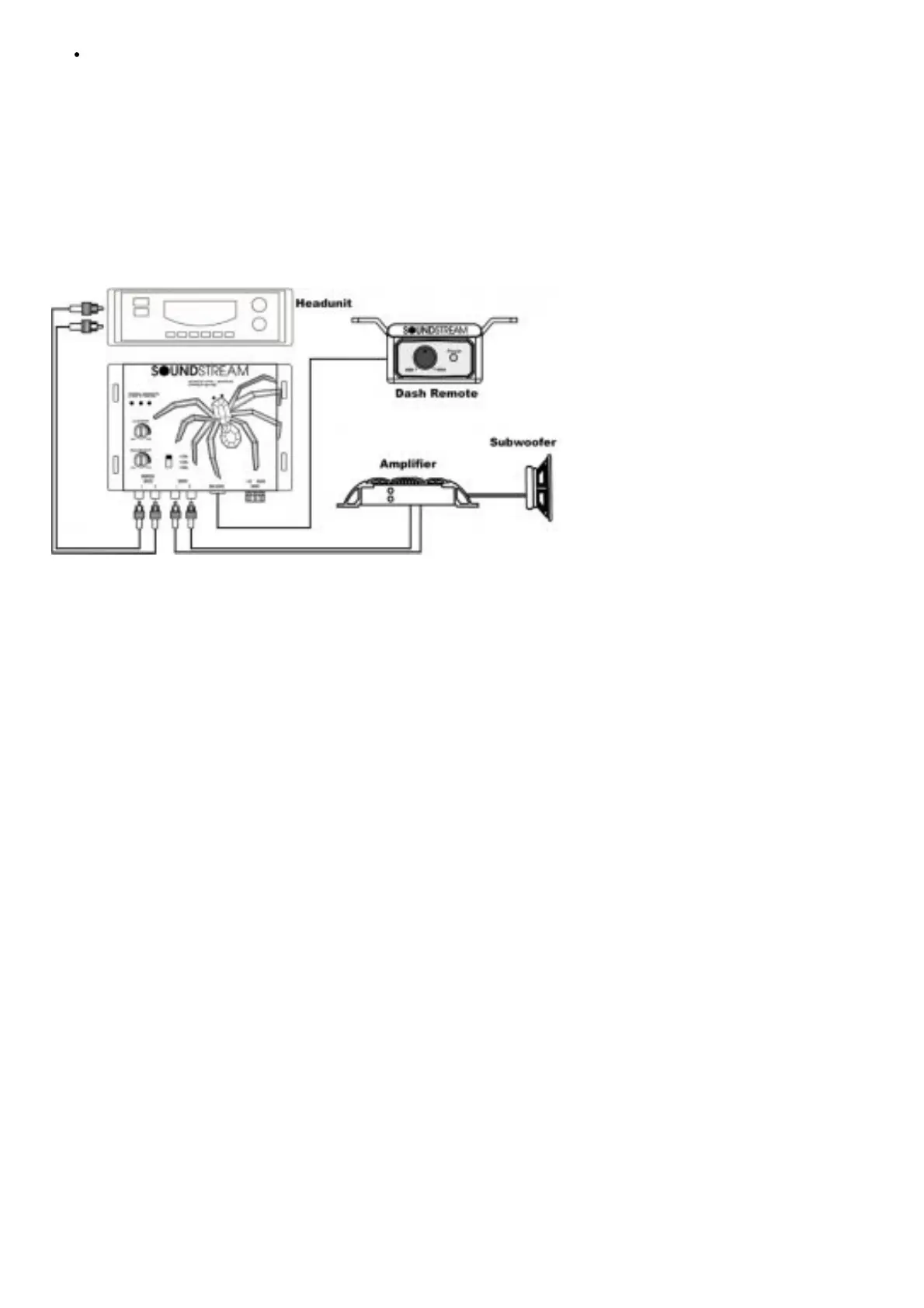
RCA Connection
Balanced Input – Connect your Low-Level signal from your vehicle’s source unit or input converter if you are not
using an aftermarket radio. Designed to handle extreme signals!
Output – This should be connected to your bass amplifiers; this kit does not come with any RCA’s cables. Make sure
and measure and purchase separately to complete the installation
Dash Remote – This is your knob, wait… you know what we mean?! Connect provide dash level controller and
provided cable to install somewhere in drivers reach for adjustments
Picture to help illustrate input and outputs
Setting the Bass Output Control
The BX is a powerful bass component. This device is equipped with several different Bass Output selections. If you
should need to change the settings, please use the chart below for guidance. It is recommended: listen using the
factory setting before changing your Bass Output settings.
Settings Amplifier Input Voltage Minimum Speaker Size
2.5 Volts 3V or Less 8” Subwoofers
5.0 Volts 5V or Less 10” Subwoofers
7.5 Volts 7V or Less 12” Subwoofers
10 Volts OH MY GOSH!!!!!!!! SPL Type Subwoofers
Product Specifications



 To Next Page