This document serves as a user manual for the Soundstream VCD-22B, a 2-Din car AM/FM radio, CD/MP3 player with USB and SD card inputs, and Bluetooth functionality. It provides comprehensive instructions for installation, general operation, radio functions, disc/USB/micro SD card playback, auxiliary input, Bluetooth operation, remote control usage, and troubleshooting.
Function Description
The Soundstream VCD-22B is a versatile car audio system designed to provide a wide range of entertainment options. Its core functions include:
- AM/FM Radio: Allows users to tune into radio stations across both AM and FM bands. It supports both USA and Europe frequency ranges, with options for manual tuning, auto seek tuning, and storing/recalling preset stations. Features like Automatic Store Station (AMS) and Local/DX mode enhance radio reception and station management. Stereo/Mono mode selection is also available for optimizing sound quality in varying signal conditions.
- CD/MP3 Player: Capable of playing audio CDs and MP3/WMA files from discs. It supports standard playback controls such as play/pause, next/previous track, fast forward/backward, introduction scan, repeat, and random play.
- USB/Micro SD Card Playback: Extends media playback capabilities to USB flash drives and micro SD cards, allowing users to enjoy MP3/WMA files stored on these devices. Similar to CD playback, it offers comprehensive control over tracks and supports track/folder navigation, including jumping forward/backward by 10 tracks and navigating through folders.
- Bluetooth Connectivity: Enables wireless audio streaming (A2DP) and hands-free calling (HFP) with Bluetooth-enabled mobile phones. Users can pair and connect their phones, make and receive calls, redial the last number, reject calls, and end calls. It also allows switching audio between the car audio system and the mobile phone, and adjusting talk volume.
- Auxiliary Input (AUX IN): Provides a 3.5mm jack for connecting external audio devices, such as MP3 players, allowing their audio output to be played through the car's sound system.
- Built-in Microphone: Integrated for hands-free calling, ensuring clear voice transmission during conversations.
Usage Features
The VCD-22B offers a user-friendly interface with various controls on the front panel and a remote control for convenient operation.
General Operation:
- Power On/Off: The unit can be turned on by pressing any button and turned off by pressing and holding the power button.
- Volume Adjustment: A rotary VOL knob on the front panel and VOL+/VOL- buttons on the remote control allow for precise volume control.
- Menu Options (SEL): The SEL button cycles through various adjustable audio functions, including BASS, TREBLE, BALANCE, FADER, EQ presets (OFF, FLAT, POP, ROCK, CLASS), LOUD ON/OFF, 7-color changing illumination, DX/LOCAL, STEREO/MONO, VOL LAS/ADJ, AREA EU/US, CLOCK 12/24, and BEEP ON/OFF. The VOL knob or VOL+/VOL- buttons are used to adjust the selected item.
- Clock Setting (CLK): The CLK button displays and sets the clock time, with separate adjustments for hours and minutes.
- Source Change (MODE): The MODE button allows switching between different input sources: RADIO, BT (Bluetooth), DISC, USB, CARD, and AUX-IN.
- Mute Function: A MUTE button on the front panel and remote control allows for quick muting and unmuting of audio.
- Loudness: The LOUD button on the remote control enhances bass frequencies for a fuller sound.
- Equalizer Presets (EQ): The EQ button on the front panel and remote control cycles through predefined equalizer settings.
- Display: An LCD display provides visual feedback on current settings, track information, radio frequency, and call details.
- Illumination: The unit features a 7-color changing illumination feature, allowing users to select a fixed color, a color fade, or an auto-changing color mode for the display.
Radio Operation:
- Band Selection (BAND): The BAND button switches between FM1, FM2, FM3, AM1, and AM2 bands, each capable of storing six preset stations.
- Tuning: Manual tuning allows step-by-step frequency adjustment, while auto seek tuning automatically finds the next/previous available station.
- Preset Stations: Stations can be stored by pressing and holding a preset button (1-6) and recalled by a brief press.
- Automatic Store Station (AMS): This function automatically scans and stores the six strongest stations in the current band.
Disc/USB/Micro SD Card Operation:
- Media Insertion: Discs are inserted label-side up into the disc slot. USB devices are inserted into the USB port, and micro SD cards into the micro SD card slot. Playback begins automatically upon insertion.
- Eject Function: An eject button (▲) is used to remove discs. USB devices and micro SD cards are removed after stopping playback.
- Playback Controls: Standard controls include play/pause (►II), next/previous track (►►I/I◄◄), fast forward/backward (►►/◄◄), introduction scan (INT), repeat (RPT), and random play (RDM).
- Track/Folder Navigation: Dedicated buttons (5/-10 and 6/+10) allow for jumping 10 tracks forward or backward. For MP3 discs, USB, or SD cards, these buttons also enable navigation through folders.
- MP3 File Search: The AMS button provides three search modes: NUM SCH (by serial number), DIR SCH (by folder serial number), and FILE SCH (by track or file name), allowing users to quickly locate specific files.
Bluetooth Operation:
- Pairing and Connection: The unit pairs with mobile phones by enabling BT mode on the phone and selecting "SOUNDSTREAM" from the device list.
- Hands-Free Calling: Calls can be made directly from the paired phone or by dialing numbers using the remote control. Incoming calls display on the LCD and can be answered or rejected via dedicated buttons.
- Audio Streaming: Music played on a paired mobile device is automatically streamed through the car audio system. Playback controls (next/previous track, play/pause) are available.
Maintenance Features
The manual provides important guidelines for handling the device and its components to ensure longevity and optimal performance.
- Disc Handling: Users are advised to handle discs by their edges, wipe them with a clean, soft, dry, lint-free cloth, and store them in sleeves or cases to prevent scratches. Solvents, thinners, paper, or tape should not be used on discs.
- General Precautions: The manual warns against attempting repairs, maintaining a reasonable volume level to avoid distracted driving, and reducing the car's internal temperature before use if it has been exposed to direct sunlight. It also notes that disconnecting the battery will reset preset memory.
- Installation: The unit is designed for level, horizontal installation to ensure optimal performance. Excessive force should be avoided when removing or attaching the faceplate, and the display and buttons should not be gripped tightly to prevent damage.
- Foreign Objects: Users are cautioned against inserting any foreign objects into the disc compartment, USB jack, card slot, or AUX IN connection to prevent damage.
- Battery Usage: The manual advises against operating the car radio for extended periods when the engine is off to prevent battery discharge.
- Remote Control Battery: Instructions are provided for removing the insulating sheet and replacing the lithium battery cell in the remote control, emphasizing correct polarity and warning against cell leakage, explosions, and keeping batteries out of reach of children.
- Troubleshooting Guide: A comprehensive troubleshooting chart helps users diagnose and resolve common issues such as no power, disc loading/ejection problems, no sound, sound skips, unresponsive operation keys, and poor radio reception. Solutions range from checking connections and fuses to cleaning discs and adjusting installation angles.

 Need help?
 General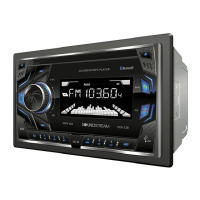

 To Next Page