– 13 –
Inverter Air-to-Water Heat Pump
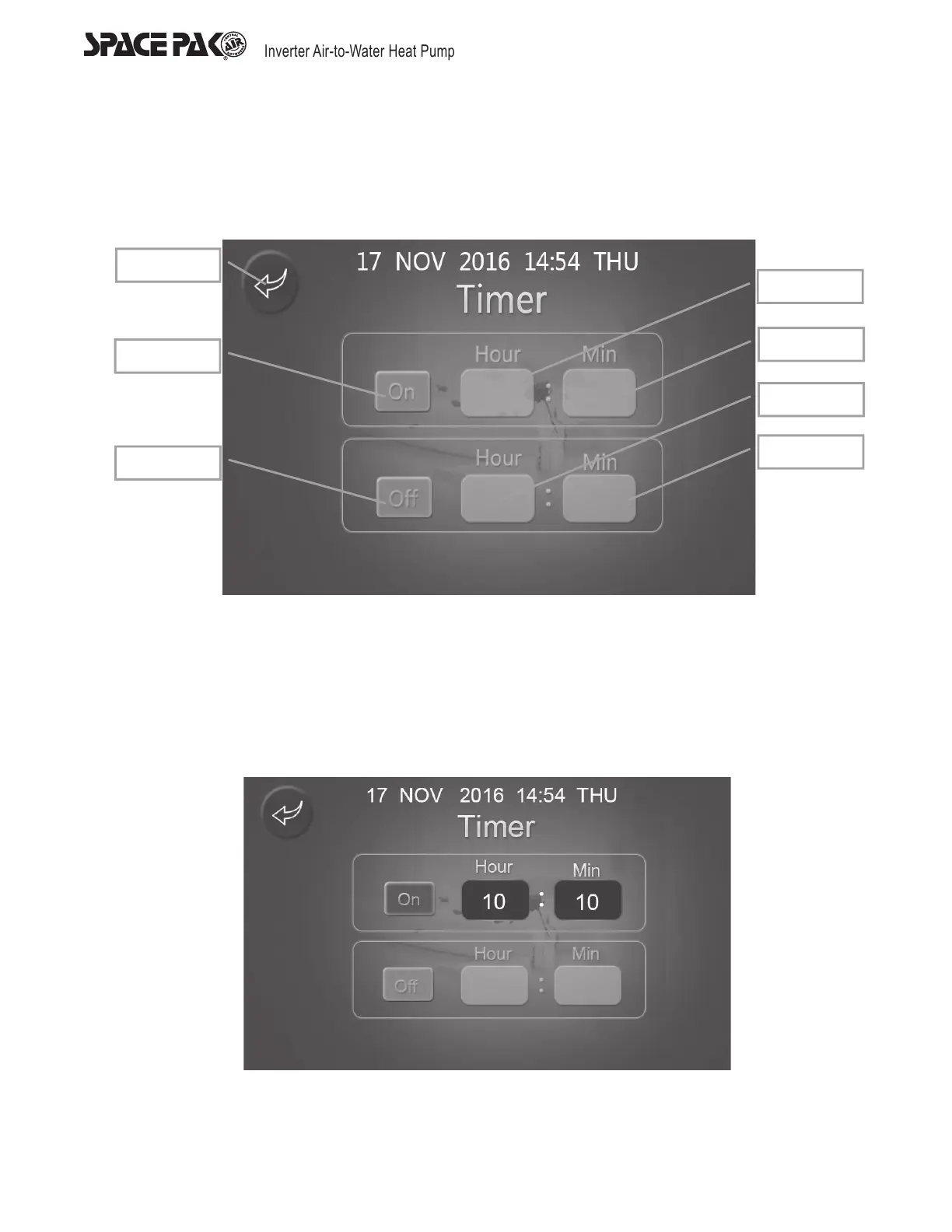
Time Power On and Off Setting Display
The function of parameter preservation and timing are operated by controller. The wire controller can only display and set the timing
time. No matter when it starts or terminates functioning, the timing power on and off key on the main display remains green. When it
does not conducting this function, it will be white.
Timer Full Closed
1. When the timer are full closed, the ‘On’ button and ‘Off’ button will turn grey. When the time interface is all grey, it means the timer
function has not been activated.
2. Press ‘On’ button and the button will be lightened, then power on timer can be set. Press ‘On’ button repeatedly to switch
between timer on and off.
3. Press ‘Off’ button and the button will be lightened, then power off timer can be set. Press ‘Off’ button repeatedly to switch
between timer on and off.
4. When the timer is under closed status, the time could not be set.
Only Use ‘On’ Timer
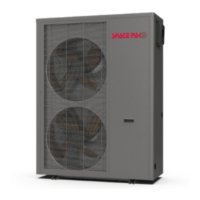
1. When using only power on timer, the ‘On’ button will be lightened as illustrated above.
2. Then the unit will power on once at the according ‘Hour’ and ‘Min’ and no more start-up will be conducted at other timing.
3. Under this status, other operation on the display should follow ‘Timer Full Closed’.
Return
Starton
Startoff
Start hour
Startmin
Endhour
Endmin



 To Next Page