// Select your board: Arduino Uno
Select the serial device of the RedBoard from the Tools |
Serial Port menu. is is likely to be
com3 or higher
(COM1 and COM2 are usually reserved for hardware
serial ports). To nd out, you can disconnect your
RedBoard and re-open the menu; the entry that
disappears should be the RedBoard. Reconnect the
board and select that serial port.
Select the serial device of the RedBoard from the Tools
> Serial Port menu. On the Mac, this should be
something with /dev/tty.usbmodem or
/dev/tty.usbserial in it.
http://www.arduino.cc/playground/Learning/Linux
// Select your Serial Device
4
Note:
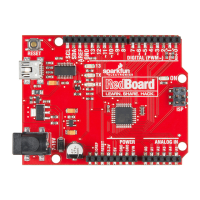
Your SparkFun RedBoard and the
Arduino UNO are interchangeable
but you won’t find the RedBoard
listed in the Arduino Software.
Select “Arduino UNO” instead.
Page 8


 To Next Page