Circuit 2
A temperature sensor is exactly what it sounds like – a
sensor used to measure ambient temperature. is
particular sensor has three pins – a positive, a ground,
and a signal. is is a linear temperature sensor. A
change in temperature of one degree centigrade is equal
to a change of 10 millivolts at the sensor output. e
TMP36 sensor has a nominal 750 mV at 25°C (about
room temperature). In this circuit, you’ll learn how to
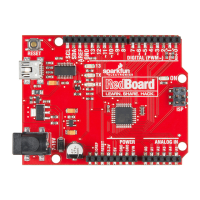
integrate the temperature sensor with your RedBoard,
and use the Arduino IDE’s serial monitor to display the
temperature.
Temperature Sensor
CIRCUIT #7
7
p.44
TMP36
(Precision Temperature Sensor)
PARTS:
Wire
5
X
Temp. Sensor
1
X
IOREF
RESET
RESET
7-15V
SCL
SDA
AREF
GND
13
12
~11
~10
~9
8
7
~6
~5
4
~3
2
1
0
TX
RX
13
3.3V
5V
GND
GND
VIN
A0
A1
A2
A3
A4
A5
POWER
ANALOG IN
DIGITAL (PWM~)
ON
ISP
TX
RX
FRONT
BACK
When you’re building the circuit be careful not
to mix up the transistor and the temperature
sensor, they’re almost identical. Look for
“TMP” on the body of the temperature sensor.
SIGNAL
+V
GND
SIGNAL
GND
+V
Page 45


 To Next Page