3. Wait a few seconds for the device to be detached.
4. Plug Qwiic Pro Micro back in.
5. Open Arduino back up, check the Serial Ports menu again.
Reset to Bootloader
We ship the Qwiic Pro Micro with a modified version of the Arduino Leonardo bootloader, with one major
enhancement. When a Leonardo (or any device using the "stock" bootloader) is externally reset, it goes back into
the bootloader...and waits there eight seconds before it starts running the sketch. For some embedded projects,
waiting eight seconds before a program runs isn't acceptable, so we modified the bootloader run time.
Arduino Leonardo Leonardo bootloader on
reset functionality.
When a Qwiic Pro Micro is externally reset (by pulling the RST pin low), it'll only briefly (<750ms) start the
bootloader before continuing on to the sketch. If you need the bootloader to run longer, resetting twice quickly
will get the Pro Micro to enter bootloader mode for eight seconds.
Qwiic Pro Micro Qwiic Pro Micro reset functionality. Press reset twice, quickly to enter bootloader
mode.
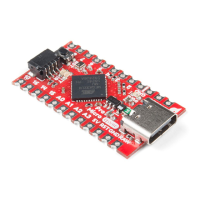
Resetting the Qwiic Pro Micro is now easier to reset with the built in reset button. Just press the reset button
located next to the Qwiic connector two times. You can also connected the RST pin to ground to initiate a reset.
This can be done with a small piece of wire, or an externally connected button.


 To Next Page
 Loading...