
 Need help?
Do you have a question about the sparkfun Qwiic Pro Micro USB-C and is the answer not in the manual?
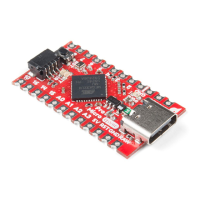
Overview of the board, its features, and comparison to older versions.
Detailed examination of the board's components, pins, and features.
Lists essential components and tools needed for the tutorial and prototyping.
Describes optional accessories for temporary or permanent connections and prototyping.
Step-by-step guide for installing necessary drivers on Windows for the Pro Micro.
Instructions for driver installation on Mac OS X and Linux systems.
Guide to installing board definitions and configuring the Arduino IDE for the Pro Micro.
Instructions for adding third-party board support through Arduino's Board Manager.
Alternative method for installing board definition files if Board Manager is unavailable.
Demonstrates controlling RX/TX LEDs and basic serial communication output.
Shows how to program the Pro Micro to act as a USB keyboard and mouse.
Combines Qwiic Joystick and Keypad for HID mouse and keyboard control.
Addresses issues like serial port detection, bootloader problems, and board recovery.
Answers common questions about VID/PID, device manager, and COM port selection.
Links to additional documentation, datasheets, and related tutorials for further learning.
 General
| Microcontroller | ATmega32U4 |
|---|---|
| Operating Voltage | 5V |
| Input Voltage (recommended) | 7-12V |
| USB Interface | USB-C |
| Digital I/O Pins | 12 |
| PWM Pins | 5 |
| Analog Input Pins | 4 |
| Flash Memory | 32 KB |
| SRAM | 2.5 KB |
| EEPROM | 1 KB |
| Clock Speed | 16 MHz |
| Qwiic Connector | Yes |
| Dimensions | 1.3" x 0.7" |

 To Next Page