EasyManua.ls Logo

Spartan TE226 Series - User Manual

Spartan TE226 Series
14 pages
Print Icon
To Next Page IconTo Next Page
Loading...
Revised Date: 2018/04/24
1
TE226 Series
Programmable Digital On-off Valve and
Modulating Fan Control Thermostats
OPERATION MANUAL
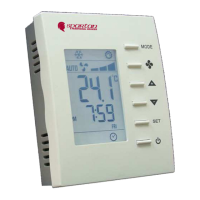
Front view Back view
#
Item
Description
1
LCD
Display temperature and working status.
2
MODE button
Access to user and engineer menu and for setting
confirmation or change ā„ƒ/℉ unit if pressed for over 3
sec.
3
FAN button
Toggle to change Fan mode: Auto or Continuous
4
UP & DOWN buttons
Increase & decrease setting or previous/next item
5
SET button
Setting for clock and programmable Schedules
6
On/Off button
Turn on/off thermostat
7
Set-point icons
Display set-point temperature while it is flashing
8
Fan icons
Indicate Fan status
9
Flake icon
Indicate working in Cooling mode
10
Hot spring icon
Indicate working in Heating mode
11
Flow icon
Indicate working in ventilating mode
12
Working icon
Indicate cooling/heating valve open
13
Clock
Not used
14
Sleep
Sleep mode is enable while it is shown
15
Moon Sign
Indicate room unoccupied
16
Outdoor icon
Indicate door/ window open
17
Cover screw
Screw to tighten back cover with front cover
18
Back plate
Plate for mounting on electric box
19
Wiring terminal blocks
Terminals for wiring
20
Mounting holes
Holes for mounting on electric box
21
small 8888
Display time
22
Schedule number
Programmable Schedule running or setting
23
Day
Current day of Sunday ~ Saturday or setting
1142-2-1-01
Question and Answer IconNeed help?

Do you have a question about the Spartan TE226 Series and is the answer not in the manual?

Summary

TE226 Programmable Thermostat Introduction

Front View Component Identification

Lists and describes components visible on the front of the TE226 thermostat.

Back View Component Identification

Lists and describes components visible on the back of the TE226 thermostat.

Thermostat Installation Guide

Mounting on Electric Box

Instructions for mounting the thermostat's back plate onto an electric box.

Front Cover Attachment

Instructions for attaching the thermostat's front cover.

Wiring Diagram Example

Provides a wiring diagram and options for cooling/heating valve connections.

Thermostat User Operation

User Mode Operations

Explains basic user operations like power, mode switching, temperature, and fan control.

User Mode Operation Flowchart

Clock and Schedule Settings Overview

Detailed Clock Setting Diagram

Detailed Schedule Setting Diagram

Control Actions Explained

On-off Valve Control Logic

Describes on-off valve controls, auto changeover, and dead band options.

Fan Control Operations

Fan Output Adjustment

Sets minimum and maximum fan output voltage (0-5 Vdc and 5-10 Vdc).

Fan Mode Selection

Explains continuous vs. auto fan modes and their behavior during dead bands.

Special Notes and Engineering Examples

Special Notes on Thermostat Features

Covers fan bar display, ESI contact status, schedule icons, and schedule modes (RUN, HALT, STOP).

Engineering Mode Parameter Examples

Provides examples of engineering mode parameters like E19, E22, E20, E21.

Engineer Mode Operation

Engineer Mode Menu Items (Part 1)

Engineer Mode Menu Items (Part 2)

Spartan TE226 Series Specifications

General IconGeneral
BrandSpartan
ModelTE226 Series
CategoryThermostat
LanguageEnglish

Related product manuals