EasyManua.ls Logo

Spartan TE256 - User Manual

Default Icon
7 pages
Print Icon
To Next Page IconTo Next Page
Loading...
Revised Date: 2017/01/24
1
TE256
Programmable Digital 6-Port Valve and Modulating Fan
Thermostats
CLIENT USER MANUAL
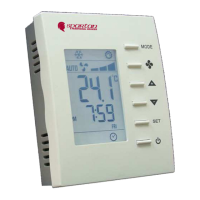
Front view Back view
# Item Description
1
LCD Display temperature and working status.
2
MODE button Access to user and engineer menu and for setting
confirmation or change / unit if press for over 3 sec.
3
FAN button Toggle to change Fan mode: Auto or Continuous
4
UP & DOWN buttons Increase & decrease setting or previous/next item
5
SET button Setting for schedules and Timers
6
On/Off button Turn on/ off Valve and Fan
7
Set-point icons Displaying set-point temperature while it is flashing
8
Fan icons Indicate Fan status
9
Flake icon Indicate working on Cooling mode;
10
Hot spring icon Indicate working on Heating mode
11
Flow icon NA
12
Gear icon Indicate cooler is ON
13
Clock NA
14
Sleep NA
15
Moon Sign Indicating room is unoccupied via occupancy contact
16
Outdoor icon NA
17
Cover screw Screw to tighten back cover with front cover
18
Back plate Plate for mounting on electric box
19
Wiring terminal blocks Terminals for wiring
20
Mounting holes Holes for mounting on electric box
21
Time Display time
22
Schedule number Current Schedule running or setting
23
Day Current day of Sunday ~ Saturday or setting
1074-2-1-04
Question and Answer IconNeed help?

Do you have a question about the Spartan TE256 and is the answer not in the manual?

Summary

Thermostat Operation

User Mode Operation

Details how to use the thermostat in user mode for daily temperature and fan management.

Operation Sequence Diagrams

User Mode Sequence Overview

Illustrates the step-by-step process for navigating thermostat functions and settings.

Button Functionality in Operation

Explains the role of MODE, FAN, and POWER buttons during operation and setting.

Clock Setting Procedure

Setting Clock Time and Format

Configures clock format (12/24 hr) and adjusts hour and minute settings.

Setting Clock Date Components

Sets the year, month, and day for accurate timekeeping.

Schedule Setting Procedure

Programming Schedule Day and Time

Sets the day and time for each of the four programmable schedules.

Programming Schedule Set Points

Defines the cooling/heating set points for each individual schedule.

Default Set Point Schedules

Cooling and Heating Schedule Details

Details default cooling/heating set points and ranges for various schedules and conditions.

Spartan TE256 Specifications

General IconGeneral
BrandSpartan
ModelTE256
CategoryThermostat
LanguageEnglish

Related product manuals