19
EN
CHARGING THE BATTERY
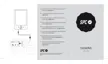
E-reader battery charging via the PC USB port.
The e-reader comes with a USB cable. With the PC
switched on, connect one end of the cable to the PC
USB connector and the other end to the e-reader (14).
The controller will be charged automatically in case
you are using Windows 7/VISTA/XP or MAC (10.6 or
previous versions), or Linux operating systems.
A message will appear on the screen asking if you wish
to connect to the PC or charge the battery. Select cancel
to charge the e-reader normally.
The battery will begin to charge. Charge the battery for 6
hours to ensure maximum use time as well as lengthen
the battery life.
If you wish to use the e-reader while charging via the
USB, power on the e-reader, connect it to the USB port
and select cancel from the message that appears on
screen.
Up to 2 months autonomy (based on a daily reading
time of 30 minutes or 30 page turns without backlight).


 To Next Page