4
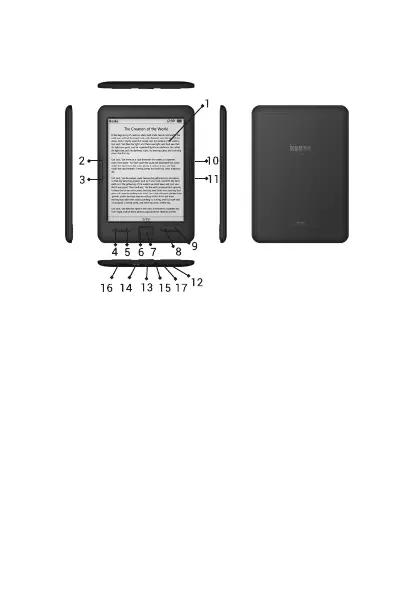
LOCALIZACIÓN DE CONTROLES
1. Pantalla E Ink
2. Página anterior
3. Página siguiente
4. Volver al menú principal
5. Acceso a los diferentes
submenús
6. Tecla de navegación
7. Aceptar
8. Volver atrás en el menú
9. Actualizar la pantalla
10. Página anterior
11. Página siguiente
12. Indicador de carga y de
apagado
13. Tecla de encendido
14. Puerto USB
15. Conector de auriculares
16. Lector de tarjetas micro
SD
17. Reset


 To Next Page