MOUNTING
THE SPEEDZONE COMP
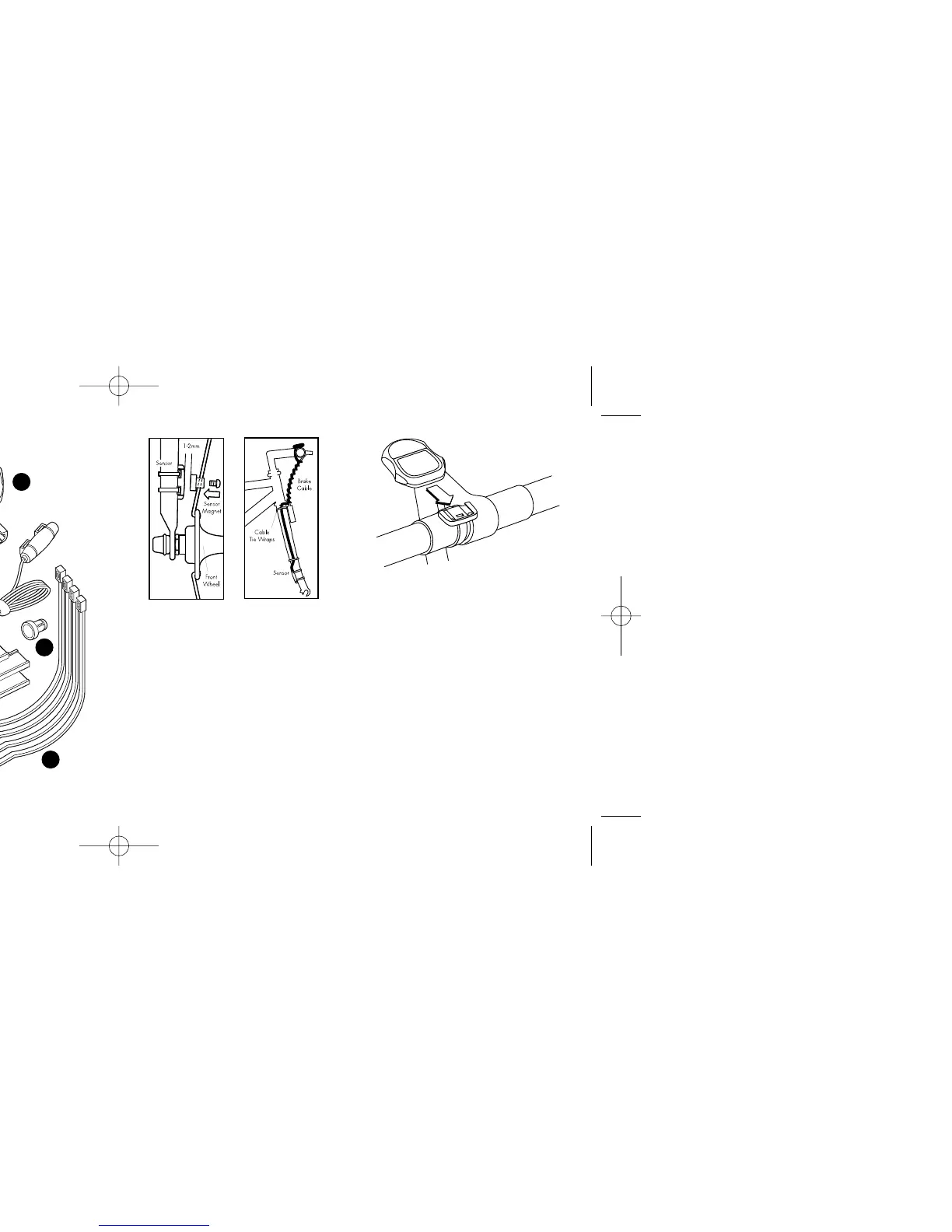
The SpeedZone Comp sensor can
mount on the right or the left side of
the fork blade. Use the cable tie-wraps
provided to position the sensor. Do not
tighten until the final placement of the
sensor magnet is correct. (See figure 1)
Attach the magnet to a spoke across
from the sensor with the magnet screw.
The clearance between the magnet and
the sensor should be approximately
1/32"-1/16" (1-2mm). Tighten the
magnet and transmitter. Do not over-
tighten the magnet screw. (See figure 2.)
Attach the mount to the handlebar
using the bracket screw provided.
Tighten so that the bracket cannot rotate
on the handlebar. There are several
3
This computer also features:
• Second Wheel Option
• Easy calibration Mode
• Triple Display LCD
• Heavy-duty abrasion resistant
pick-up wire
• Water resistant housing
• Two-year warranty
What is included in your
SpeedZone Comp package:
1. SpeedZone Computer (1)
2. Mounting bracket (1)
3. Magnet with screw (1)
4. Cable tie wraps (4)
5. Mounting bracket sizing straps (3)
2
1
2
3
5
4
FIGURE 3: MOUNTING BRACKET
FIGURE 1:
SENSOR
PLACEMENT
FIGURE 2:
MAGNET
ATTACHMENT










 To Next Page