Tap to enter the Thumbnail mode.
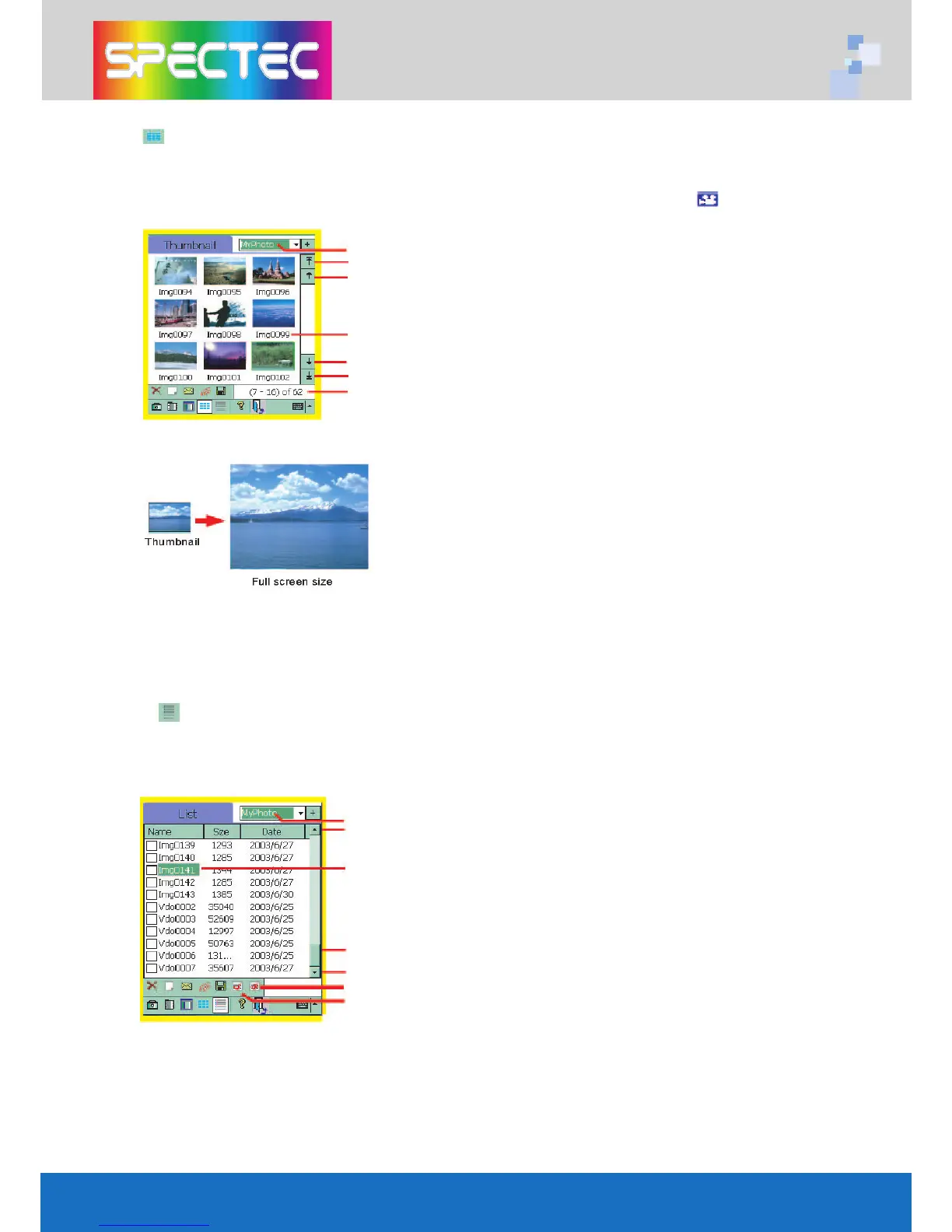
Thumbnail mode The screen will show the saved images and the firstphoto
of video. If the thumbnail showed with a mark,
means it’s a video record.
The current category
Tap here to view the first 9-thumbnail set
Tap here to view the previous 9-thumbnail set
File name
Tap here to view next 9-thumbnail set.
Tap here to view the last 9-thumbnail set.
The location of your saved images in current category.
Double-click the thumbnail, the thumbnail will get
into a Slide Show mode and will enlarge into a full
screen display.
Tap to enter the List mode.
List mode Screen will show the Name / Size / Date of the saved images
or videos.
The file name shows Imgxxxx, means that’s a image file.The file name
shows Vdoxxxx, means that’s a video file.
You may select a file name to have following functions:
Category
Page up
Double-click the file name, the screen willget
into the Slide show mode and display a full
screen image.
Move Page Up / Page
Page down.
Deselect all
Select all
4



 To Next Page