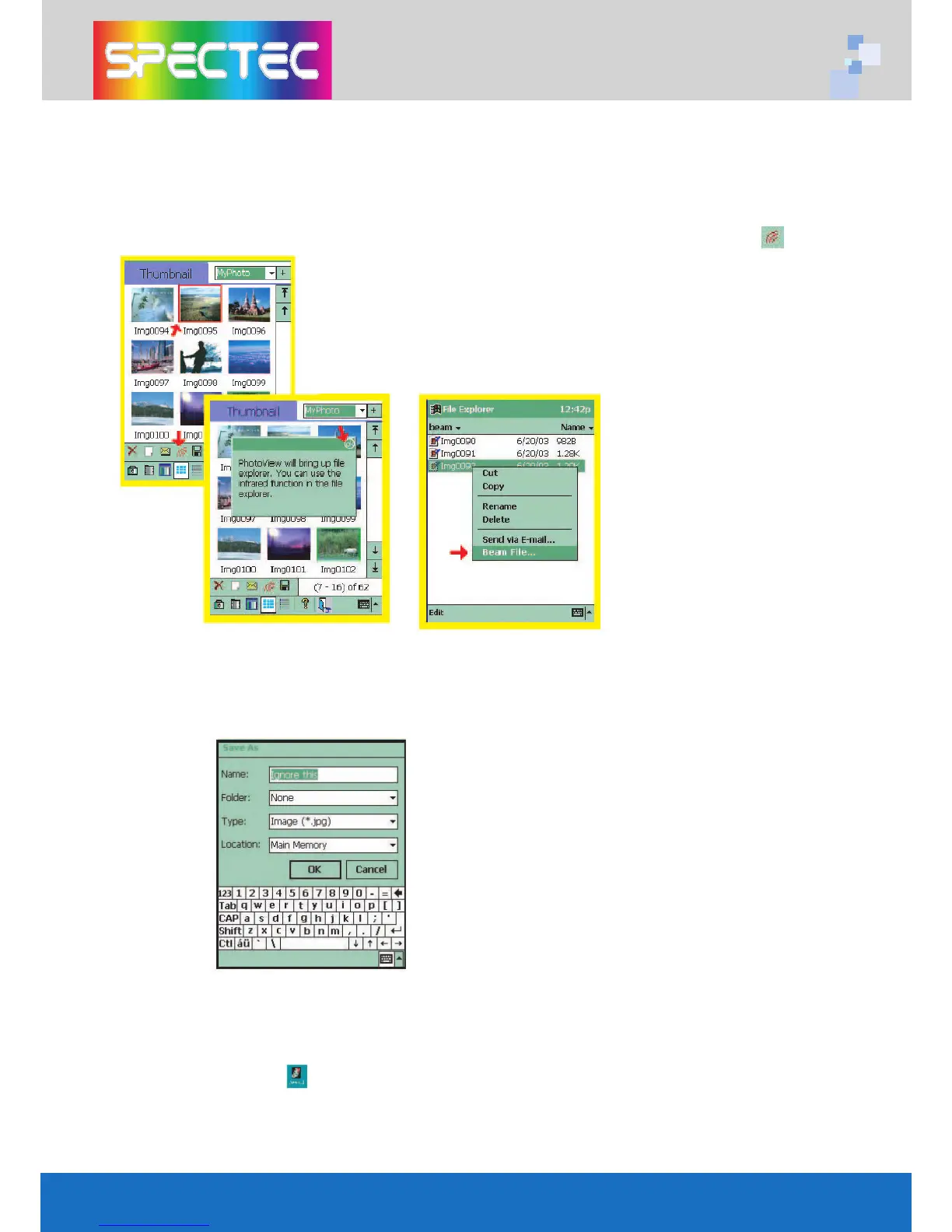
How to beam the saved images or videos?
You can beam the saved images or videos from Thumbnail mode or List mode.
Align the infrared port on your Pocket PC with the infrared port on the receiving
device. On the receiving device (Pocket PC), tap Start menu / Infrared Receive icon
to get ready to receive.
First, select an image or a file name. Tap , then
the screen will show “PhotoView will bring up file
explorer. You can use the infrared function in the
file explorer”. Tap OK to open the File Explorer
screen. Select one file, then the screen will showa
list.Tap” Beam File ---” and the screen will enterto
Infrared Send screen. Tap OK to complete the
beam task.
How to save the images and videos?
You may rename your image or video or select a category for your image or video.
Also can saved the image or video to a designate location (iPAQ File Store / Main
memory).
How to transfer the saved images and videos to your PC?
1. Connect the Pocket PC to the PC with ActiveSync program, and make sure they are
fully functioning.
2. Double click the icon from PC. Then the saved images and videos bill be howed
on the Download photos screen.
3. Select the images or videos which you want to save. And click Download button to
download the selected files to PC. The selected files will be saved to:
My Documents\PhotoView\
5



 To Next Page