Need help?
Do you have a question about the Spectra LR50 and is the answer not in the manual?
Provides essential safety instructions, warnings, and cautions for operating the receiver.
Instructions for installing alkaline and recharging Ni-MH batteries.
Information on safe battery charging, handling, and error indicators.
Step-by-step guide for replacing alkaline and Ni-MH batteries in the receiver.
Details turning the receiver on/off, using the power button, and accessing secondary functions.
Covers general safety, setup, and mounting instructions for the receiver on a mast.
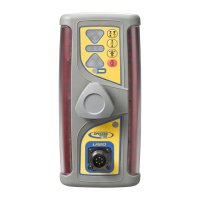
The Spectra Precision LR50 Laser Receiver is a rugged, multi-purpose electronic sensor designed to detect laser light generated by rotating laser transmitters. It is compatible with nearly all models of rotating lasers and can detect both visible and invisible beams. The receiver is intended for use in construction and agricultural applications, providing precise grade readings and machine control.
The LR50 Laser Receiver's primary function is to detect laser beams and provide visual indications of blade or bucket position relative to the laser plane. It features four sets of photocells, equally spaced to provide 360-degree reception of the laser beam. Super-bright LEDs graphically display the blade or bucket position, making it highly visible in various lighting conditions.
The receiver includes LED status indicators that show on-grade location, selected deadband (accuracy), and a low-battery warning. These indicators also function as a blade-tilt indicator, providing visual feedback on the blade's side-to-side position.
Touch-panel buttons allow users to select various operating modes and settings. These include blade-tilt indication, on-grade location, deadband (accuracy), plumb indication, and display brightness. Secondary functions accessible via button combinations include blade-tilt accuracy, plumb-accuracy indication, laser-beam averaging, and a laser out-of-level warning.
The receiver also has an out-of-beam (OOB) function, which indicates when the receiver has moved beyond the vertical laser-reception range. This function helps guide the operator on which direction to move the blade or cutting edge to reacquire the laser beam.
The LR50 is designed for ease of use and versatility in the field.
The receiver is powered by four "C" cell alkaline batteries or four "C" cell Nickel Metal Hydride (Ni-MH) rechargeable batteries. An accessory connector allows for connection to an optional remote display, machine power cable, automatic control box, or Ni-MH battery charger. A dust cap protects this connector.
To turn the receiver on, press the power button. All LEDs will briefly light up, followed by a sequence of LED grade-display rows and status indicators turning on and off. The current deadband status and on-grade location are momentarily displayed. If no laser beam is detected, the center green LED flashes to confirm power is on. If a laser beam is present, a corresponding LED grade display lights up. To turn off the receiver, press and hold the power button until the LEDs light, then release. Settings are retained for the next power-on cycle.
Secondary functions are activated by pressing and holding the power button while the receiver is on, then pressing the desired touch-panel button. These functions are indicated by symbols above the buttons.
The blade-tilt button toggles the blade-tilt display on and off. When activated, the LEDs provide 5 channels of tilt indication. The center LED illuminates when the blade or dipper stick is within the set tilt-accuracy. Right-side LEDs light when the operator's right side of the blade or dipper stick is low, and left-side LEDs light when the left side is low. The blade-tilt function is initially set to level but can be adjusted to match the current blade slope for slope matching operations.
Blade-tilt accuracy has three options: fine (±0.5°), standard (±1.5°), and wide (±2.5°). These can be cycled through by pressing and holding the power button, then pressing the blade-tilt button. The current selection flashes rapidly, and continued pressing changes the selection.
The Center/Offset On-Grade button allows selection between "center on-grade" for typical grading/cut/fill operations and "offset on-grade" for excavation. Center on-grade provides an equal amount of grade information above and below on-grade. Offset on-grade provides more information and a larger display area above on-grade, and also enables the plumb indication for more accurate grade readings. Each selection uses a different array of LEDs. Pressing the button once flashes the current on-grade location LED; pressing it again while flashing changes the selection.
The plumb indication shows when the mast and receiver are perpendicular to the ground (plumb) or beyond the selected deadband range. Grade-display LEDs flash quickly when the boom is extended, flash slowly when retracted beyond range, and remain lit when within the plumb range setting.
Plumb accuracy also has fine (±0.5°), standard (±1.5°), and wide (±2.5°) options, selected by pressing and holding the power button, then pressing the on-grade location button.
Each on-grade location has three deadband or accuracy selections: fine, standard, and wide. Center or grading deadbands are smaller than offset or excavating deadbands. Pressing the deadband button once shows the current selection (status LED flashes); pressing it again changes the selection.
The secondary function of the deadband button is beam averaging. This feature senses laser strikes and applies the highest level of averaging appropriate for the laser rotation speed, stabilizing the LED display in unstable setups (e.g., windy conditions, long-range applications). The factory default is "on." When off, the receiver processes and displays each laser strike individually. To toggle, press and hold the power button, then press and release the deadband button. Outer green on-grade LEDs flash to indicate selection; center LED on means averaging is on, off means averaging is off.
The Display-Brightness button controls the brightness of the LED grade and blade-tilt displays, with "Bright" and "Dim" options. Dim is for normal/lower light conditions and conserves battery life; Bright is for sunny daytime operation. When out of the laser beam, pressing the button displays a circle showing the current setting; pressing again changes it. When in the laser beam, simply pressing the button changes the setting.
The secondary function of the display-brightness button is the laser out-of-level (OOL) warning. This function works with lasers that indicate out-of-level status by changing their rotation speed. The factory default is "off." To activate, turn on the receiver, press and hold the power button, then press and release the display-brightness button. The center green LED lights to confirm it's on. Pressing the button combination again while the "X" pattern is lit toggles the function on/off. When the center green LED is not lit, the warning is off. When activated and the laser drops to 140 RPM, a flashing "X" appears, indicating the laser is out of level.
The receiver has low-battery warning LEDs. During normal operation, these LEDs are off. When batteries are low, they begin flashing, providing approximately 90 minutes of remaining battery life. When batteries are too low for normal operation, the LEDs remain on, the four corner grade-display LEDs flash, and the receiver stops receiving laser signals. Batteries should be replaced or recharged. This warning does not operate when connected to machine power.
The receiver mounts to round tubing (42-50 mm outside diameter) or square tubing (38 mm). Mounting knobs allow for quick and easy installation to a mast or magnetic mount. The blade-tilt and plumb indications are measured internally, requiring proper alignment of masts and receivers to the machinery for accurate readings.
Detailed instructions are provided for both grading and excavating applications, including in-trench and out-of-trench setups. These involve positioning the machine, setting up the laser, mounting the receiver, and adjusting its height to achieve on-grade readings.
The blade-tilt indicator can be nulled to match an existing slope or set to a predetermined slope other than level. This is achieved by positioning the blade at the desired slope, ensuring receiver alignment, then pressing and holding the power, blade-tilt, and display-brightness buttons until a "0" followed by a "Y" symbol displays. To reset to level, the blade is positioned level, and the procedure is repeated. This also corrects display issues if the mast is misaligned.
The LR50 is designed for durability and ease of maintenance.
The receiver features aluminum-cast upper and lower housings for protection, and a polycarbonate housing to protect the internal electronics. It is shipped in a protective carrying case, and storing it in this case when not in use helps ensure many years of service.
To prevent scratching, dust or dirt should not be wiped off with a dry cloth. Instead, a good quality glass cleaner and a soft cloth should be used on all external components. If hardened concrete or other materials are present, the system should be taken to an Authorized Service Center for cleaning.
For alkaline batteries, access screws allow easy entry to the battery compartment for replacement. The receiver will not operate while Ni-MH batteries are charging. The charge-status indicator on the back of the housing remains solid during charging and flashes when fully charged. A charge-error indicator provides feedback on battery connection, type, or temperature issues. Built-in overcharging protection prevents damage to the receiver. If the receiver will not be used for more than 30 days, alkaline batteries should be removed. Proper disposal of all batteries according to local requirements is emphasized.
The receiver is designed to be serviced only by authorized Trimble service personnel. Users should not disassemble any part of the receiver other than to replace batteries.
 General
| Channel Capacity | 128 channels |
|---|---|
| Dimensions | 120mm x 55mm x 35mm |
| Weight | 220g (with battery) |
| Data Logging | Yes |
| Operating Temperature | -20°C to +60°C |
| Audio Output | 1W |
| Receiver Type | Superheterodyne |
| GNSS Supported | GPS, GLONASS, BeiDou |
| Communication | Bluetooth, USB |
| Channel Bandwidth | 12.5kHz/25kHz |
| Output Impedance | 50 Ω |
| Frequency Range | 400-470MHz |

 To Next Page