52
© Copyright SPECTRA Technologies Holdings Co. Ltd.
This information is CONFIDENTIAL. It may not be duplicated, published or disclosed without SPECTRA written permission.
10. 如何輸入英文字母 HOW TO INPUT THE ALPHABETIC CHARACTERS
如何輸入英文字母
How to input
the alphabetic characters
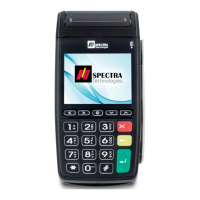
需要輸入英文字母時,操作如下:
1. 先按印有該英文字母的數字鍵。
2. 再按〈FEED〉鍵一至三次,直至該英文字母出現。
例如:
輸入 Y 字 — 先按〈9〉,再按〈FEED〉鍵兩次,9 字會先變 X,後變 Y。
When English character is needed:
1. Press the key marked with the alphabets.
2. Then press the <FEED> key one to three times, until the alphabet appear on the screen.
For example:
If you want to input the letter “Y” — press “9”, then press <FEED> twice. The number “9” will
change to “X”, and then “Y”.
9
X
Y
Z
FEED
送紙/英文
FEED
送紙/英文
+ +
9
X
Y
Z
FEED
送紙/英文
FEED
送紙/英文
+ +



 To Next Page
 Loading...