4
© Copyright SPECTRA Technologies Holdings Co. Ltd.
This information is CONFIDENTIAL. It may not be duplicated, published or disclosed without SPECTRA written permission.
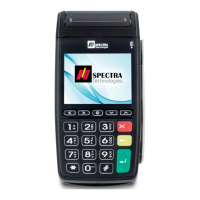
1. 終端機按鍵介紹 POS TERMINAL KEYBOARD LAYOUT
功能 FUNC
按此鍵再按入1或2位數字
的指定商戶功能鍵
Enter this key and follow
by 1-2 digits to enter
the specific merchant
function
交易 TRANS
該卡類的其他功能
Other function of that
card type
結算 SETTLE
易辦事核賬,查詢交易
總數
EPS recap/settlement,
review transaction total
電源開/關鍵
Power on/off button
1. 確認資料和顯示項目
Confirm the information and option display
2. 切換至不同卡類交易(如信用卡、易辦事)
Switch to the different card type transaction
(e.g. Credit Card, EPS etc)
返回主頁,如交易進行中,
則代表取消操作
Back to main menu. If the
transaction is processing,
it means cancel the
operation
送紙鍵/輸入英文
Paper feed/Input
English character
數字鍵輸入
Numeric keys. Data entry
重印
Reprint
1. 清除輸入資料
Clear data entry
2. 否定資料
Deny the data entry
終端機按鍵介紹
POS Terminal
Keyboard Layout
尺寸及重量
尺寸:165 (長) x 80 (闊) x 57(高) 毫米
重量:340 克 (包括電池)
電源輸入
DC 5V 1A (只作充電) 或 DC 9V 1A
Dimensions & Weight
Size: 165(L) x 80 (W) x 57(H) mm
Weight: 340g (with battery)
Power Supply
DC 5V 1A (for charging only) or DC 9V 1A



 To Next Page